
Introduction
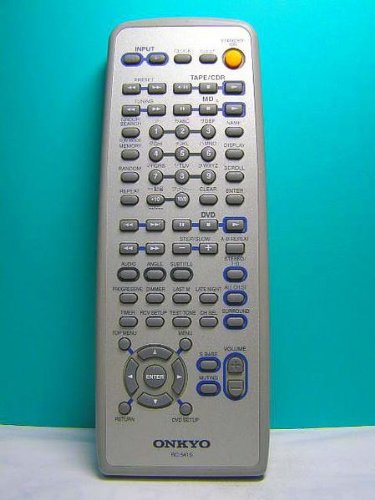
This manual provides essential instructions for the proper setup, operation, and maintenance of your Onkyo RC-541S Audio Remote Control. Please read this guide thoroughly before using the remote control to ensure optimal performance and longevity. The Onkyo RC-541S is designed to provide convenient control over compatible Onkyo audio devices.
Setup
Battery Installation
The Onkyo RC-541S remote control requires two AA (LR6) alkaline batteries for operation. Follow these steps to install the batteries correctly:
- Locate the battery compartment cover on the back of the remote control.
- Slide the cover downwards or press the latch (if present) and lift to remove it.
- Insert two new AA (LR6) alkaline batteries, ensuring that the positive (+) and negative (-) terminals align correctly with the markings inside the compartment. Incorrect battery orientation can prevent the remote from functioning.
- Replace the battery compartment cover by sliding it back into place until it clicks securely.
This image displays the back of the Onkyo RC-541S remote control with the battery cover removed, revealing the two compartments for AA-size alkaline batteries. Observe the positive (+) and negative (-) terminals for correct battery insertion.
Note: Always use new batteries and replace both batteries at the same time. Do not mix old and new batteries or different types of batteries.
Operating Instructions
The Onkyo RC-541S remote control is designed for intuitive operation of your compatible Onkyo audio components. Point the remote control directly at the infrared sensor on your audio device.
- Power Button: Press to turn the connected audio component on or off.
- Input Selector Buttons: Use these buttons to switch between different audio input sources (e.g., CD, Tuner, AUX).
- Volume Control: Use the VOL + and VOL - buttons to adjust the audio output level.
- Mute Button: Press to temporarily silence the audio output. Press again to restore sound.
- Playback Controls: If controlling a compatible player (e.g., CD player), use buttons like Play, Pause, Stop, Fast Forward, and Rewind.
- Navigation Buttons: For menu navigation or track selection, use the directional arrows and Enter/OK button.
Refer to your specific Onkyo audio component's user manual for detailed functions controlled by the RC-541S.
Maintenance
Proper care will ensure the longevity and reliable performance of your remote control.
- Cleaning: Wipe the remote control with a soft, dry cloth. For stubborn dirt, slightly dampen the cloth with water or a mild, non-abrasive cleaner. Do not use strong chemicals or solvents.
- Battery Replacement: Replace batteries when the remote control becomes unresponsive or its range decreases significantly. Remove batteries if the remote will not be used for an extended period to prevent leakage.
- Storage: Store the remote control in a cool, dry place away from direct sunlight and extreme temperatures.
- Avoid Drops: Protect the remote from physical impact, as drops can damage internal components.
Troubleshooting
If you experience issues with your Onkyo RC-541S remote control, try the following troubleshooting steps:
- Remote Not Responding:
- Check if the batteries are inserted correctly with the correct polarity (+/-).
- Replace old batteries with new AA alkaline batteries.
- Ensure there are no obstructions between the remote control and the audio component's infrared sensor.
- Confirm you are within the effective operating range and pointing the remote directly at the device.
- Specific Functions Not Working:
- Verify that the audio component is powered on and set to the correct input.
- Some functions may be specific to certain models or modes. Refer to your audio component's manual.
- Interference:
- Bright light sources, such as direct sunlight or fluorescent lamps, can interfere with infrared signals. Try operating the remote in a different lighting condition.
If the problem persists after trying these steps, contact Onkyo customer support or refer to the service information provided with your audio component.
Specifications
| Brand | Onkyo |
| Model Number | RC-541S |
| Controller Type | Remote Control |
| Battery Type | AA (LR6) Alkaline |
| ASIN | B00IXFPS4W |
Warranty and Support
This product is typically sold as a replacement part or accessory. Specific warranty information for the RC-541S remote control may be included with the original audio component it was designed for, or it may be covered under a limited warranty by Onkyo. Please refer to the documentation that came with your primary Onkyo audio device for warranty details.
For further support or inquiries, please visit the official Onkyo website or contact their customer service department. You can also find more information about Onkyo products on their Amazon store page: Onkyo Amazon Store.


