
Introduction
This manual provides essential instructions for the proper installation, operation, and maintenance of the Hakko T11-B Conical Soldering Tip. Designed for precision work, the T11-B tip is compatible with the Hakko FX-901 soldering iron. Adhering to these guidelines will ensure optimal performance, extended tip life, and safe operation.
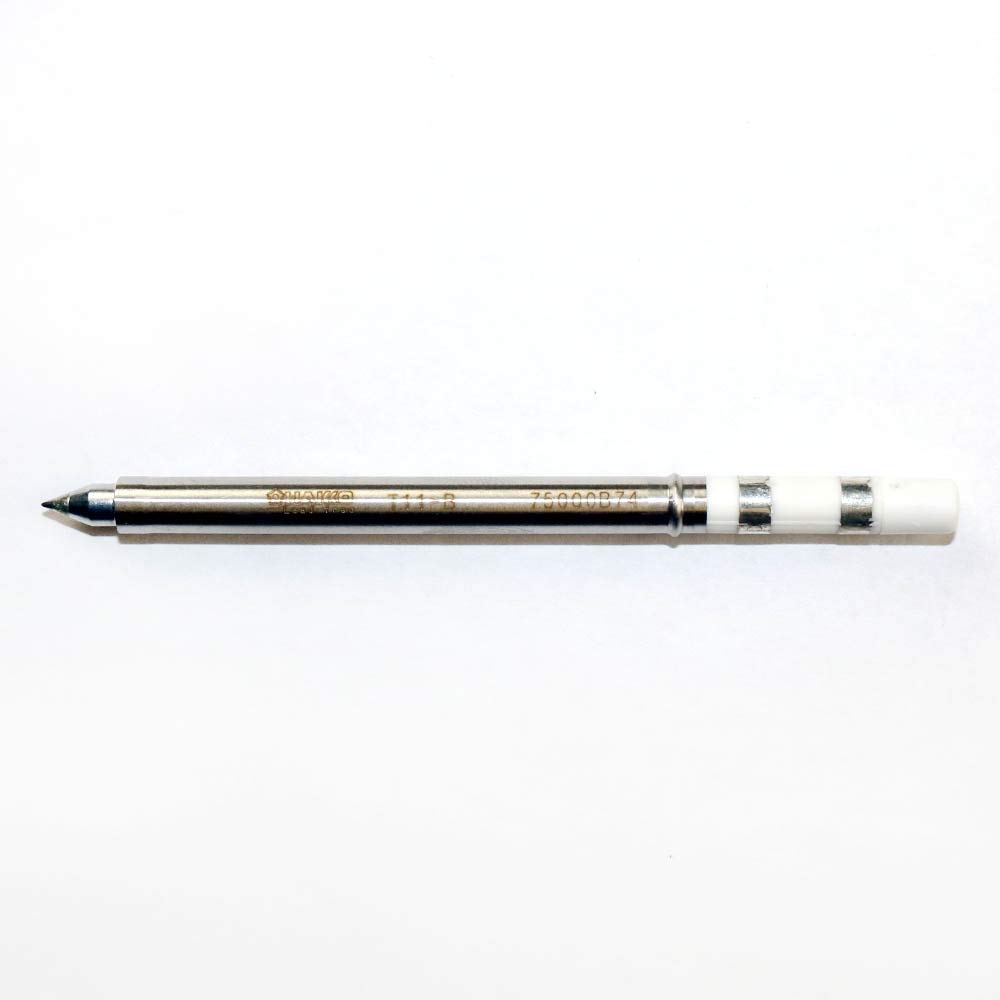
An image showing the Hakko T11-B conical soldering tip. The tip is a slender, metallic component with a pointed end, designed for precision soldering tasks. It features a silver-colored shaft with the Hakko logo and model number 'T11-B' etched on it, and a white ceramic-like base at the connection end.
Setup and Installation
Proper installation of the soldering tip is crucial for efficient heat transfer and safe operation. Always ensure the soldering iron is powered off and cool before handling tips.
- Power Off and Cool Down: Disconnect the Hakko FX-901 soldering iron from its power source and allow it to cool completely before attempting to change tips.
- Remove Old Tip (if applicable): Carefully unscrew or pull out the existing soldering tip from the FX-901 handpiece. Use heat-resistant gloves if the iron is still warm.
- Inspect New Tip: Examine the Hakko T11-B tip for any visible damage or manufacturing defects.
- Insert New Tip: Gently insert the T11-B tip into the heating element of the FX-901 handpiece. Ensure it is fully seated to maximize thermal contact.
- Secure Tip: If your FX-901 model uses a retaining nut or sleeve, tighten it securely but do not overtighten, as this can damage the tip or heating element.
- Initial Tinning: Once installed and the iron is heated, immediately tin the new tip with a small amount of solder. This protects the tip from oxidation and prepares it for use.
Operating Instructions
The Hakko T11-B conical tip is ideal for fine pitch components and general soldering tasks requiring precision. Follow these guidelines for effective use:
- Temperature Setting: Set your FX-901 soldering iron to the appropriate temperature for the solder and components you are using. Refer to solder manufacturer specifications. Typical lead-free solder temperatures range from 320°C to 380°C (608°F to 716°F).
- Tip Cleaning: Before each use and periodically during soldering, clean the tip using a damp sponge or brass wool to remove old solder and flux residue.
- Tinning: Always keep the tip tinned with a thin layer of fresh solder. This improves heat transfer and prevents oxidation.
- Contact Angle: Apply the tip to the joint at an angle that maximizes contact with both the component lead and the PCB pad for efficient heat transfer.
- Solder Application: Feed solder onto the heated joint, not directly onto the tip. Allow the heat from the tip to melt the solder, forming a strong connection.
- Avoid Excessive Pressure: Do not apply excessive pressure to the tip, as this can damage the tip plating and reduce its lifespan.
Maintenance
Regular maintenance extends the life of your Hakko T11-B soldering tip and ensures consistent performance.
- Daily Cleaning: After each soldering session, clean the tip thoroughly with a damp sponge or brass wool.
- Re-tinning: Always re-tin the tip with fresh solder before storing the iron or turning it off. This protective layer prevents oxidation.
- Avoid Abrasives: Never use abrasive materials like sandpaper or files to clean the tip, as this will remove the protective plating and severely shorten tip life.
- Proper Storage: Store the soldering iron with the tip installed in a dry, clean environment.
- Tip Revitalization: If the tip becomes heavily oxidized and solder will not adhere, a tip revitalizer compound can sometimes restore its wettability. Follow the revitalizer product instructions carefully.
Troubleshooting
Address common issues with your Hakko T11-B tip using the following solutions:
- Solder Not Sticking to Tip:
- Cause: Tip oxidation or insufficient tinning.
- Solution: Clean the tip thoroughly with brass wool, then immediately re-tin with fresh solder. If heavily oxidized, use a tip revitalizer.
- Poor Heat Transfer to Joint:
- Cause: Insufficient tip contact, low temperature, or oxidized tip.
- Solution: Ensure full contact with the joint. Increase soldering iron temperature if necessary. Clean and re-tin the tip. Verify the tip is fully seated in the handpiece.
- Tip Pitting or Erosion:
- Cause: High temperatures, aggressive fluxes, or prolonged contact with molten solder.
- Solution: Use the lowest effective soldering temperature. Use appropriate flux for your solder. Avoid leaving the tip in molten solder for extended periods. Replace the tip if damage is severe.
Specifications
Key specifications for the Hakko T11-B Conical Soldering Tip:
| Model Number | T11-B |
| Tip Type | Conical |
| Compatible Handpiece | Hakko FX-901 |
| Tip Length | 7.5 mm |
| Tip Outside Diameter | 5.08 mm |
| Material | Plated Copper Alloy |
| Product Dimensions | 4.6 x 2 x 0.3 inches (packaging); 0.32 ounces |
Warranty and Support
For specific warranty information regarding your Hakko T11-B soldering tip, please refer to the documentation provided with your Hakko FX-901 soldering iron or visit the official Hakko website. For technical support, replacement parts, or further assistance, please contact Hakko customer service directly.
You can find more information and contact details on the official Hakko website: www.hakko.com


