1. Introduction
This manual provides essential information for the safe and efficient operation of your Astron SS Series SS-25M-AP Switching Power Supply. The SS-25M-AP is a highly regulated desktop switching power supply designed for moderate to high power applications, providing a stable 13.8 Vdc output at 25 Amperes continuous service. It features a low-profile design, light weight, and robust components for durability.
2. Safety Information
Please read and understand all safety instructions before operating this device. Failure to do so may result in injury or damage to the equipment.
- Electrical Shock Hazard: Do not open the power supply casing. There are no user-serviceable parts inside. Refer all servicing to qualified personnel.
- Ventilation: Ensure adequate ventilation around the unit. Do not block ventilation openings. Overheating can cause damage and fire hazards.
- Moisture: Do not expose the power supply to rain, moisture, or excessive humidity.
- Power Cord: Use only the provided power cord or a suitable replacement. Ensure the power cord is not damaged or frayed.
- Grounding: Always connect the power supply to a grounded electrical outlet.
- Overload: Do not exceed the rated output current of 25 Amperes. Overloading can trigger protection circuits or damage the unit.
3. Features
The Astron SS-25M-AP Switching Power Supply incorporates several advanced features for reliable performance:
- Highly regulated 13.8 Vdc output.
- 25 Amperes continuous output current.
- Short circuit and over-voltage protection.
- Automatic over-temperature shutdown.
- Dual digital LED meters for voltage and current monitoring.
- Front panel Powerpoles for convenient DC output connections.
- Precision regulation of output voltage.
- Fully EMI filtered and RFI-resistant, including in HF bands.
- Internal fuse access for maintenance.
- Switchable 120/240 V input voltage (auto-select with power cord change).
- Compact, low-profile design and light weight for portability or desktop use.
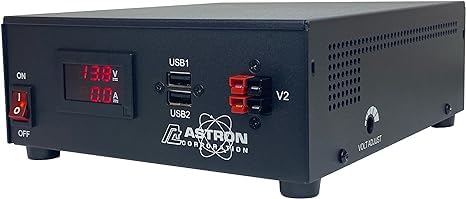
Figure 1: Astron SS-25M-AP Switching Power Supply front view. This image shows the front panel of the Astron SS-25M-AP Switching Power Supply, featuring dual digital LED meters and front panel Powerpoles for DC output connections.
4. Setup
Follow these steps to set up your power supply:
- Unpacking: Carefully remove the power supply from its packaging. Inspect the unit for any signs of damage. If damage is found, contact your dealer immediately.
- Placement: Place the power supply on a stable, flat surface. Ensure there is sufficient space around the unit for proper ventilation. Do not place it near heat sources or in direct sunlight.
- Input Voltage Selection: The SS-25M-AP features auto-selection of input voltage (120V/240V) based on the power cord used. Ensure you are using the correct power cord for your region's mains voltage.
- AC Power Connection: Connect the appropriate AC power cord to the power supply's AC input receptacle and then to a grounded wall outlet.
- DC Output Connection: Connect your DC-powered equipment to the front panel Powerpoles. Ensure correct polarity: red for positive (+), black for negative (-). Verify that your equipment's current draw does not exceed the power supply's 25A rating.
5. Operating Instructions
To operate your Astron SS-25M-AP power supply:
- Power On: After connecting your equipment, turn on the power supply using the main power switch, typically located on the front or rear panel.
- Monitor Output: Observe the dual digital LED meters on the front panel. One meter displays the output voltage (V), and the other displays the output current (A). Ensure the voltage is stable at 13.8 Vdc and the current draw is within acceptable limits for your connected device.
- Power Off: When finished, turn off the power supply using the main power switch before disconnecting your equipment.
6. Maintenance
Proper maintenance ensures the longevity and reliable operation of your power supply:
- Cleaning: Periodically clean the exterior of the unit with a soft, dry cloth. Do not use liquid cleaners or solvents. Ensure ventilation openings are free from dust and debris.
- Ventilation: Regularly check that the ventilation openings are not obstructed. Good airflow is crucial to prevent overheating.
- Fuse Replacement: The power supply has internal fuse access. If the unit fails to power on, the fuse may need replacement. This procedure should only be performed by qualified personnel after disconnecting the unit from AC power. Use only fuses of the specified type and rating.
- Cable Inspection: Periodically inspect all power and output cables for any signs of wear, cuts, or damage. Replace damaged cables immediately.
7. Troubleshooting
If you encounter issues with your power supply, refer to the following troubleshooting guide:
- No Power:
- Check if the AC power cord is securely connected to both the power supply and the wall outlet.
- Verify that the wall outlet has power by testing it with another device.
- Check the internal fuse (refer to Maintenance section).
- Output Voltage/Current Fluctuations:
- Ensure all DC connections are secure and have correct polarity.
- Verify that the connected equipment is not drawing excessive current, potentially triggering overload protection.
- Unit Shuts Down Automatically:
- This indicates the over-temperature or overload protection has been activated.
- Check for proper ventilation; clear any obstructions around the unit.
- Reduce the load on the power supply if it is exceeding 25 Amperes.
- Allow the unit to cool down before restarting.
If the problem persists after following these steps, contact customer support.
8. Specifications
Detailed technical specifications for the Astron SS-25M-AP Switching Power Supply:
| Specification | Value |
|---|---|
| Product Dimensions (L x W x H) | 11 x 7 x 4 inches |
| Item Weight | 5.41 pounds (2.46 Kilograms) |
| Manufacturer | Astron |
| Model Number | 8541595651 |
| Brand | Astron |
| Compatible Devices | Personal Computer (General DC-powered equipment) |
| Connector Type | Powerpoles (USB mentioned in original data, but Powerpoles are primary for output) |
| Output Wattage | 345 Watts |
| Form Factor | Desktop |
| Wattage | 345 watts |
| Cooling Method | Air |
| Date First Available | March 8, 2014 |
9. Warranty and Support
For warranty information and technical support, please refer to the documentation included with your purchase or visit the official Astron website. Keep your purchase receipt as proof of purchase for warranty claims.


