
Webber Electronics 0722-CW
Webber Electronics 0722-CW AC Inlets Outlets User Manual
Model: 0722-CW | Brand: Webber Electronics
1. Introduction
This manual provides essential information for the proper installation, operation, and maintenance of your Webber Electronics 0722-CW AC Inlet. This product is designed as a C-20 type AC inlet with screw mount and .250 inch tab terminals, suitable for various electronic applications requiring a robust power connection.
2. Product Overview
The Webber Electronics 0722-CW is a panel-mount AC power inlet designed to provide a secure and reliable connection for power cords. It features a C20 receptacle on the front and .250 inch quick-connect tab terminals on the rear for easy wiring.
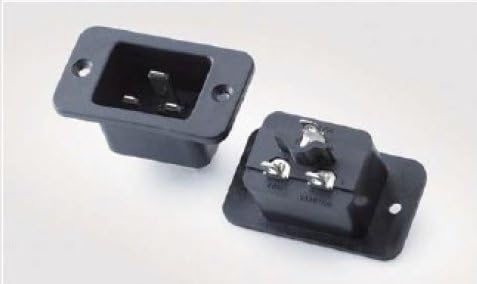
This image displays two units of the Webber Electronics 0722-CW AC Inlet. One unit is shown from the front, revealing the C20 type receptacle with three flat pins. The other unit is shown from the rear, exposing the three .250 inch tab terminals for wiring connections. Both units feature screw mounting holes on their flanges.
3. Setup and Installation
Follow these steps for proper installation of the AC inlet:
- Safety First: Ensure all power is disconnected from the device or system before beginning installation.
- Prepare Mounting Location: Cut an appropriate rectangular opening in the panel or chassis where the inlet will be mounted. Refer to the product's technical drawing for exact dimensions.
- Mount the Inlet: Insert the inlet into the prepared opening. Secure it using screws through the mounting holes on the inlet's flange. Ensure it is firmly seated.
- Wire Connections: Connect the appropriate power wires to the .250 inch tab terminals on the rear of the inlet. Typically, these connections are for Line, Neutral, and Ground. Ensure correct polarity and secure connections.
- Verify Installation: Double-check all connections and mounting security before restoring power.
4. Operating Instructions
The 0722-CW AC Inlet is a passive component designed to receive power from an external source. Once properly installed and wired, its operation is straightforward:
- Connect Power Cord: Insert a compatible C19 power cord (not included) into the C20 receptacle on the front of the inlet. Ensure the cord is fully seated.
- Power On: Once the power cord is connected and the external power source is active, the inlet will pass power to the internal circuitry of your device.
- Disconnect Power: To disconnect power, firmly pull the power cord from the inlet. Always disconnect power from the source before disconnecting the cord from the inlet if possible.
5. Maintenance
The Webber Electronics 0722-CW AC Inlet requires minimal maintenance. Regular inspection can help ensure its longevity and safe operation:
- Cleaning: Periodically wipe the exterior of the inlet with a dry, soft cloth to remove dust and debris. Do not use liquid cleaners directly on the inlet.
- Connection Check: Occasionally inspect the power cord connection for any signs of looseness or damage. Ensure the power cord is not bent or stressed at the connection point.
- Terminal Inspection: If accessible and safe to do so (with power disconnected), periodically check the rear tab terminals for secure wiring connections and signs of corrosion.
6. Troubleshooting
If you encounter issues with your AC inlet, consider the following common troubleshooting steps:
- No Power to Device:
- Ensure the power cord is fully inserted into the inlet and the wall outlet/power source.
- Check the power source (wall outlet, power strip) for functionality.
- Verify that the internal wiring connections to the inlet's terminals are secure.
- Loose Connection:
- If the power cord feels loose in the inlet, ensure it is the correct C19 type for a C20 inlet.
- Inspect the inlet's receptacle for any visible damage or deformation.
- Overheating:
- If the inlet feels excessively warm, immediately disconnect power. This could indicate an overload or a faulty connection. Consult a qualified electrician.
If problems persist after troubleshooting, contact a qualified technician or the manufacturer for assistance.
7. Specifications
| Feature | Detail |
|---|---|
| Model Number | 0722-CW |
| Product Type | AC Inlet (C-20) |
| Mounting Type | Screw Mount |
| Terminal Type | .250 inch Tabs |
| Shape | Rectangle |
| Manufacturer | Webber Electronics |
| ASIN | B00IUSIQRS |
8. Warranty and Support
Information regarding product warranty and customer support for the Webber Electronics 0722-CW AC Inlet is not available in the provided data. Please refer to the manufacturer's official website or contact Webber Electronics directly for details on warranty coverage, technical support, and service options.
Webber Electronics Contact: Please visit the official Webber Electronics website or refer to your purchase documentation for contact information.
Ask a question about this manual
Ask about setup, troubleshooting, compatibility, parts, safety, or missing instructions. Manuals+ will review the question and use this page’s manual context to help answer it.