
1. Introduction
The I-Tech MAG2000 is a magnetotherapy device designed for therapeutic applications. This manual provides essential information for the safe and effective use, setup, operation, and maintenance of your MAG2000 device. Please read this manual thoroughly before using the device and retain it for future reference.

Figure 1: Front view of the I-Tech MAG2000 Magnetotherapy Device, showing the display and control buttons.
2. Safety Information
Important: Always consult a medical professional before starting any new therapy, including magnetotherapy. This device is intended for therapeutic use as directed by a healthcare provider.
- Do not use this device if you have a pacemaker, defibrillator, or any other implanted electronic medical device.
- Avoid use during pregnancy.
- Keep the device away from strong magnetic fields and electronic equipment that may be sensitive to magnetic interference.
- Do not immerse the device in water or other liquids.
- Ensure the power adapter and cables are undamaged before use.
- Keep out of reach of children.
- If you experience any discomfort or adverse reactions during use, discontinue therapy immediately and consult your doctor.
3. Package Contents
Verify that all items are present in the package:
- I-Tech MAG2000 Magnetotherapy Device
- Power Adapter
- 1 x Elastic Therapeutic Band (Applicator)
- Carrying Bag
- User Manual (this document)
4. Device Overview
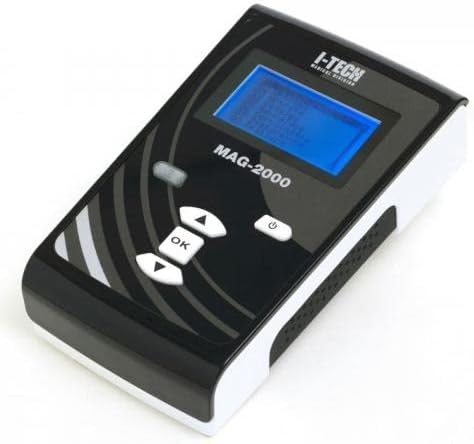
Figure 2: The I-Tech MAG2000 device, highlighting the display and control panel.
The MAG2000 features a clear display for program selection and monitoring, along with intuitive control buttons. The side of the device includes connection ports for the therapeutic applicators and the power input.

Figure 3: Side view of the MAG2000, showing the ON/OFF switch, DC power input, and two applicator connection ports (CH1, CH2).
5. Setup
- Unpack: Carefully remove the MAG2000 device and all accessories from the packaging.
- Connect Power: Insert the power adapter cable into the DC 18V/1A input port on the side of the device (refer to Figure 3). Plug the adapter into a suitable electrical outlet.
- Connect Applicators: Connect the elastic therapeutic band(s) to the CH1 and/or CH2 ports on the side of the device. Ensure the connectors are fully inserted.
6. Operating Instructions
- Power On: Flip the ON/OFF switch on the side of the device to the 'ON' position. The display will illuminate.
- Program Selection: Use the UP/DOWN arrow buttons to navigate through the available programs. Press the 'OK' button to select a program. The MAG2000 offers 35 pre-set programs.
- Adjust Parameters: Depending on the selected program, you may be able to adjust parameters such as frequency (1 to 100 Hz) and intensity (up to 35 Gauss per channel). Use the arrow buttons to modify values and 'OK' to confirm.
- Apply Applicator: Position the elastic therapeutic band(s) on the area of the body requiring treatment. Ensure good contact with the skin or clothing.
- Start Treatment: Once the program and parameters are set, press 'OK' to start the treatment. The display will show the remaining treatment time.
- Monitor: During treatment, you can monitor the progress on the display. Do not adjust parameters unless instructed by a medical professional.
- End Treatment: The device will automatically stop when the treatment time is complete. You can also manually stop the treatment by pressing the 'ON/OFF' button or navigating to the stop option.
- Power Off: After treatment, flip the ON/OFF switch to the 'OFF' position and disconnect the power adapter.
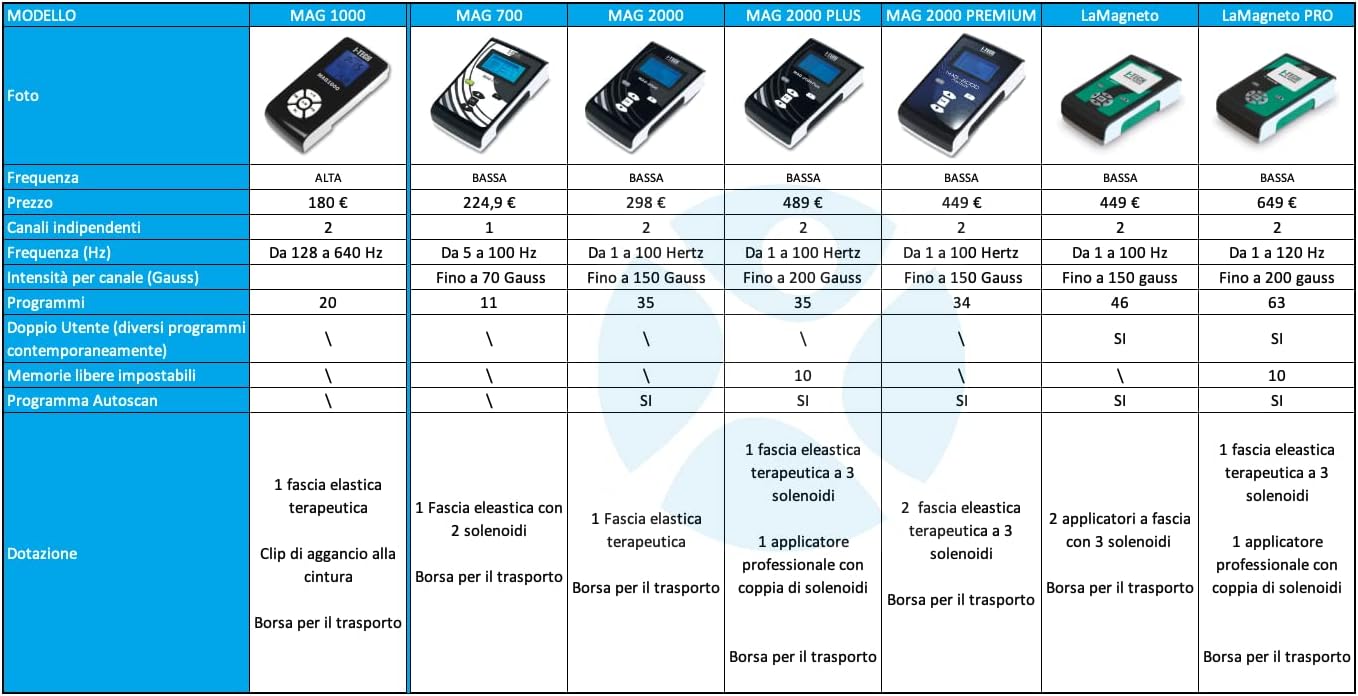
Figure 4: Example of the MAG2000 device with an applicator band applied to the lower back area.
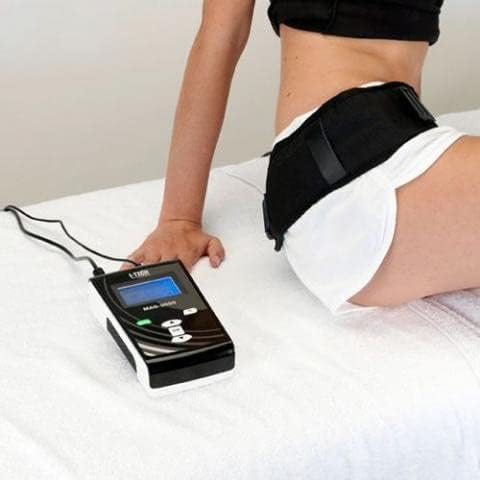
Figure 5: Example of the MAG2000 device with an applicator band applied to the upper back area.
7. Maintenance
- Cleaning: Clean the device and applicators with a soft, damp cloth. Do not use abrasive cleaners or solvents. Ensure the device is powered off and unplugged before cleaning.
- Storage: Store the MAG2000 device and accessories in the provided carrying bag in a cool, dry place, away from direct sunlight and extreme temperatures.
- Inspection: Regularly inspect the power adapter and cables for any signs of damage. Do not use if damaged.
8. Troubleshooting
- Device does not power on:
- Check if the power adapter is securely connected to both the device and the electrical outlet.
- Ensure the ON/OFF switch is in the 'ON' position.
- Verify the electrical outlet is functioning.
- No output from applicators:
- Ensure applicators are correctly and fully plugged into the CH1/CH2 ports.
- Check that a program is selected and the treatment has started.
- Verify intensity settings are not at zero.
- Error message on display:
- Note the error code or message and refer to the manufacturer's support for specific guidance.
- Try powering the device off and on again.
If problems persist, contact I-Tech customer support or your local distributor.
9. Specifications
| Feature | Specification |
|---|---|
| Model | MAG2000 |
| Brand | I-Tech |
| Manufacturer | I-Tech |
| Frequency Range | 1 to 100 Hz (Low Frequency) |
| Intensity per Channel | Up to 35 Gauss |
| Independent Channels | 2 |
| Number of Programs | 35 |
| Autoscan Program | Yes |
| Package Dimensions | 40 x 25 x 10 cm |
| Weight | 2.5 kg |
| Batteries Included | No |
| Country of Origin | China |
10. Warranty and Support
For warranty information, technical support, or service, please contact your authorized I-Tech dealer or the manufacturer directly. Keep your purchase receipt as proof of purchase.


