
1. Introduction
This instruction manual provides essential information for the safe and efficient operation, maintenance, and troubleshooting of your Bosch GSR 14.4 VLi Cordless Drill Driver. Please read this manual thoroughly before using the tool and keep it for future reference. Proper use and care will ensure optimal performance and extend the lifespan of your drill driver.
2. General Safety Instructions
Always observe the following general safety precautions when operating any power tool to reduce the risk of electric shock, fire, and serious injury.
- Work Area Safety: Keep your work area clean and well-lit. Cluttered or dark areas invite accidents. Do not operate power tools in explosive atmospheres, such as in the presence of flammable liquids, gases, or dust.
- Electrical Safety: Avoid body contact with earthed or grounded surfaces. Do not expose power tools to rain or wet conditions.
- Personal Safety: Stay alert, watch what you are doing, and use common sense when operating a power tool. Do not use a power tool while you are tired or under the influence of drugs, alcohol, or medication. Always wear appropriate personal protective equipment, including eye protection, hearing protection, and gloves.
- Power Tool Use and Care: Do not force the power tool. Use the correct power tool for your application. Disconnect the plug from the power source and/or remove the battery pack from the power tool before making any adjustments, changing accessories, or storing power tools.
- Battery Tool Use and Care: Recharge only with the charger specified by the manufacturer. Use power tools only with specifically designated battery packs.
- Service: Have your power tool serviced by a qualified repair person using only identical replacement parts.
3. Product Overview and Features
The Bosch GSR 14.4 VLi is a compact and powerful cordless drill driver designed for various drilling and screwdriving applications. Its robust construction and ergonomic design ensure comfortable and efficient operation.
Key Features:
- Compact Design: Short head length for easy handling in confined spaces.
- Ergonomic Grip: Slim circumference with softgrip covering for reduced user fatigue during extended use.
- Long Runtime: Designed for extended operation on a single charge.
- Flexible Battery System: Allows users to choose battery capacity based on their specific needs.
- Belt Hook: Conveniently hang the tool from a belt for easy access.
- Forward/Reverse Rotation: Essential for both driving and removing fasteners.
- Adjustable Torque Settings: 18+1 torque settings for precise control over screwdriving applications.

Figure 1: The Bosch GSR 14.4 VLi Cordless Drill Driver. This image displays the main unit with its battery attached, highlighting the ergonomic design and chuck.

Figure 2: The Bosch GSR 14.4 VLi drill driver shown with its carrying case, two battery packs, and a charger. This illustrates the complete kit for storage and power management.
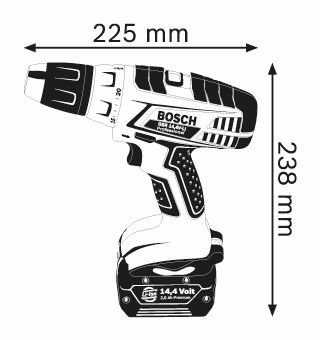
Figure 3: A technical diagram illustrating the dimensions of the Bosch GSR 14.4 VLi drill driver, showing its length (225 mm) and height (238 mm). This provides a clear understanding of the tool's physical size.
4. Setup
4.1 Battery Charging and Installation
Ensure the battery pack is fully charged before initial use. Use only the charger specified by Bosch for 14.4 Volt Li-ion batteries. To install the battery, align it with the base of the drill driver and slide it in until it clicks securely into place. To remove, press the release button and slide the battery out.
4.2 Attaching Drill Bits or Screwdriver Bits
The drill driver features a 1.5 - 13mm chuck clamping range. To attach a bit:
- Rotate the chuck counter-clockwise to open the jaws.
- Insert the desired drill bit or screwdriver bit into the chuck.
- Rotate the chuck clockwise to tighten the jaws firmly around the bit. Ensure the bit is centered and securely held.
5. Operating Instructions
5.1 Power On/Off and Speed Control
The tool is activated by pressing the trigger switch. The speed is variable, controlled by the amount of pressure applied to the trigger. The drill driver offers two no-load speed settings: 0 - 500 rpm (1st gear) for higher torque applications and 0 - 1600 rpm (2nd gear) for faster drilling.
5.2 Forward/Reverse Rotation
A selector switch located above the trigger controls the direction of rotation. Push the switch to the left for forward rotation (for drilling and driving screws) and to the right for reverse rotation (for removing screws or freeing jammed bits). Ensure the switch is in the neutral (center) position when not in use to prevent accidental starting.
5.3 Torque Settings for Screwdriving
The Bosch GSR 14.4 VLi features 18+1 torque settings, allowing precise control for various screwdriving tasks. Rotate the torque collar to select the desired setting. Lower settings are for smaller screws and softer materials, while higher settings are for larger screws and harder materials. The '+1' setting is for maximum torque, suitable for drilling.
- Maximum torque for hard screwdriving applications: 60 Nm
- Maximum torque for soft screwdriving applications: 25 Nm
5.4 Drilling Applications
When drilling, ensure the torque collar is set to the drill symbol (maximum torque). Apply steady, even pressure and allow the drill to do the work. The maximum drilling diameter in wood is 32mm, and in steel is 13mm.

Figure 4: A user operating the Bosch GSR 14.4 VLi drill driver to drive screws into a wooden floor. This demonstrates the tool's application in screwdriving tasks.

Figure 5: A user utilizing the Bosch GSR 14.4 VLi drill driver for drilling into a wooden structure. This image highlights the tool's capability in drilling applications.
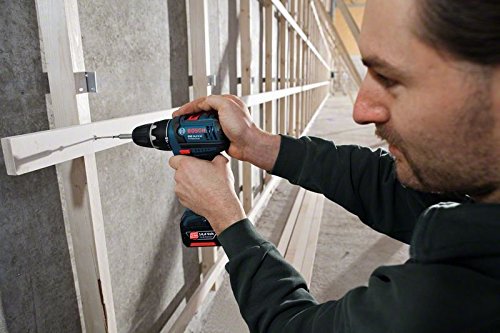
Figure 6: A user driving screws into a wooden frame using the Bosch GSR 14.4 VLi drill driver. This illustrates the tool's precision in assembly work.

Figure 7: A user performing overhead drilling into a wooden ceiling with the Bosch GSR 14.4 VLi drill driver. This demonstrates the tool's versatility and ergonomic design for various working positions.
6. Maintenance
Regular maintenance ensures the longevity and optimal performance of your Bosch GSR 14.4 VLi drill driver.
- Cleaning: Keep the ventilation openings clean to prevent overheating. Use a soft, damp cloth to clean the tool casing. Do not use harsh chemicals or abrasive cleaners.
- Chuck Maintenance: Periodically clean the chuck jaws to ensure proper gripping of bits.
- Battery Care: Store batteries in a cool, dry place. Do not store fully discharged batteries for extended periods.
- Storage: When not in use, store the drill driver and its accessories in a dry, secure location, away from direct sunlight and extreme temperatures.
7. Troubleshooting
This section addresses common issues you might encounter with your drill driver. For problems not listed here, contact Bosch customer support.
| Problem | Possible Cause | Solution |
|---|---|---|
| Tool does not start | Battery not charged or improperly installed. | Ensure battery is fully charged and correctly inserted. |
| Reduced power or short runtime | Battery charge is low or battery is old. | Recharge battery. Consider replacing old batteries. |
| Bit slips in chuck | Chuck not tightened sufficiently or jaws are dirty. | Tighten chuck firmly. Clean chuck jaws. |
| Overheating | Blocked ventilation slots or continuous heavy use. | Clean ventilation slots. Allow tool to cool down. |
8. Technical Specifications
| Feature | Specification |
|---|---|
| Brand | Bosch |
| Model Number | GSR 14.4 VLi |
| Power Source | Cordless |
| Voltage | 14.4 Volts |
| Maximum Rotational Speed | 1600 RPM |
| Maximum Torque (Hard) | 60 Newton Metres |
| Maximum Torque (Soft) | 25 Newton Metres |
| Torque Settings | 18+1 |
| Chuck Clamping Range | 1.5 - 13 mm |
| Maximum Drilling Diameter (Wood) | 32 mm |
| Maximum Drilling Diameter (Steel) | 13 mm |
| Special Feature | Reverse Rotation |
| Material | Metal |
| Item Weight | 1.7 kg (1700 Grams) |
| Colour | Black, Blue, Silver |
9. Warranty and Support
9.1 Warranty Information
The Bosch GSR 14.4 VLi Cordless Drill Driver comes with a 6-month warranty from the date of invoice. To claim warranty service, you must provide a copy of your purchase invoice. Please retain your invoice as proof of purchase.
9.2 Customer Support
For any questions, technical assistance, or warranty claims, please contact Bosch customer support. Refer to your product packaging or the official Bosch website for the most current contact information.