
1. Introduction
This manual provides essential information for the safe and efficient use of the Omron Z-15GW2-B7-K Industrial Snap Switch. Please read these instructions thoroughly before installation, operation, or maintenance to ensure proper function and prevent potential hazards.
2. Safety Information
WARNING: Risk of Electric Shock and Injury.
- Always disconnect power before installing, wiring, or servicing the switch.
- Installation and wiring must be performed by qualified personnel in accordance with all local and national electrical codes.
- Do not exceed the specified current and voltage ratings.
- Ensure proper grounding to prevent electric shock.
- Avoid exposing the switch to environments outside its specified operating temperature and IP rating.
3. Product Overview
The Omron Z-15GW2-B7-K is an industrial snap switch designed for reliable operation in various control applications. It features a Single Pole Double Throw (SPDT) contact form and a hinge roller lever actuator, providing precise detection of mechanical movement.
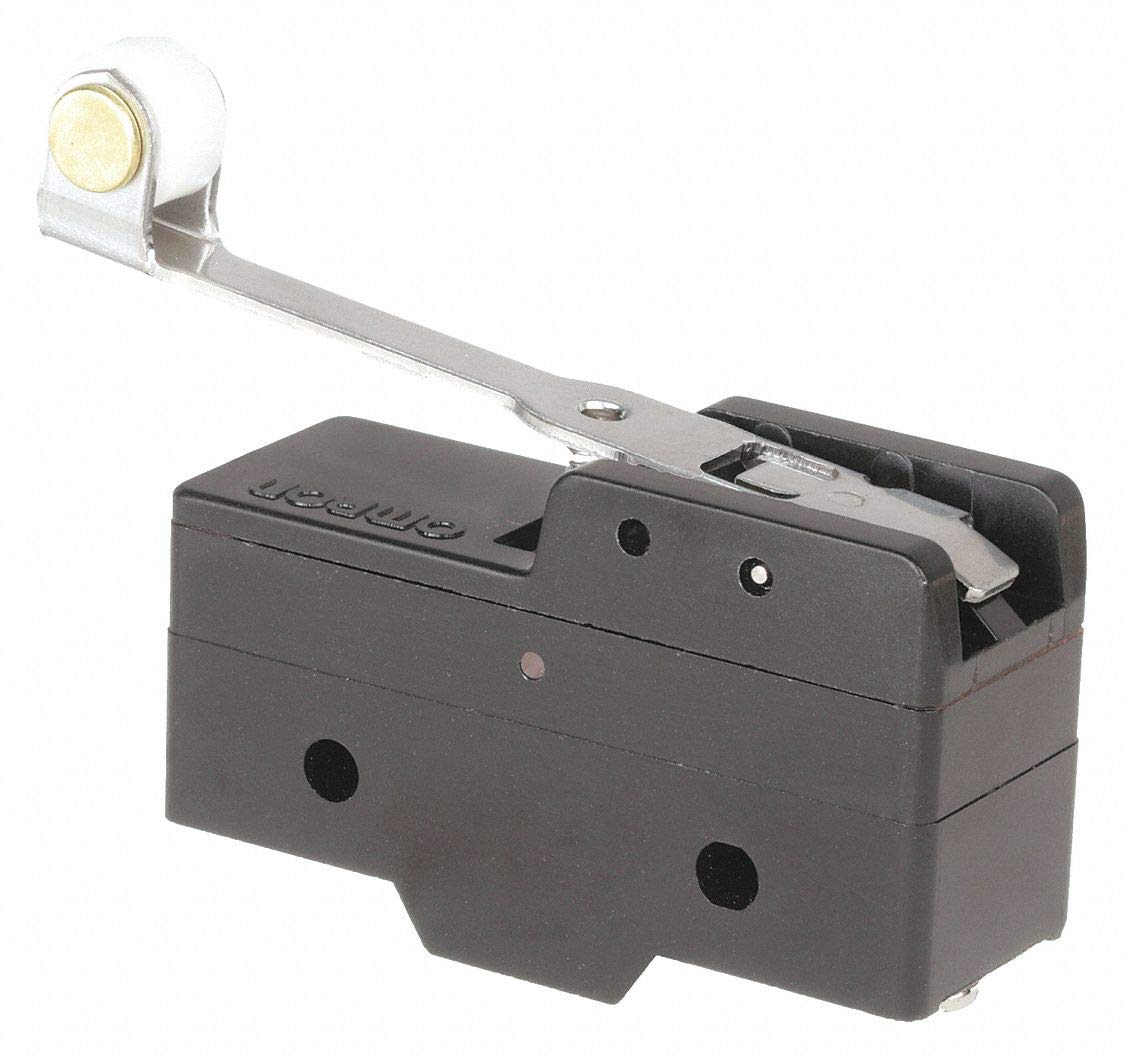
Figure 1: Omron Z-15GW2-B7-K Industrial Snap Switch. This image shows the Omron Z-15GW2-B7-K Industrial Snap Switch, featuring a hinge roller lever actuator and screw terminals. The compact design is suitable for various industrial applications.
Key Features:
- Actuator Type: Hinge Roller Lever
- Contact Form: SPDT (Single Pole Double Throw)
- Current Rating: 15 Amps
- Voltage Rating: 480VAC
- Terminal Type: Screw
- Housing Material: Plastic
- International Protection Rating: IP65
4. Setup and Installation
Follow these steps for proper installation of the Omron Z-15GW2-B7-K snap switch:
- Power Disconnection: Ensure all power to the circuit is disconnected before beginning installation. Verify with a voltage tester.
- Mounting: The switch is designed for snap-in mounting. Secure the switch using the mounting dimensions of 1.03 inches centers. Ensure the mounting surface is stable and free from excessive vibration.
- Wiring:
- Identify the screw terminals. The SPDT contact form typically includes Common (C), Normally Open (NO), and Normally Closed (NC) terminals. Refer to the wiring diagram on the switch body if available.
- Connect the appropriate wires to the screw terminals. Ensure connections are tight and secure to prevent loose contacts and overheating.
- Use wire gauges suitable for the 15A current rating.
- Actuator Alignment: Position the hinge roller lever actuator so that it can be reliably engaged by the target mechanism. Ensure the mechanism provides sufficient over travel (0.157 In.) and does not exceed the maximum pretravel (0.157 In.) for consistent operation.
- Environmental Considerations: Install the switch in an environment within its specified operating temperature range (-25°C to 80°C) and where its IP65 rating is sufficient for protection against dust and water ingress.
- Testing: After installation, carefully restore power and test the switch's operation to confirm correct functionality and wiring.
5. Operating Instructions
The Omron Z-15GW2-B7-K snap switch operates based on the physical displacement of its hinge roller lever actuator. When the actuator is depressed, the internal contacts switch state.
- Actuation: The switch requires an operating force of approximately 3.5 oz. to actuate. The hinge roller lever is designed to be engaged by a moving part of machinery or equipment.
- Contact Function (SPDT):
- In its normal (unactuated) state, the Common (C) terminal is connected to the Normally Closed (NC) terminal.
- When the hinge roller lever is depressed, the Common (C) terminal switches connection to the Normally Open (NO) terminal.
- The switch maintains this state as long as the actuator is depressed. Upon release, the contacts return to their normal state.
- Operation Mode: The switch functions in an OFF-NONE-ON mode, meaning it has a stable OFF state, a transient ON state when actuated, and returns to OFF when released.
6. Maintenance
Regular maintenance helps ensure the longevity and reliable performance of your Omron snap switch.
- Inspection: Periodically inspect the switch for any signs of physical damage, wear on the hinge roller lever, or loose wiring connections.
- Cleaning: Keep the switch free from dust, dirt, and debris. Use a soft, dry cloth for cleaning. Do not use harsh chemicals or abrasive materials.
- Actuator Check: Verify that the mechanism actuating the hinge roller lever is operating smoothly and consistently, without excessive force or misalignment.
- Environmental Protection: Ensure that the environmental conditions remain within the specified IP65 rating. If the housing is damaged, the protection level may be compromised.
- Power Disconnection: Always disconnect power before performing any maintenance or inspection.
7. Troubleshooting
If you encounter issues with your Omron Z-15GW2-B7-K snap switch, refer to the following common problems and solutions:
| Problem | Possible Cause | Solution |
|---|---|---|
| Switch does not actuate when lever is pressed. |
|
|
| No electrical contact change when switch actuates. |
|
|
| Switch operates intermittently. |
|
|
If problems persist after attempting these solutions, contact Omron technical support or a qualified electrician.
8. Specifications
Technical specifications for the Omron Z-15GW2-B7-K Industrial Snap Switch:
| Parameter | Value |
|---|---|
| Model Number | Z-15GW2-B7-K |
| Series | Z |
| Actuator Type | Hinge Roller Lever |
| Contact Form | SPDT (Single Pole Double Throw) |
| Current Rating | 15 Amps |
| Voltage Rating | 480VAC |
| Operation Mode | OFF-NONE-ON |
| Terminal Type | Screw |
| Operating Force | 3.5 oz. |
| Max. Pretravel | 0.157 In. |
| Release Force | 0.79 oz. |
| Differential Travel | 0.040 In. |
| Over Travel | 0.157 In. |
| Length | 1.94 In. (Product Dimensions: 2.5 inches) |
| Height | 1.16 In. (Product Dimensions: 1.8 inches) |
| Depth | 0.69 In. (Product Dimensions: 0.6 inches) |
| Mounting Dimension | 1.03 In. Centers |
| Operating Temperature Range | -25°C to 80°C |
| Housing Material | Plastic |
| Contact Material | Copper, Brass |
| International Protection Rating | IP65 |
| Item Weight | 0.01 ounces |
9. Warranty and Support
For warranty information and technical support regarding your Omron Z-15GW2-B7-K Industrial Snap Switch, please refer to the official Omron website or contact your authorized Omron distributor. Keep your purchase receipt for warranty claims.
Omron Website: www.omron.com
For specific product inquiries or troubleshooting assistance not covered in this manual, Omron's customer service team is available to help.


