
1. Introduction
This manual provides instructions for the proper setup, operation, and maintenance of your Explore Scientific ED127 Essential Series Air-Spaced Apochromatic Triplet Refractor Telescope. This instrument is designed for both visual astronomy and astrophotography, offering high-contrast views and excellent optical performance. Please read this manual thoroughly before using your telescope to ensure optimal performance and longevity.

Figure 1: Front view of the Explore Scientific ED127 Apochromatic Refractor Telescope, showing the objective lens and branding.
2. Product Features
The Explore Scientific ED127 telescope incorporates several key features for superior astronomical observation and imaging:
- Brilliant, High-Contrast Views: Features genuine FCD1 HOYA extra-low dispersion (ED) glass and proprietary enhanced multi-layer coatings on all optical surfaces, producing excellent views with stunning detail.
- Optimized for Astrophotography: The 127mm aperture, versatile f/7.5 focal ratio, and air-spaced triplet optical design effectively eliminate chromatic aberrations, making it suitable for capturing images of celestial objects.
- Designed for Portability: With a 952mm focal length, this refractor includes a retractable dew shield for quick setup and a cradle ring with a sculpted handle for secure handling and transport.
- Precision Collimation System: The front cell is equipped with push-pull adjustments to achieve precise collimation, ensuring sharp star images.

Figure 2: The main optical tube assembly of the Explore Scientific ED127 telescope.
3. Setup
Proper setup is crucial for the performance of your telescope. Follow these general steps to prepare your ED127 for observation or astrophotography.
3.1 Unpacking and Inspection
- Carefully remove all components from the packaging.
- Inspect the telescope and accessories for any signs of damage during shipping. Contact customer support immediately if any damage is found.
- Ensure all listed components are present.
3.2 Mounting the Telescope
The ED127 is designed to be mounted on an equatorial mount (as per specifications). A sturdy mount is essential for stability, especially given the telescope's weight (18 pounds).
- Set up your equatorial mount on a stable, level surface.
- Attach the telescope's cradle ring assembly to the mount's dovetail saddle. Ensure it is securely fastened.
- Balance the telescope on the mount by adjusting its position within the cradle rings.
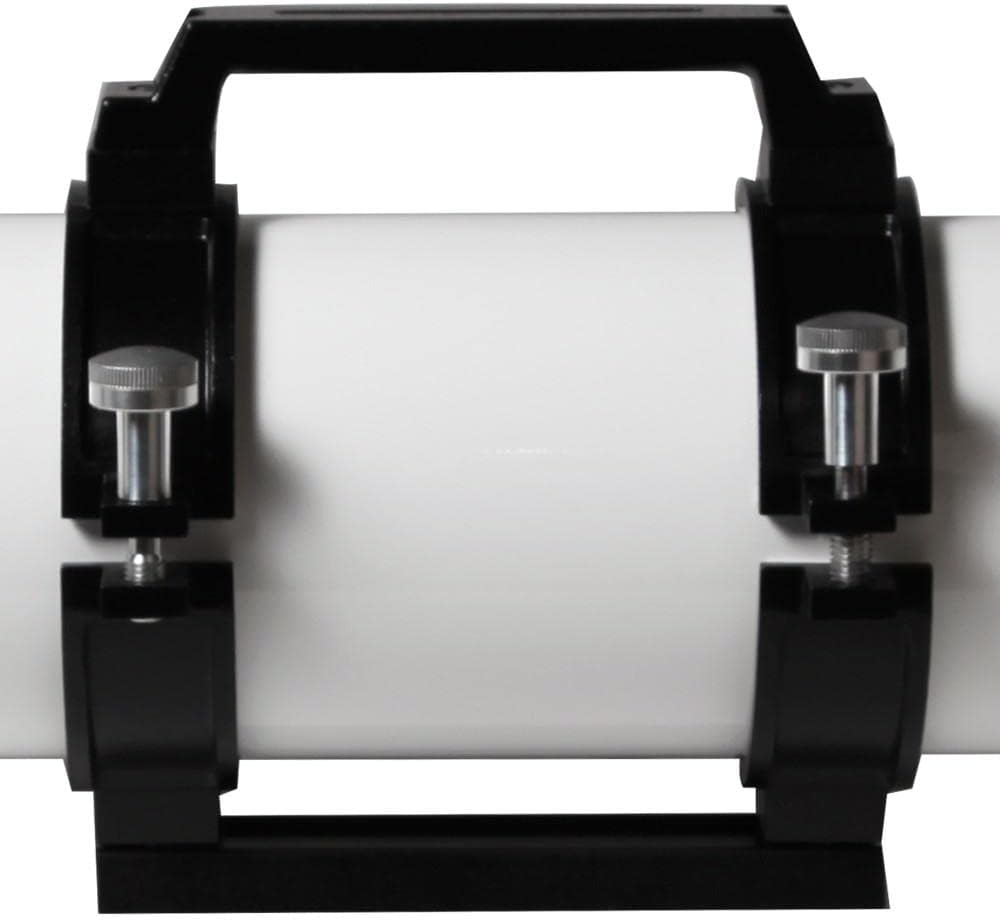
Figure 3: The cradle ring with integrated handle, designed for secure handling and mounting.
3.3 Attaching Accessories
- Diagonal: Insert the diagonal into the focuser. Secure it with the thumbscrew.
- Eyepiece: Insert your chosen eyepiece into the diagonal. Secure it with the thumbscrew.
- Finderscope: Attach the reflex finderscope to its designated bracket on the telescope tube.
- Dew Shield: Extend the retractable dew shield to protect the objective lens from dew formation and stray light.

Figure 4: Example of a diagonal and extension tubes, used to achieve focus with various eyepieces and cameras.
4. Operating Instructions
Once your telescope is set up, you can begin observing.
4.1 Aligning the Finderscope
Before observing, align your finderscope with the main telescope.
- Point the main telescope at a distant, stationary object (e.g., a streetlight or distant tree) during daylight hours.
- Center the object in the main telescope's eyepiece.
- Adjust the finderscope's alignment screws until the same object is centered in its reticle.
4.2 Focusing
The ED127 features manual focus.
- Look through the eyepiece.
- Turn the focuser knobs slowly until the image appears sharp.
- For astrophotography, precise focusing is critical and may require a Bahtinov mask or similar focusing aid.
4.3 Observing and Astrophotography
- Visual Observation: Use the finderscope to locate your desired celestial object, then fine-tune its position in the main eyepiece. Adjust focus as needed.
- Astrophotography: Attach your camera to the focuser (often requiring specific adapters or a field flattener/reducer). Ensure proper back focus is achieved for sharp images across the field. The ED127's apochromatic design is well-suited for capturing detailed images of the Moon, planets, nebulae, and galaxies.
5. Maintenance
Proper care will ensure your telescope provides years of enjoyment.
5.1 Cleaning Optics
- Avoid touching optical surfaces.
- For dust, use a blower brush or compressed air (specifically for optics).
- For smudges or stubborn dirt, use a specialized optical cleaning solution and a clean microfiber cloth, applying minimal pressure. Always clean in a circular motion from the center outwards.
- Never use abrasive materials or household cleaners.
5.2 Storage
- Store the telescope in a dry, dust-free environment.
- Use dust caps on both ends of the optical tube when not in use.
- If storing for extended periods, consider a padded case.
5.3 Collimation
The ED127 features a precision collimation system. While factory-collimated, occasional checks may be beneficial, especially after transport or impacts. Refer to advanced guides for detailed collimation procedures if necessary.
6. Troubleshooting
This section addresses common issues you might encounter.
| Problem | Possible Cause | Solution |
|---|---|---|
| Fuzzy or blurry images | Out of focus, poor seeing conditions, dew on optics, thermal currents. | Adjust focuser slowly. Wait for stable atmospheric conditions. Extend dew shield. Allow telescope to equalize with ambient temperature. |
| No image visible | Dust caps on, finderscope not aligned, wrong eyepiece, object too faint. | Remove all dust caps. Align finderscope. Start with a low-power eyepiece. Ensure you are pointing at a visible object. |
| Stars appear elongated or distorted | Poor tracking (for astrophotography), telescope not balanced, mount instability, collimation issues. | Check mount tracking and polar alignment. Re-balance the telescope. Ensure mount is stable. Check collimation if persistent. |
| Purple fringing (chromatic aberration) | This apochromatic design minimizes chromatic aberration. If observed, it might be atmospheric dispersion or an issue with the eyepiece. | Ensure eyepiece quality. Observe when object is higher in the sky to reduce atmospheric effects. |
7. Specifications
Key technical specifications for the Explore Scientific ED127 Essential Series Apochromatic Refractor Telescope:
| Feature | Detail |
|---|---|
| Brand | Explore Scientific |
| Model Number | ES-ED127075-03 |
| Optical Design | Air-Spaced Apochromatic Triplet Refractor |
| Objective Lens Diameter | 127 Millimeters |
| Focal Length | 952 millimeters |
| Focal Ratio | f/7.5 |
| Optical Tube Length | 41.75 Inches |
| Product Dimensions (D x W x H) | 40.5"D x 11.5"W x 11"H |
| Item Weight | 18 Pounds |
| Coating | Multi-Coated |
| Finderscope | Reflex |
| Focus Type | Manual Focus |
| Compatible Devices | Finder Scope, Camera |
| Mount Type (Recommended) | Equatorial Mount |
| Field Of View | 1.67 Degrees |
| UPC | 812257014965 |
8. Warranty and Support
Explore Scientific provides customer support for their products.
- USA Support: Based in Springdale, Arkansas, USA.
- For warranty information, service, or technical questions, please refer to the official Explore Scientific website or contact their customer service department directly.
- Keep your purchase receipt as proof of purchase for warranty claims.

Figure 5: The Explore Scientific facility, indicating their base of operations.


