
1. Introduction
This manual provides detailed instructions for the proper installation, operation, and maintenance of your TEC TC-760LC MM/MC Phono Preamplifier. The TC-760LC is designed to boost the output of both Moving Magnet (MM) and Moving Coil (MC) phono cartridges, allowing connection to an audio amplifier or receiver that lacks a dedicated phono input. This unit ensures your turntable's signal is correctly amplified and equalized to the RIAA standard for optimal sound reproduction.
2. Safety Information
Please read and understand the following safety precautions before operating the device:
- Ensure the power adapter is connected to a compatible power outlet with the correct voltage.
- Do not expose the unit to moisture, rain, or extreme temperatures.
- Avoid placing the unit near heat sources, such as radiators, or in direct sunlight.
- Do not attempt to open the casing or service the unit yourself. Refer all servicing to qualified personnel.
- Disconnect power from the wall outlet before making any connections or disconnections to prevent electrical shock or damage to equipment.
- Keep the unit away from children and pets.
3. Package Contents
Verify that all the following items are present in your product package:
- TEC TC-760LC Phono Preamplifier (Black)
- Premium AC Adaptor (Magellan Switching Adapter)
- RCA Cable
- Miniplug Adaptor

Image: Included AC Power Adapter. This Magellan switching adapter provides 12V at 1A output and is designed for use with the phono preamplifier.
4. Product Overview
4.1. Key Features
- Available in black finish.
- Total harmonic distortion: 0.005%.
- RIAA frequency response: 20Hz-20,000Hz +/- 0.5dB.
- Signal-to-noise ratio: 82dB (MM) / 85dB (MC).
- Gain: 38dB (MM) / 58dB (MC).
- Selectable high range (100 ohm) / low range (20 ohm) MC input impedance.
4.2. Front Panel Controls
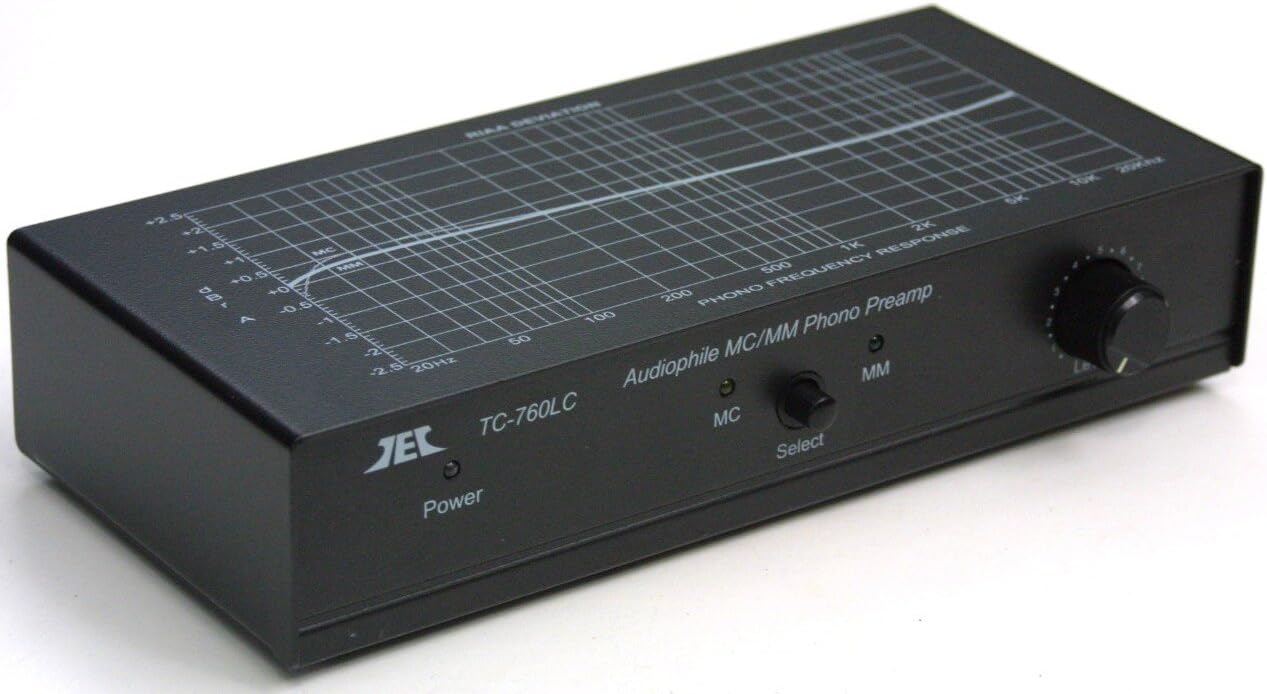
Image: Front panel of the TEC TC-760LC Phono Preamplifier. Shows the Power indicator, MC/MM selector switch, and Level Control knob.
- Power Indicator: An LED that illuminates when the unit is powered on.
- MC/MM Select Switch: A toggle switch to select between Moving Coil (MC) and Moving Magnet (MM) input modes. Ensure this matches your turntable cartridge type.
- Level Control: A rotary knob to adjust the output volume of the preamplifier.
4.3. Rear Panel Connections

Image: Rear panel of the TEC TC-760LC Phono Preamplifier. Displays RCA output jacks, MM input jacks (47kΩ), MC input jacks (20Ω, 100Ω), a ground terminal, and the DC power input.
- OUTPUT (Receiver/Amp): RCA stereo output jacks (Left and Right) for connecting to your amplifier or receiver's line-level input (e.g., AUX, CD, Tuner).
- INPUTS (MM): RCA stereo input jacks (Left and Right) specifically for Moving Magnet cartridges. The input impedance is fixed at 47kΩ.
- INPUTS (MC): RCA stereo input jacks (Left and Right) for Moving Coil cartridges. These inputs feature selectable impedance options: 20Ω and 100Ω, typically chosen via small switches near the inputs.
- Ground Terminal: A screw terminal to connect your turntable's ground wire. This connection is crucial for minimizing hum and noise.
- DC Power Input: A jack for connecting the included AC power adapter.
5. Setup
Follow these steps to correctly set up your TEC TC-760LC Phono Preamplifier:
- Power Off All Equipment: Before making any connections, ensure your turntable, amplifier/receiver, and the phono preamplifier are all powered off and unplugged from the wall outlet.
- Connect Turntable to Preamplifier:
- Connect the RCA output cables from your turntable to the appropriate INPUTS on the TEC TC-760LC (MM or MC, depending on your cartridge type).
- Connect the ground wire from your turntable to the Ground terminal on the preamplifier. Secure the connection by tightening the screw.
- Connect Preamplifier to Amplifier/Receiver:
- Connect the RCA output cables from the TEC TC-760LC's OUTPUT jacks to a line-level input on your amplifier or receiver (e.g., AUX, CD, Tuner). Important: Do NOT connect to your amplifier's dedicated PHONO input, as this unit is already a phono preamplifier and connecting to another phono input will result in distorted sound.
- Connect Power Adapter: Plug the small barrel connector of the included AC power adapter into the DC Power Input on the rear of the preamplifier. Then, plug the AC power adapter into a suitable wall outlet.
- Select Cartridge Type and Impedance: Use the MC/MM Select switch on the front panel to match your turntable's cartridge type. For Moving Coil cartridges, ensure the correct impedance (20Ω or 100Ω) is selected via the small switches located near the MC input jacks on the rear panel. Consult your MC cartridge's specifications for the recommended impedance.
- Power On: First, power on your amplifier/receiver, then power on the TEC TC-760LC.
6. Operating Instructions
Once the preamplifier is set up, follow these steps for operation:
- Select Input: Double-check that the MC/MM switch on the front panel is set to match your turntable's cartridge type (MM or MC).
- Adjust Level: Start with the Level Control knob on the front panel at its minimum (lowest volume) setting.
- Play Record: Place a record on your turntable and begin playback.
- Adjust Volume: Slowly increase the Level Control on the TEC TC-760LC and the main volume on your amplifier/receiver to achieve the desired listening level. Avoid setting the Level Control too high, which can lead to distortion.
- Monitor Sound: Listen carefully for any unwanted hum, buzzing, or distortion. If present, refer to the Troubleshooting section.
7. Maintenance
To ensure the longevity and optimal performance of your phono preamplifier, follow these maintenance guidelines:
- Cleaning: Clean the unit with a soft, dry, lint-free cloth. Do not use liquid cleaners, abrasive pads, or chemical solvents, as these can damage the finish or internal components.
- Dust Control: Keep the unit free from dust and debris. You may use a soft brush or compressed air to gently remove dust from vents and connectors.
- Ventilation: Ensure proper ventilation around the unit. Do not block any ventilation openings, and avoid placing the unit in enclosed spaces that could lead to overheating.
- Connections: Periodically check all cable connections to ensure they are secure and free from corrosion. Loose connections can lead to signal loss or noise.
- Storage: If storing the unit for an extended period, disconnect it from power and store it in a cool, dry place, ideally in its original packaging.
8. Troubleshooting
If you encounter issues with your TEC TC-760LC, consult the table below for common problems and their solutions:
| Problem | Possible Cause | Solution |
|---|---|---|
| No sound or very low sound output. |
|
|
| Humming or buzzing noise. |
|
|
| Distorted sound. |
|
|
9. Specifications
- Product Dimensions: 7 x 3 x 1.5 inches (17.8 x 7.6 x 3.8 cm)
- Item Weight: 2 pounds (0.91 kg)
- Manufacturer: Technolink
- Model Number: TC-760LC BLACK
- Total Harmonic Distortion: 0.005%
- RIAA Frequency Response: 20Hz-20,000Hz +/- 0.5dB
- Signal-to-Noise Ratio (S/N): 82dB (MM) / 85dB (MC)
- Gain: 38dB (MM) / 58dB (MC)
- MM Input Impedance: 47kΩ
- MC Input Impedance: Selectable 100 ohm / 20 ohm
- Power Supply: 12V DC, 1A (via included AC adapter)
10. Warranty and Support
This product is typically covered by a manufacturer's warranty. Please refer to the documentation included with your purchase for specific warranty terms and conditions, including the duration and coverage details. For technical support, troubleshooting assistance beyond this manual, or service inquiries, please contact your retailer or the manufacturer, Technolink. Keep your proof of purchase for warranty claims.
