
1. Introduction
The B&O PLAY Beoplay Form 2i are lightweight on-ear headphones designed to deliver a balanced and impressive sound experience. Combining an iconic design with comfortable wear, these headphones are suitable for various listening environments, from home to on-the-go use. This manual provides essential information for setting up, operating, maintaining, and troubleshooting your Beoplay Form 2i headphones.

Figure 1: Front view of the B&O PLAY Beoplay Form 2i On-Ear Headphones.
2. Package Contents
Ensure all items are present in the package:
- Beoplay Form 2i On-Ear Headphones (Black)
- User Manuals
3. Setup and Connection
3.1 Connecting to an Audio Source
The Beoplay Form 2i headphones connect to your audio device via a standard 3.5mm audio jack. Simply plug the 3.5mm connector into the headphone port of your smartphone, tablet, computer, or other compatible audio source.

Figure 2: Detail of the 3.5mm audio jack connection.
3.2 Adjusting for Comfort
The headphones feature an adjustable headband and pivoting earcups to ensure a comfortable fit. Gently slide the earcups along the metal adjustment mechanism to position them over your ears. The lightweight design contributes to extended listening comfort.
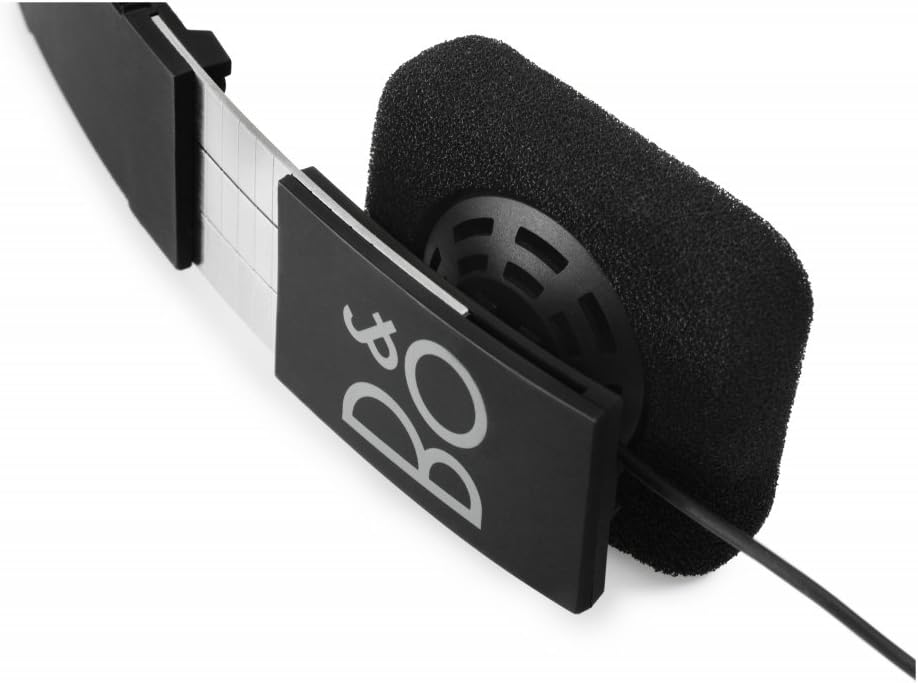
Figure 3: Adjusting the headband for optimal fit.
4. Operation
4.1 Audio Playback
Once connected to an audio source, begin playback from your device. The headphones will reproduce audio with a clear and balanced sound profile.
4.2 Using the Inline Remote and Microphone
The Beoplay Form 2i headphones include an inline remote and microphone for convenient control of music and calls.

Figure 4: Inline remote with control buttons and microphone.
- Play/Pause: Press the center button once.
- Next Track: Press the center button twice quickly.
- Previous Track: Press the center button three times quickly.
- Answer/End Call: Press the center button once during an incoming call or active call.
- Volume Control: Use the '+' and '-' buttons to adjust the volume.
Note: The inline remote's functionality, particularly volume control, is optimized for Apple iOS devices. On Android devices, play/pause and track skipping typically work, but volume control may not function as intended.
4.3 Product Overview Video
Watch this official video for a visual overview of the Beoplay Form 2i headphones in use.
Video 1: Official product video demonstrating the B&O PLAY Beoplay Form 2i headphones in various urban environments, highlighting their design and portability.
5. Maintenance and Care
- Cleaning: Use a soft, dry cloth to clean the headphones. For the ear pads, gently wipe with a slightly damp cloth if necessary, and allow them to air dry completely. Avoid using harsh chemicals or abrasive materials.
- Storage: Store the headphones in a clean, dry place away from extreme temperatures and direct sunlight.
- Cable Care: Avoid sharp bends or excessive pulling on the cable to prevent damage.

Figure 5: Top view of the headphones, illustrating the headband and earcups for cleaning reference.
6. Troubleshooting
- No Sound:
- Ensure the 3.5mm jack is fully inserted into both the headphones and the audio source.
- Check the volume level on your audio source and on the inline remote (if applicable for your device).
- Test the headphones with a different audio source to rule out device issues.
- Inline Remote Not Responding:
- Verify compatibility with your device. Note that full functionality, especially volume control, is primarily designed for Apple iOS devices.
- Ensure the connection is secure.
- Discomfort During Use:
- Adjust the headband and earcups to find the most comfortable position.
- Take breaks during extended listening sessions.
7. Specifications
| Brand | B&O PLAY |
| Model Number | 1641326 |
| Connectivity Technology | Wired |
| Headphones Jack | 3.5 mm Jack |
| Ear Placement | On Ear |
| Form Factor | On Ear |
| Material | Plastic |
| Item Weight | 90 Grams (3.17 ounces) |
| Product Dimensions | 6.14 x 6.18 x 1.57 inches |
| Frequency Response | 20 Hz - 21 kHz |
| Control Type | Remote (Inline) |
| Special Feature | Lightweight, Universal Phone Control |
| UPC | 780305201431 |
| Global Trade Identification Number (GTIN) | 00780305201431, 05705260042993 |
8. Warranty and Support
For warranty information, technical support, or service inquiries, please refer to the official B&O PLAY website or contact their customer support directly. Keep your proof of purchase for warranty claims.
Official B&O PLAY Website: www.beoplay.com