
1. Introduction
The Palintest SP 612 Pooltester Kit provides a simple and cost-effective method for testing chlorine, pH, and alkalinity levels in swimming pools, spas, and hot tubs. This manual outlines the proper procedures for using the kit to ensure accurate and reliable water quality results.
2. Safety Information
WARNING: Chemical Reagents
- Always handle chemical tablets with care. Avoid direct contact with skin and eyes.
- Wash hands thoroughly after handling tablets.
- Keep tablets out of reach of children and pets.
- Do not ingest tablets. If ingested, seek immediate medical attention.
- Store the kit and reagents in a cool, dry place, away from direct sunlight.
- Refer to the hazard warnings on the back of the reagent packaging for specific safety precautions.

3. Package Contents
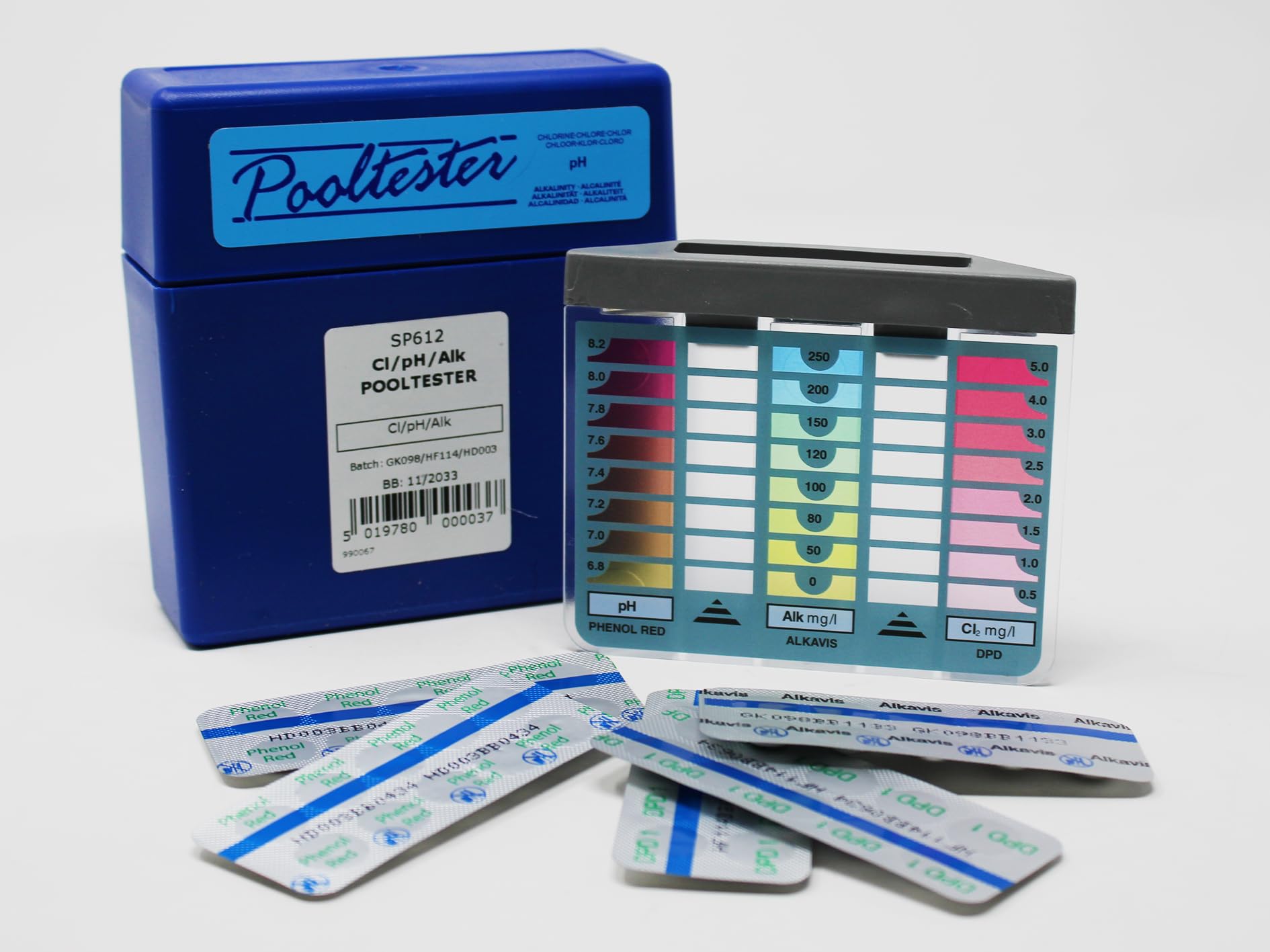
The Palintest SP 612 Pooltester Kit includes the following components:
- 1 x Pooltester Comparator Block
- 20 x DPD No. 1 Rapid Tablets (for Free Chlorine)
- 20 x Phenol Red Tablets (for pH)
- 10 x ALKAVIS Tablets (for Total Alkalinity)
- Instruction Leaflet (this manual)

4. Setup
Before beginning testing, ensure you have a clean water sample and a well-lit area. The kit is designed for immediate use with no assembly required.
- Open the blue Pooltester case.
- Familiarize yourself with the comparator block and the different reagent tablets.
- Ensure the comparator block is clean and free from debris. Rinse with clean water if necessary.

5. Operating Instructions
Perform tests in the following order: Chlorine, pH, then Alkalinity, as some reagents can affect subsequent tests.
5.1. Free Chlorine Test (DPD No. 1)
- Rinse the comparator block cells with the water to be tested.
- Fill both cells of the comparator block to the 10 ml mark with the water sample.
- Add one DPD No. 1 Rapid tablet to the left cell. Do not touch the tablet with your fingers.
- Place the cap on the cell and shake gently until the tablet dissolves completely.
- Wait for 10 seconds for the color to develop.
- Hold the comparator block against a white background in good light and compare the color in the left cell with the chlorine color standards on the block.
- Record the Free Chlorine reading.
Range: 0.5 - 5.0 mg/l (increments: 0.5, 1.0, 1.5, 2.0, 2.5, 3.0, 4.0, 5.0)
5.2. pH Test (Phenol Red)
- Empty and rinse both cells of the comparator block thoroughly.
- Fill both cells to the 10 ml mark with a fresh water sample.
- Add one Phenol Red tablet to the middle cell. Do not touch the tablet with your fingers.
- Place the cap on the cell and shake gently until the tablet dissolves completely.
- Wait for 10 seconds for the color to develop.
- Hold the comparator block against a white background in good light and compare the color in the middle cell with the pH color standards on the block.
- Record the pH reading.
Range: 6.8 - 8.2 (increments: 6.8, 7.0, 7.2, 7.4, 7.6, 7.8, 8.0, 8.2)
5.3. Total Alkalinity Test (ALKAVIS)
- Empty and rinse both cells of the comparator block thoroughly.
- Fill both cells to the 10 ml mark with a fresh water sample.
- Add one ALKAVIS tablet to the right cell. Do not touch the tablet with your fingers.
- Place the cap on the cell and shake gently until the tablet dissolves completely.
- Wait for 10 seconds for the color to develop.
- Hold the comparator block against a white background in good light and compare the color in the right cell with the alkalinity color standards on the block.
- Record the Total Alkalinity reading.
Range: 0 - 250 mg/l (increments: 0, 50, 80, 100, 120, 150, 200, 250)
6. Reading Results
For each test, match the color developed in the sample cell to the closest color standard on the comparator block. The number corresponding to the matched color is your test result. For best accuracy, read results in natural daylight, avoiding direct sunlight.
7. Maintenance
- After each use, thoroughly rinse the comparator block cells and caps with clean water.
- Dry all components with a clean, lint-free cloth.
- Store the kit in its original case in a cool, dry place, away from direct sunlight and chemicals.
- Ensure all reagent tablets are kept in their original blister packs until use to maintain their integrity.
8. Troubleshooting
| Problem | Possible Cause | Solution |
|---|---|---|
| Inaccurate readings | Contaminated sample water; dirty comparator cells; expired reagents; incorrect tablet dosage; reading in poor light. | Use a fresh water sample; clean cells thoroughly; check reagent expiry dates; use only one tablet per test; read in natural daylight. |
| Tablet not dissolving | Insufficient shaking; old or damaged tablet. | Shake more vigorously; ensure tablets are not expired or damaged. |
| No color change | Incorrect tablet used; very low concentration of parameter being tested. | Ensure correct tablet for the test; re-test with a fresh sample. If chlorine is 0, add chlorine to the pool and re-test. |
9. Specifications
- Model: SP 612
- Brand: Palintest
- Material: Plastic
- Test Parameters: Free Chlorine (Cl2), pH, Total Alkalinity (CaCO3)
- Chlorine Range: 0.5 - 5.0 mg/l (increments: 0.5, 1.0, 1.5, 2.0, 2.5, 3.0, 4.0, 5.0)
- pH Range: 6.8 - 8.2 (increments: 6.8, 7.0, 7.2, 7.4, 7.6, 7.8, 8.0, 8.2)
- Alkalinity Range: 0 - 250 mg/l (increments: 0, 50, 80, 100, 120, 150, 200, 250)
- Kit Includes: Comparator block, 20 DPD1 tablets, 20 Phenol Red tablets, 10 ALKAVIS tablets.
- Product Dimensions (Package): 11.2 x 10.8 x 3.4 cm
- Product Weight (Package): 3.97 grams
10. Warranty and Support
For specific warranty information, please refer to the documentation provided at the time of purchase or contact Palintest customer support directly. Palintest products are manufactured to high standards, and support is available for product inquiries and technical assistance.
Manufacturer: Palintest
ASIN: B00IEALKKC
Manufacturer Part Number: SP 612
For further assistance, please visit the official Palintest website or contact their authorized distributors.