1. Product Overview
The Grundig 72861 is a 3-button USB optical mouse designed for comfortable and precise navigation. It features optical movement detection technology for accurate tracking and connects via a standard USB port, making it compatible with personal computers. This corded mouse operates at a fixed sensitivity of 800 dots per inch (dpi) and does not require batteries.
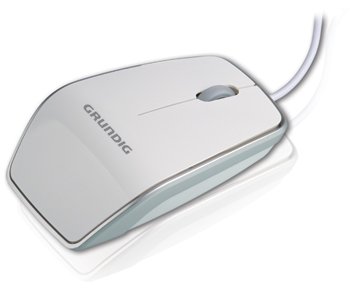
Image showing the Grundig 72861 USB Optical Mouse, white in color, displayed within its product packaging. The packaging highlights 'Optical Mouse' and 'Grundig' branding, along with icons indicating USB connectivity, optical technology, 3 buttons, and 800 DPI.
2. Package Contents
Verify that your package contains the following items:
- 1x Grundig 72861 3-Button USB Optical Mouse
3. Setup
To set up your Grundig 72861 USB Optical Mouse, follow these steps:
- Connect the Mouse: Locate an available USB port on your personal computer. Insert the USB connector of the Grundig 72861 mouse firmly into the USB port.
- Automatic Driver Installation: Your operating system (e.g., Windows, macOS, Linux) should automatically detect the mouse and install the necessary drivers. This process typically takes a few moments.
- Verification: Once the drivers are installed, the mouse cursor should become responsive to your mouse movements. No additional software installation is required for basic functionality.
4. Operating Instructions
The Grundig 72861 mouse features a standard 3-button layout for intuitive control:
- Left Button: Used for primary actions such as selecting items, opening files, and clicking links.
- Right Button: Used for secondary actions, typically opening context menus with additional options.
- Scroll Wheel (Middle Button):
- Scrolling: Roll the wheel up or down to navigate through documents and web pages.
- Middle Click: Pressing the scroll wheel acts as a third button, often used for opening links in new tabs or other application-specific functions.
The mouse operates at a fixed sensitivity of 800 dpi, providing a balance of speed and precision for general computing tasks.
5. Maintenance
Proper maintenance ensures the longevity and optimal performance of your mouse:
- Cleaning the Exterior: Use a soft, slightly damp cloth to wipe the surface of the mouse. Avoid harsh chemicals or abrasive materials.
- Cleaning the Optical Sensor: Periodically inspect the optical sensor on the underside of the mouse for dust or debris. Use a soft, dry cotton swab or compressed air to gently clean the sensor area. Do not touch the sensor directly with your fingers.
- Storage: When not in use, store the mouse in a clean, dry environment away from extreme temperatures and direct sunlight.
- Cable Care: Avoid bending or twisting the USB cable excessively to prevent internal damage.
6. Troubleshooting
If you encounter issues with your Grundig 72861 mouse, refer to the following troubleshooting tips:
- Mouse Not Responding:
- Ensure the USB connector is securely plugged into the computer's USB port.
- Try plugging the mouse into a different USB port on your computer.
- Restart your computer.
- Erratic Cursor Movement:
- Clean the optical sensor on the underside of the mouse as described in the Maintenance section.
- Ensure you are using the mouse on a clean, non-reflective, and uniform surface. Mouse pads are recommended.
- Avoid using the mouse on glass or highly reflective surfaces.
- Buttons Not Functioning:
- Verify that the mouse is properly connected.
- Test the mouse on another computer to determine if the issue is with the mouse or the computer's settings.
If these steps do not resolve the issue, please refer to the Warranty and Support section.
7. Specifications
| Feature | Specification |
|---|---|
| Model Number | 72861 |
| Connectivity Technology | USB |
| Movement Detection Technology | Optical |
| Number of Buttons | 3 |
| Sensitivity (DPI) | 800 dpi |
| Color | White |
| Item Weight | 0.23 kilograms (8.1 ounces) |
| Product Dimensions | 6.69 x 2.36 x 8.27 inches |
| Compatible Devices | Personal Computers |
8. Warranty and Support
For warranty information, please refer to the documentation provided with your purchase or contact your retailer. For technical support or further assistance, please reach out to Grundig customer service through their official website or contact channels.


