
1. Introduction
Thank you for choosing the Precision Power BA1300.1D Monoblock Ice Series Class D Car Amplifier. This amplifier is designed to deliver powerful and clear audio performance for your car audio system. This manual will guide you through the proper installation, operation, and maintenance procedures to ensure you get the best experience from your new amplifier.
The BA1300.1D features an over-compensated high headroom power supply, capable of producing more than conventional power gain with 2 ohm loads. It incorporates double-sided PCBs with all surface mount technology to enhance audio quality.
2. Safety Information
Please read all instructions carefully before installing and operating the amplifier. Failure to follow these guidelines may result in damage to the amplifier, your vehicle, or personal injury.
- Professional Installation Recommended: Installation of car audio equipment can be complex. If you are unsure about any part of the installation process, seek assistance from a qualified professional installer.
- Power Disconnection: Always disconnect the vehicle's negative battery terminal before beginning any installation work to prevent electrical shorts.
- Proper Wiring: Ensure all wiring is correctly sized and fused. Incorrect wiring can lead to overheating, fire, or damage to components.
- Ventilation: Mount the amplifier in a location that allows for adequate air circulation to prevent overheating. Do not cover the amplifier's heat sinks.
- Avoid Moisture: Do not expose the amplifier to moisture or water.
- Secure Mounting: Securely mount the amplifier to prevent it from coming loose during vehicle movement, which could cause injury or damage.
3. Product Overview
The Precision Power BA1300.1D is a high-performance monoblock amplifier designed for driving subwoofers. Its compact design and efficient Class D circuitry make it an ideal choice for various car audio setups.
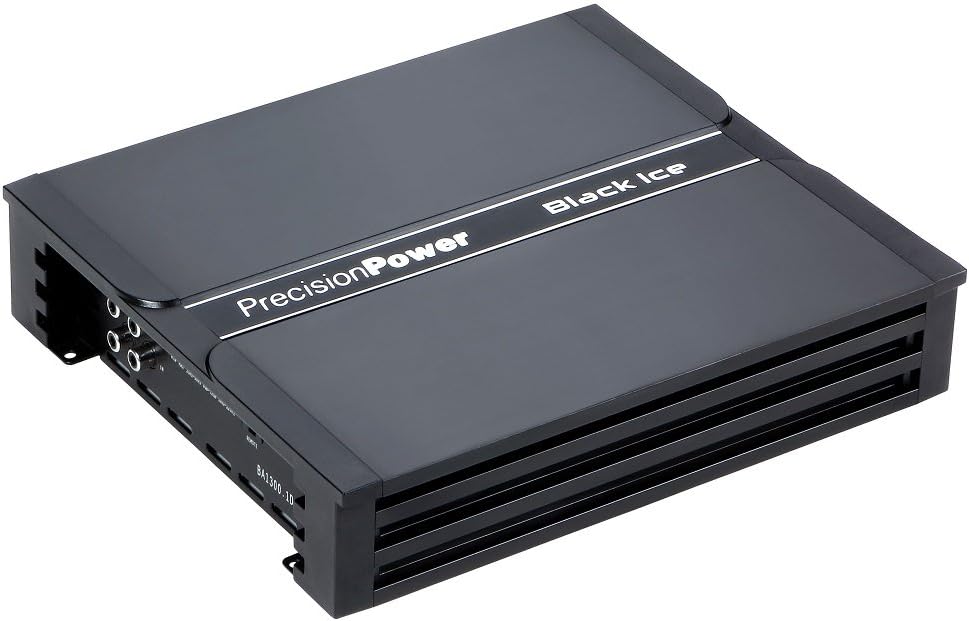
Image: Precision Power BA1300.1D Monoblock Ice Series Class D Car Amplifier. The amplifier features a sleek black casing with 'Precision Power' and 'Black Ice' branding on the top surface. Input and output terminals are visible on the sides.
Key Features:
- Black Ice Series Monoblock Class D Car Amplifier
- High-efficiency Class D Topology
- Wired Remote Bass Level Control Included
- Mono Channel Operation
- Over-compensated high headroom power supplies
- Double-sided PCBs with surface mount technology
4. Setup and Installation
Proper installation is crucial for the performance and longevity of your amplifier. Follow these steps carefully.
4.1. Mounting Location
Choose a mounting location that is dry, well-ventilated, and secure. Common locations include under a seat, in the trunk, or behind a panel. Ensure there is enough space around the amplifier for air circulation.
4.2. Wiring Connections
- Power Wire: Run a heavy-gauge power wire (e.g., 4-gauge or 8-gauge depending on power requirements) directly from the positive terminal of the vehicle's battery to the amplifier's +12V terminal. Install an in-line fuse holder within 18 inches (45 cm) of the battery.
- Ground Wire: Connect a short, heavy-gauge ground wire from the amplifier's GND terminal to a clean, unpainted metal surface on the vehicle's chassis. Ensure a solid electrical connection.
- Remote Turn-On Wire: Connect a remote turn-on wire from your head unit's remote output to the amplifier's REM terminal. This wire turns the amplifier on and off with your head unit.
- RCA Input: Connect RCA cables from your head unit's subwoofer or full-range pre-outs to the amplifier's RCA input jacks.
- Speaker Output: Connect your subwoofer(s) to the amplifier's speaker output terminals. Pay attention to polarity (+ to + and - to -). Ensure the total impedance of your speakers matches the amplifier's stable operating impedance (1 ohm, 2 ohms, or 4 ohms).
- Remote Bass Control: Plug the wired remote bass level control into the designated port on the amplifier. Mount the control in an accessible location for easy adjustment.
5. Operating the Amplifier
Once installed, you can configure the amplifier for optimal performance.
5.1. Initial Setup and Adjustments
- Gain Control: Start with the gain control set to minimum. Play a familiar track with strong bass. Slowly increase the gain until you hear distortion, then back off slightly. This matches the amplifier's input sensitivity to your head unit's output.
- Low Pass Filter (LPF): Adjust the LPF to filter out frequencies above your desired subwoofer range. A common setting is between 80Hz and 120Hz, depending on your subwoofer and other speakers.
- Bass Boost: Use the bass boost sparingly. Excessive bass boost can cause distortion and damage to your speakers or amplifier. Adjust it to enhance bass response if needed, but avoid over-boosting.
- Subsonic Filter: If available, set the subsonic filter to protect your subwoofer from playing frequencies below its resonant frequency, which can cause damage.
5.2. Remote Bass Level Control
The included wired remote bass level control allows you to conveniently adjust the subwoofer output level from your listening position without needing to access the amplifier directly.
6. Maintenance
The Precision Power BA1300.1D amplifier requires minimal maintenance to ensure long-term performance.
- Cleaning: Periodically wipe the amplifier's exterior with a soft, dry cloth to remove dust and debris. Do not use harsh chemicals or abrasive cleaners.
- Ventilation: Ensure that the amplifier's cooling fins are free from obstructions to allow for proper heat dissipation.
- Connections: Occasionally check all wiring connections to ensure they are secure and free from corrosion. Loose connections can lead to poor performance or damage.
7. Troubleshooting
If you experience issues with your amplifier, refer to the following common problems and solutions before contacting support.
| Problem | Possible Cause | Solution |
|---|---|---|
| Amplifier does not turn on (no power light) | Blown fuse, loose power/ground/remote wire, no remote signal from head unit. | Check in-line fuse, verify all power, ground, and remote connections are secure. Test remote wire for 12V when head unit is on. |
| No sound output | Loose RCA cables, incorrect gain setting, speaker wires disconnected, amplifier in protect mode. | Check RCA connections, adjust gain, verify speaker wiring, check amplifier's protection indicator. |
| Distorted sound | Gain set too high, improper LPF setting, speaker impedance mismatch, damaged speaker. | Reduce gain, adjust LPF, verify speaker impedance, inspect speakers for damage. |
| Amplifier overheats (goes into protect mode) | Insufficient ventilation, speaker impedance too low, prolonged high volume use. | Ensure proper ventilation, verify speaker impedance is within specifications, reduce volume or allow amplifier to cool. |
8. Specifications
Detailed technical specifications for the Precision Power BA1300.1D amplifier.
- Model: BA1300.1D
- RMS Power Rating:
- 4 Ohms: 300 watts x 1 channel
- 2 Ohms: 450 watts x 1 channel
- 1 Ohm: 650 watts x 1 channel
- Max Power Output: 1300 watts
- Product Dimensions: 42.93 x 23.37 x 6.1 cm (16.9 x 9.2 x 2.4 inches)
- Item Weight: 3.08 kg (6.79 lbs)
- Mounting Type: Surface Mount
- GTIN (UPC): 00709483048102, 012304182344, 803982977267
9. Warranty and Support
Precision Power products are designed for reliability and performance. For warranty information and technical support, please refer to the official Precision Power website or contact their customer service department.
Please retain your proof of purchase for any warranty claims. Do not attempt to repair the amplifier yourself, as this may void the warranty.
No official product videos are available from the seller for this model at this time.