
YONGNUO YN560-III-USA
YONGNUO YN560-III-USA Speedlite Flash User Manual
Model: YN560-III-USA
1. Introduction
This manual provides detailed instructions for the safe and effective use of your YONGNUO YN560-III-USA Speedlite Flash. Please read this manual thoroughly before operating the device to ensure optimal performance and to prevent damage.
2. Safety Information
Always observe the following safety precautions to prevent injury or damage to the flash unit:
- Do not disassemble or modify the flash unit.
- Keep the flash unit away from water and moisture.
- Avoid direct eye exposure to the flash light, especially at close range.
- Use only specified batteries (4 AA batteries).
- Do not operate in environments with flammable gases or liquids.
3. Package Contents
Verify that all items are present in your package:
- YONGNUO YN560-III-USA Speedlite Flash
- Protecting Bag
- Mini Stand
- User Manual (this document)
4. Product Features
The YONGNUO YN560-III-USA Speedlite Flash offers advanced features for versatile lighting control:
- Integrated 2.4G Wireless Receiver: Supports ultra-long-range wireless flash with a triggering distance of up to 100 meters.
- Compatibility: Can receive signals from RF-603 and RF-602 wireless transmitters, supporting 16 channels for flexible wireless flash setups.
- Multiple Trigger Modes: Can be triggered via camera hot shoe, 2.4G radio, S1 (optical slave), and S2 (pre-flash cancel optical slave) modes.
- Zoom Function: Flash coverage can be adjusted manually from 24mm to 105mm.
- External Power Port: Equipped with a charging socket for an external power pack to reduce recycle time.
- PC Sync Port: Provides a PC port for synchronous flash triggering.
- Large LCD Screen: Features a clear and intuitive display for easy operation and setting adjustments.
- Automatic Settings Save: Automatically saves your current settings for convenience.
5. Setup
5.1 Battery Installation
- Open the battery compartment cover on the back of the flash unit.
- Insert four (4) AA-size batteries according to the polarity indicators (+/-) inside the compartment.
- Close the battery compartment cover securely.
5.2 Mounting the Flash
The YN560-III-USA can be mounted on a camera's hot shoe or used off-camera with the included mini stand.

Front view of the YN560-III-USA Speedlite Flash on its mini stand.
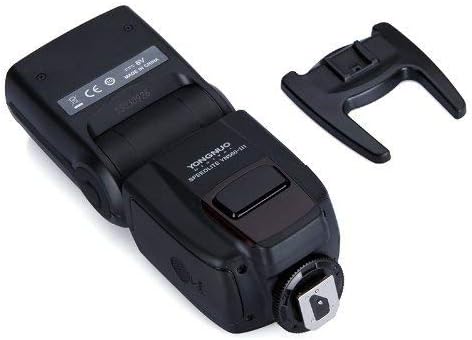
Bottom view showing the hot shoe mount and external ports.
On-Camera Mounting:
- Slide the flash's hot shoe into your camera's hot shoe mount.
- Tighten the locking ring on the flash unit to secure it to the camera.
Off-Camera Mounting:
- Attach the flash unit to the included mini stand.
- Place the mini stand on a flat, stable surface or mount it onto a light stand/tripod.
5.3 Connecting External Power
For faster recycle times, an external power pack can be connected.

Close-up of the external power port (left) and PC sync port (right).
- Locate the external power port on the side of the flash unit.
- Connect the compatible external power pack cable to this port.
6. Operating Instructions
6.1 Power On/Off
Press and hold the ON/OFF button for approximately 2 seconds to power the flash on or off.

Back panel with LCD screen and control buttons.
6.2 Mode Selection
Press the MODE button to cycle through the available flash modes:
- M (Manual Mode): Manually set the flash output power.
- Multi (Stroboscopic Mode): Fires a series of rapid flashes.
- S1 (Optical Slave Mode): Triggers the flash when it detects another flash firing.
- S2 (Pre-flash Cancel Optical Slave Mode): Triggers the flash when it detects another flash firing, ignoring the camera's pre-flash.
6.3 Power Adjustment
In Manual (M) mode, use the directional buttons (up/down) to adjust the flash output power from 1/1 (full power) to 1/128 in 1/3 stop increments.
6.4 Zoom Adjustment
Press the ZOOM button to adjust the flash head's coverage. Use the directional buttons to select a focal length from 24mm, 28mm, 35mm, 50mm, 70mm, 80mm, to 105mm.

Flash head tilted with wide-angle diffuser and bounce card extended.
6.5 Wireless Operation (2.4G)
The YN560-III-USA has an integrated 2.4G wireless receiver. To use this feature:
- Ensure the flash is in a wireless slave mode (indicated by a wireless icon on the LCD).
- Set your compatible YONGNUO 2.4G wireless transmitter (e.g., RF-603, RF-602, YN560-TX) to the same channel as the flash unit.
- The flash will trigger wirelessly when commanded by the transmitter.
6.6 PC Sync Port Usage
Connect a PC sync cable from your camera's PC sync terminal to the flash's PC sync port for wired synchronization.
7. Maintenance
- Clean the flash unit with a soft, dry cloth. Do not use solvents or abrasive cleaners.
- Remove batteries if the flash will not be used for an extended period to prevent leakage.
- Store the flash in a cool, dry place, away from direct sunlight and extreme temperatures.
8. Troubleshooting
| Problem | Possible Cause | Solution |
|---|---|---|
| Flash does not power on. | Batteries are dead or incorrectly inserted. | Replace batteries or check polarity. |
| Flash does not fire. | Flash is not fully charged. Incorrect mode selected. Hot shoe connection is loose. | Wait for recycle indicator. Select appropriate mode (M, S1, S2). Re-mount flash securely. |
| Wireless triggering fails. | Channels do not match. Transmitter is out of range. Interference. | Ensure flash and transmitter are on the same channel. Reduce distance. Change channels. |
| Flash output is inconsistent. | Low battery power. | Replace batteries or connect external power pack. |
9. Specifications
| Feature | Detail |
|---|---|
| Guide Number | GN58 (ISO 100, 105mm) |
| Flash Mode | M, Multi, S1, S2 |
| Zoom Range | 24, 28, 35, 50, 70, 80, 105mm |
| Vertical Rotation Angle | -7 to 90 degrees |
| Horizontal Rotation Angle | 0 to 270 degrees |
| Power Supply | 4 x AA size batteries (Alkaline or Ni-MH) |
| Recycle Time | Approx. 3 seconds (with new AA alkaline batteries) |
| Color Temperature | 5600K |
| Flash Duration | 1/200s - 1/20000s |
| Dimensions | 3.25 x 3.75 x 8.25 inches (approx.) |
| Weight | 1.06 pounds (without batteries) |
| Compatible Mountings | Canon, Nikon, Pentax, Olympus (standard hot shoe) |
| Flash Sync Speed | 1/200 or 1/250 (depending on camera model) |
10. Warranty and Support
This product comes with a limited warranty. Please refer to the warranty card included in your product packaging for specific terms and conditions. For technical support or service inquiries, please contact your local YONGNUO distributor or visit the official YONGNUO website for contact information.
Related Documents - YN560-III-USA
 |
YONGNUO YN560 Speedlite User Manual User manual for the YONGNUO YN560 Speedlite, detailing its features, installation, operation, specifications, and troubleshooting for photographers. |
 |
Instrukcja Obsługi Yongnuo YN560 IV V2018 - Lampa Błyskowa Poznaj funkcje, specyfikacje techniczne i instrukcje obsługi lampy błyskowej Yongnuo YN560 IV V2018. Dowiedz się, jak efektywnie wykorzystać jej możliwości w fotografii. |
 |
YONGNUO YN560-TX II Flash Controller - Operation Manual Information Information regarding the operation manual for the YONGNUO YN560-TX II Flash Wireless Trigger and Controller. Contact seller's customer service for the full manual. |
 |
YONGNUO YN320EX Speedlite User Manual Comprehensive user manual for the YONGNUO YN320EX Speedlite, covering installation, operation, wireless flash settings, custom functions, and troubleshooting. |
 |
Yongnuo YN568EX III Speedlite User Manual Comprehensive user manual for the Yongnuo YN568EX III Speedlite, covering features, operation, advanced applications, and troubleshooting for Canon and Nikon cameras. |
 |
YONGNUO YN-E3-RT Wireless Flash Transceiver User Manual This document is the user manual for the YONGNUO YN-E3-RT wireless flash transceiver. It provides detailed instructions on setup, operation, various flash modes (ETTL, Manual, Multi, Group), advanced functions like Linked Shot and remote control, auxiliary features, troubleshooting, and technical specifications. |
Ask a question about this manual
Ask about setup, troubleshooting, compatibility, parts, safety, or missing instructions. Manuals+ will review the question and use this page’s manual context to help answer it.