
1. Safety Information
Always turn off power at the circuit breaker before installing or servicing the fan control. Failure to do so may result in serious injury or death. All wiring must be in accordance with national and local electrical codes. If you are unsure about wiring procedures, consult a qualified electrician.
- Do not use with solid-state fan speed controls.
- Ensure the electrical supply to the fan is disconnected before installation.
- This control is designed for indoor use only.
2. Package Contents
- MCRC-RC1 Wall Control Unit
- Receiver Unit
- Mounting Hardware
- Instruction Manual (this document)
3. Setup and Installation
The Monte Carlo MCRC-RC1 fan control can be installed as a hardwired wall mount or used as a portable handheld unit with a wall holster (holster not included with all models). This section details the hardwired wall mount installation.
3.1 Wiring the Receiver Unit
The receiver unit must be wired between the household electrical supply and the ceiling fan. Ensure power is OFF at the circuit breaker before proceeding.
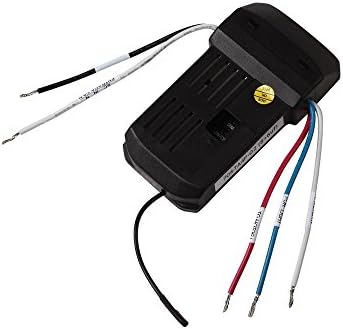
The receiver unit, shown here with its various colored wires, connects to the ceiling fan and household electrical supply. Wires are labeled for fan motor, light, and power input.
- Identify Wires: Locate the Live (Black), Neutral (White), Fan (Blue), and Light (Red) wires from your ceiling fan and household supply.
- Connect Power Input: Connect the black wire from the household supply to the black wire labeled 'AC IN L' on the receiver. Connect the white wire from the household supply to the white wire labeled 'AC IN N' on the receiver.
- Connect Fan: Connect the blue wire from the fan to the blue wire labeled 'TO MOTOR' on the receiver.
- Connect Light: Connect the red wire from the light kit to the red wire labeled 'FOR LIGHT' on the receiver.
- Grounding: Ensure all ground wires are securely connected according to local codes.
- Secure Receiver: Carefully tuck the wired receiver into the fan's canopy or junction box, ensuring no wires are pinched.
3.2 Installing the Wall Control Unit
The wall control unit replaces a standard wall switch. Ensure power is OFF at the circuit breaker.

This image displays the front panel of the MCRC-RC1 wall control. It features buttons for adjusting fan speed, turning the fan off, and controlling the light function.
- Remove Old Switch: Carefully remove the existing wall switch from the wall box.
- Wire Wall Control: Connect the wires from the wall box to the corresponding terminals on the MCRC-RC1 wall control. Typically, this involves Line (hot) and Load wires. Refer to the wiring diagram provided with the physical product for exact connections.
- Mount Control: Secure the wall control unit into the wall box using the provided screws. Attach the faceplate.
3.3 Syncing the Wall Control and Receiver
After installation, the wall control and receiver may need to be synced to communicate properly. Refer to the specific instructions included with your product for the exact syncing procedure, which often involves a combination of restoring power and pressing a button on the control within a short timeframe.
4. Operating Instructions
The MCRC-RC1 wall control provides intuitive touch control for your ceiling fan and light.
The MCRC-RC1 wall control features dedicated buttons for fan speed, fan off, and light control.
- Fan Speed Control: Press the fan icon button (usually at the top) to cycle through the 4 available fan speeds (Low, Medium, High, Max).
- Fan OFF: Press the 'OFF' button (center) to turn the ceiling fan off.
- Light Control: Press the light bulb icon button (bottom) to turn the light ON or OFF. If your fan has dimmable lights, press and hold the light button to adjust the brightness. Release when the desired brightness is reached.
- Power Switch: A small toggle switch at the bottom of the control (labeled 'OFF' and 'ON') acts as a master power cut-off for the entire unit.
5. Maintenance
The Monte Carlo MCRC-RC1 fan control requires minimal maintenance.
- Cleaning: To clean the surface of the wall control, wipe gently with a soft, damp cloth. Do not use abrasive cleaners, solvents, or harsh chemicals, as these can damage the finish or internal components.
- Environmental Conditions: Avoid exposing the control to excessive moisture or extreme temperatures.
6. Troubleshooting
If you experience issues with your MCRC-RC1 fan control, refer to the following common solutions:
- Fan or Light Not Responding:
- Ensure the master power switch on the wall control is in the 'ON' position.
- Check the circuit breaker to ensure power is supplied to the fan.
- Verify that the wall control and receiver are properly synced. Refer to Section 3.3 or your product's specific syncing instructions.
- Inspect wiring connections at both the receiver and wall control for any loose or incorrect connections (ensure power is OFF at the breaker before inspection).
- Difficulty Syncing:
- Ensure the receiver is powered on and within range of the wall control.
- Follow the syncing procedure precisely as outlined in the product's detailed instructions. Timing is often crucial for successful pairing.
- Intermittent Operation:
- Check for any potential sources of interference, such as other wireless devices operating on similar frequencies.
- Ensure all wiring connections are secure and free from corrosion.
If these steps do not resolve the issue, contact Monte Carlo customer support for further assistance.
7. Specifications
| Feature | Specification |
|---|---|
| Brand | Monte Carlo |
| Model Name | Monte Carlo MCRC-RC1 Fan Controls NEO |
| Part Number | MCRC-RC1 |
| Color | Black |
| Control Method | Touch |
| Number of Power Levels | 4 (Fan Speeds) |
| Voltage | 120 Volts |
| Item Weight | 6.4 ounces |
| Product Dimensions | 6 x 8 x 5 inches |
| Installation Type | Portable handheld with wall holster or hardwired wall mount |
| Indoor/Outdoor Usage | Indoor |
| Material | Plastic |
| UPC | 014817516616 |
8. Warranty Information
The Monte Carlo MCRC-RC1 Fan Controls NEO comes with a 1 Year Manufacturer Warranty. Please retain your proof of purchase for warranty claims. For specific terms and conditions, refer to the warranty documentation included with your product or visit the Monte Carlo official website.
9. Support
For technical assistance, replacement parts, or further inquiries regarding your Monte Carlo MCRC-RC1 Fan Controls NEO, please contact Monte Carlo customer support. You can typically find contact information on the manufacturer's website or on the product packaging.
Online Resources: Visit the official Monte Carlo website for FAQs, additional product information, and support resources.


