1. Introduction
The Yamaha RX-V377 is a 5.1-channel A/V home theater receiver designed to deliver powerful surround sound and advanced features for an immersive audio-visual experience. Key features include a discrete amplifier configuration, YPAO sound optimization, 4K Ultra HD pass-through, and a front USB input for portable devices. This receiver is engineered for high sound clarity and flexible home theater setups.
This manual provides detailed instructions for setting up, operating, and maintaining your RX-V377 receiver, ensuring optimal performance and longevity.
2. Setup
2.1 Unpacking and Initial Inspection
Carefully remove all components from the packaging. Ensure all accessories, including the remote control and YPAO microphone, are present. Inspect the receiver for any signs of damage.
2.2 Connecting Your Speakers
The RX-V377 supports a 5.1-channel speaker configuration. For optimal sound, connect your speakers as follows:
- Front Speakers (L/R): Connect to the FRONT L/R terminals.
- Center Speaker: Connect to the CENTER terminal.
- Surround Speakers (L/R): Connect to the SURROUND L/R terminals.
- Subwoofer: Connect to the SUBWOOFER PRE OUT terminal.
For users who cannot place surround speakers in the rear, the Virtual CINEMA FRONT feature allows for virtual 5-channel surround sound with all speakers positioned at the front.
2.3 Connecting Audio/Video Devices
Utilize the HDMI inputs for high-definition sources such as Blu-ray players, gaming consoles, and streaming devices. The RX-V377 features 4K Ultra HD pass-through, 3D support, and Audio Return Channel (ARC) functionality.
- HDMI: Connect up to 4 HDMI input devices and 1 HDMI output to your TV/projector.
- USB: A front panel USB port allows direct digital connection for iPod/iPhone, providing high-quality audio and charging.
- Optical/Coaxial: Digital audio inputs are available for other audio sources.
- Analog Audio/Video: Multiple analog inputs are provided for legacy devices.
2.4 YPAO Sound Optimization
The Yamaha Parametric Acoustic Optimizer (YPAO) automatically analyzes your room acoustics and adjusts various audio parameters for optimal sound. Connect the supplied YPAO microphone to the front panel and follow the on-screen instructions for automatic speaker setup.

Figure 2.4.1: Front view of the Yamaha RX-V377 receiver, showing the YPAO microphone and remote control.
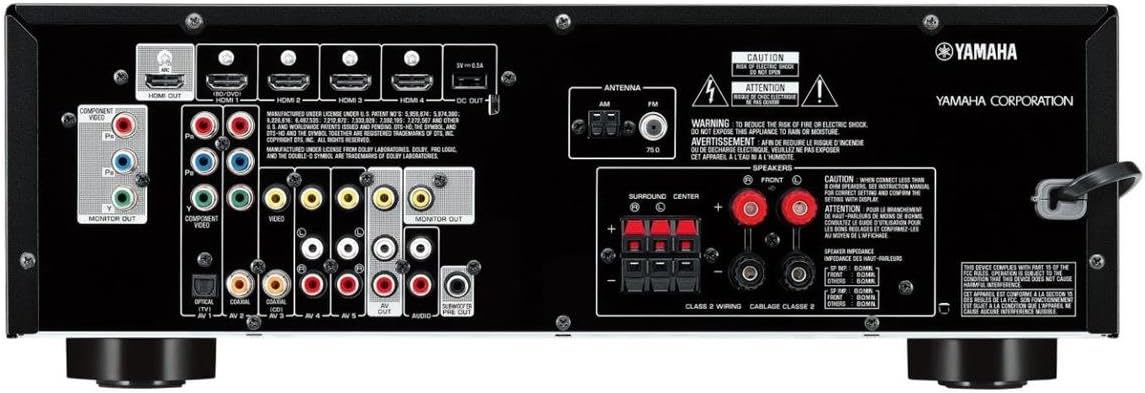
Figure 2.4.2: Rear panel of the Yamaha RX-V377 receiver, illustrating various input and output connections.
2.5 Network Connectivity
The RX-V377 supports network features, allowing access to streaming services like Spotify, Pandora, and vTuner. For models with built-in Wi-Fi, direct wireless connectivity simplifies setup and daily use of network sources. An optional YBA-11 Bluetooth wireless adapter can be connected for Bluetooth streaming.
Video 2.5.1: Yamaha RX-V Series Overview. This video provides a general overview of the RX-V series, including setup and features relevant to the RX-V377.
3. Operating
3.1 Basic Operation
- SCENE Buttons: Pressing a SCENE button powers on the receiver, selects the input source, and applies a specific DSP mode. These can be customized.
- HDMI CEC: When connected to a CEC-compatible TV, the receiver can power on/off with the TV, and TV remote can control receiver volume.
3.2 Audio Enhancements
- CINEMA DSP: Yamaha's exclusive CINEMA DSP technology supports HD Audio playback (Dolby TrueHD, DTS-HD Master Audio), providing natural and expansive sound imaging.
- Extra Bass: This feature enriches powerful bass sound, even with small speakers, by enhancing low-range frequencies.
- Subwoofer Trim Control: Improves sound imaging by preventing overlap between front speaker output and subwoofer frequencies, resulting in a cleaner, more focused soundstage.
- Compressed Music Enhancer: Restores lost frequencies in digitally compressed music formats (like MP3) using sophisticated digital signal processing.
Video 3.2.1: CINEMA DSP Overview. This video explains Yamaha's CINEMA DSP technology for enhanced audio experiences.
3.3 Multi-Zone Audio
For models supporting Zone 2 audio, you can enjoy different audio sources in separate rooms. Party Mode allows both zones to play the same source simultaneously with zero audio delay.
3.4 AV Controller App
Control your receiver effortlessly from your smartphone or tablet using the Yamaha AV Controller App (available for iOS and Android). This app allows you to select music, adjust volume, change DSP modes, and access various settings.
4. Maintenance
4.1 Cleaning
To maintain the appearance and performance of your receiver, regularly wipe the exterior with a soft, dry cloth. Avoid using abrasive cleaners, solvents, or chemical cloths, as these may damage the finish. Ensure the unit is powered off and unplugged before cleaning.
4.2 Ventilation
Ensure adequate ventilation around the receiver to prevent overheating. Do not block ventilation openings or place the unit in an enclosed space without proper airflow. Avoid placing other components directly on top of the receiver.
4.3 Software Updates
Periodically check the Yamaha website for any available firmware updates for your RX-V377 receiver. Updates can improve performance, add new features, or resolve potential issues. Follow the instructions provided with the update carefully.
5. Troubleshooting
If you encounter issues with your RX-V377 receiver, refer to the following common troubleshooting steps:
- No Power: Check the power cord connection and ensure the power outlet is functional.
- No Sound: Verify speaker connections, input source selection, and volume levels. Ensure mute is not activated. Run YPAO again if speaker settings seem incorrect.
- No Picture: Confirm HDMI cable connections between the source, receiver, and TV. Ensure the correct input is selected on both the receiver and TV.
- Remote Control Not Working: Check battery levels and ensure there are no obstructions between the remote and the receiver's IR sensor.
- Network Connection Issues: Verify your Wi-Fi or Ethernet connection. Restart your router and the receiver.
For more detailed troubleshooting, consult the comprehensive owner's manual available on the Yamaha support website.
6. Specifications
| Feature | Specification |
|---|---|
| Brand | Yamaha |
| Model Number | RX-V377 |
| Channels | 5.1 |
| Output Power | 100 W per channel (8 ohms, 1 kHz, 0.9% THD, 1-ch driven) |
| HDMI Inputs/Outputs | 4 In / 1 Out |
| 4K Ultra HD Pass-through | Yes |
| USB Input | Front panel (iPod/iPhone compatible) |
| Sound Optimization | YPAO |
| Virtual Surround | Virtual CINEMA FRONT |
| ECO Mode | Yes (approx. 20% less power consumption) |
| Audio Encoding | Dolby TrueHD, DTS-HD Master Audio |
| Supported Internet Services | Spotify, Pandora, vTuner |
| Item Weight | 16 Pounds |
| Color | Black |
7. Warranty and Support
7.1 Manufacturer's Warranty
The Yamaha RX-V377 receiver is covered by a manufacturer's warranty. Please refer to the warranty card included with your product for specific terms, conditions, and duration of coverage. Retain your proof of purchase for warranty claims.
7.2 Customer Support
For technical assistance, product inquiries, or service requests, please contact Yamaha customer support. Visit the official Yamaha website for contact information, FAQs, and additional resources.
Video 7.2.1: Yamaha RX-V377 5.1-Channel A/V Home Theater Receiver Overview. This video provides a comprehensive look at the features and benefits of the RX-V377 receiver.


