
1. Introduction
This manual provides detailed instructions for the proper use and maintenance of your Toshiba TV Remote Control, model CT-9155. Please read this manual thoroughly before using the remote control to ensure optimal performance and longevity. Keep this manual for future reference.
2. Safety Information
- Do not expose the remote control to direct sunlight, high temperatures, or high humidity.
- Avoid dropping the remote control or subjecting it to strong impacts.
- Do not attempt to disassemble or modify the remote control. This may cause damage and void any warranty.
- Keep batteries out of reach of children. If swallowed, seek immediate medical attention.
- Dispose of used batteries according to local regulations. Do not dispose of batteries in fire.
- If the remote control will not be used for an extended period, remove the batteries to prevent leakage.
3. Package Contents
Please check that the following items are included in your package:
- Toshiba TV Remote Control CT-9155
- User Manual (this document)
4. Setup
4.1 Battery Installation
The remote control requires two AAA alkaline batteries (not included). Follow these steps to install the batteries:
- Locate the battery compartment cover on the back of the remote control.
- Slide the cover downwards or press the latch and lift to open the compartment.
- Insert two AAA alkaline batteries, ensuring the positive (+) and negative (-) terminals align correctly with the markings inside the compartment.
- Replace the battery compartment cover by sliding it back into place until it clicks securely.
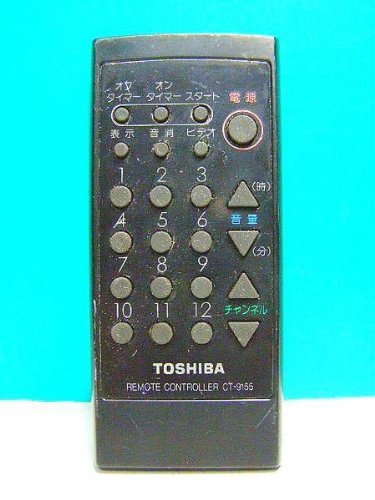
Image of the Toshiba TV Remote Control CT-9155, showing its overall layout and buttons. The battery compartment is located on the back of the device.
5. Operating the Remote Control
Point the remote control directly at the TV's remote sensor. Ensure there are no obstructions between the remote control and the TV.
5.1 Basic Functions
- POWER (⏻): Turns the TV on or off.
- CH ▲/▼ (Channel Up/Down): Changes the TV channel.
- VOL ▲/▼ (Volume Up/Down): Adjusts the TV volume.
- MUTE (🔇): Mutes or unmutes the TV sound.
- INPUT/SOURCE: Selects the input source (e.g., HDMI 1, AV, Component).
- Number Buttons (0-9): Directly selects TV channels.
5.2 Menu Navigation
- MENU: Displays the TV's main menu.
- Arrow Buttons (▲▼◄►): Navigates through menu options.
- ENTER/OK: Confirms a selection or enters a submenu.
- EXIT/RETURN: Exits the current menu or returns to the previous screen.
6. Maintenance
6.1 Cleaning
To clean the remote control, gently wipe it with a soft, dry cloth. For stubborn dirt, slightly dampen the cloth with water or a mild cleaning solution. Do not use abrasive cleaners, alcohol, or benzene, as these can damage the surface.
6.2 Storage
Store the remote control in a cool, dry place away from direct sunlight and extreme temperatures. If storing for an extended period, remove the batteries to prevent potential leakage and damage.
7. Troubleshooting
If you experience issues with your remote control, refer to the following common problems and solutions:
| Problem | Solution |
|---|---|
| Remote control is not working. |
|
| Buttons are unresponsive. |
|
| TV does not respond to commands. |
|
8. Specifications
- Brand: Toshiba
- Model: CT-9155
- Compatible Device: Television
- Battery Type: AAA Alkaline (x2)
9. Warranty and Support
For information regarding warranty coverage, please refer to the warranty card included with your original TV purchase or visit the official Toshiba website for details specific to your region. For further technical support or inquiries, please contact Toshiba customer service.