
1. Introduction
This manual provides essential information for the safe and effective use of your Fujifilm X-T1 Mirrorless Digital Camera. Please read this manual thoroughly before using the camera and keep it in a safe place for future reference.
The Fujifilm X-T1 is a professional-quality mirrorless digital camera featuring an APS-C 16-megapixel X-Trans CMOS II sensor and EXR Processor II. It is designed to deliver detailed images with natural color reproduction across various lighting conditions. Key features include a high-magnification OLED electronic viewfinder, a tilting LCD screen, and a weather-resistant body.
2. What's in the Box
Verify that all items listed below are included in your product packaging:
- Fujifilm X-T1 Mirrorless Digital Camera (Body Only)
- Np-W126 Li-Ion Battery Pack
- Bc-W126 Battery Charger
- Ef-X8 Shoe-Mount Flash Unit
- Shoulder Strap
- Body Cap
- Metal Strap Clip
- Protective Cover
- Clip Attaching Tool
- Hot Shoe Cover
3. Camera Layout
Familiarize yourself with the main components and controls of your Fujifilm X-T1 camera.
3.1. Rear View
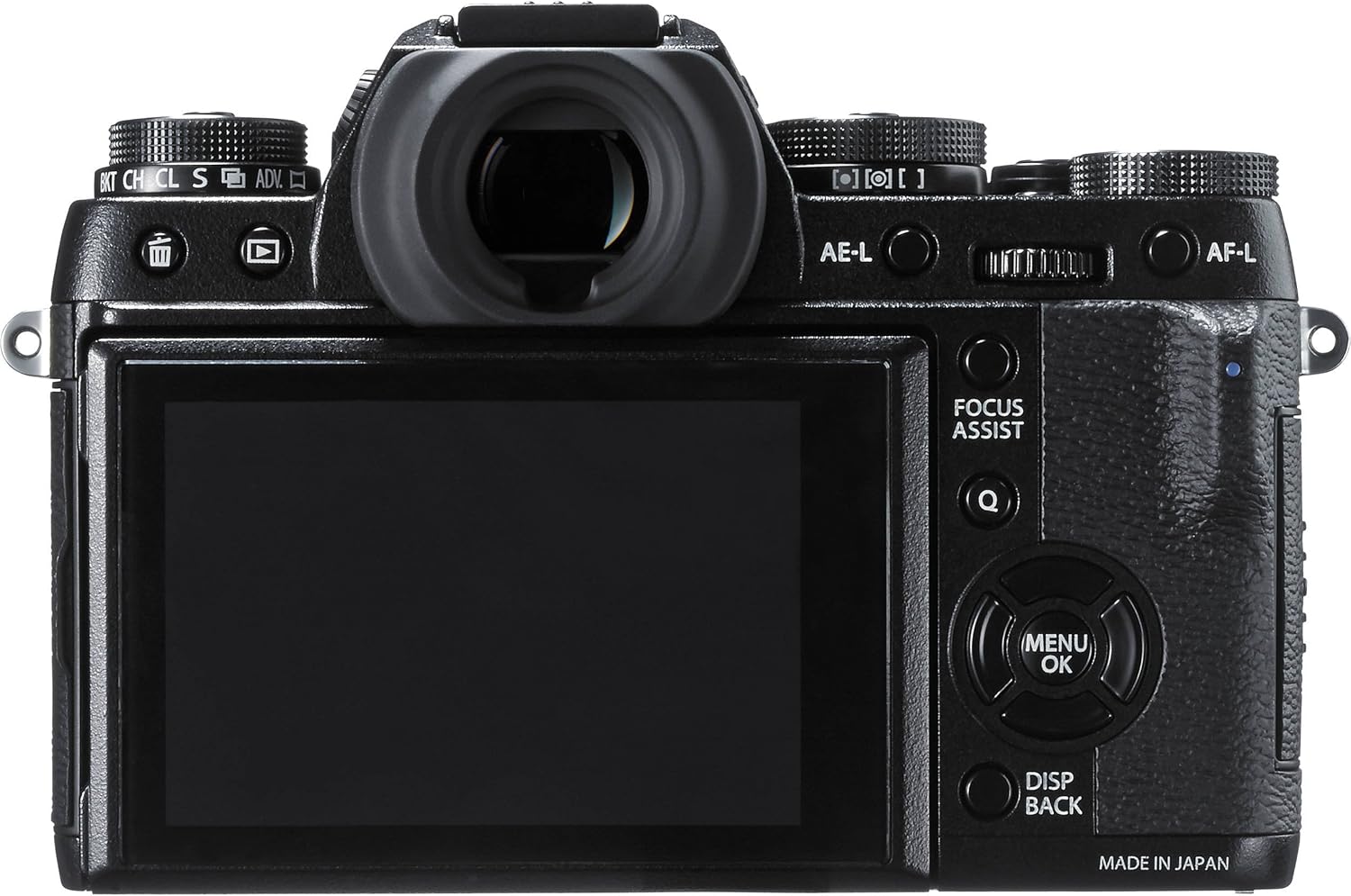
Figure 3.1: Rear view of the Fujifilm X-T1. This image displays the camera's back panel, including the electronic viewfinder, the fixed LCD screen, and various control buttons such as AE-L, AF-L, Focus Assist, Menu/OK, and Disp/Back.
3.2. Rear View with Tilting LCD

Figure 3.2: Rear view of the Fujifilm X-T1 with the LCD screen tilted. This image highlights the camera's tilting 3.0-inch LCD screen, which can be adjusted for various shooting angles, along with the electronic viewfinder and surrounding controls.
3.3. Top View

Figure 3.3: Top view of the Fujifilm X-T1. This perspective shows the camera's top plate, featuring dedicated dials for ISO, shutter speed, exposure compensation, and drive mode, along with the hot shoe and power switch.
3.4. Front View with Lens

Figure 3.4: Front 3/4 view of the Fujifilm X-T1 with the XF18-55mm lens. This image displays the camera body with the kit lens mounted, showcasing the Fujifilm X-mount and the overall compact design.
3.5. Front View with External Flash

Figure 3.5: Front 3/4 view of the Fujifilm X-T1 with the EF-X8 shoe-mount flash unit. This image illustrates the camera with the included external flash unit attached to the hot shoe and in its deployed position.
4. Setup
4.1. Charging the Battery
- Insert the Np-W126 Li-Ion Battery Pack into the Bc-W126 Battery Charger.
- Plug the charger into a power outlet. The charging indicator will illuminate.
- Charging is complete when the indicator light turns off or changes color (refer to charger instructions for specific indicator behavior).
4.2. Inserting the Battery and Memory Card
- Open the battery/memory card compartment cover on the bottom of the camera.
- Insert the charged battery pack with the arrow facing into the camera until it clicks into place.
- Insert an SDHC memory card into the designated slot until it clicks. Ensure the card is facing the correct direction.
- Close the compartment cover securely.
4.3. Attaching the Lens
- Remove the body cap from the camera and the rear cap from the lens.
- Align the white mounting mark on the lens with the white mounting mark on the camera body.
- Mount the lens onto the camera body and rotate it clockwise until it clicks into place.
4.4. Initial Settings
Upon first power-on, the camera will prompt you to set the date, time, and language. Follow the on-screen instructions to configure these settings.
5. Basic Operation
5.1. Powering On/Off
Rotate the ON/OFF switch located on the top plate of the camera to power the device on or off.
5.2. Adjusting Exposure Settings
The Fujifilm X-T1 features dedicated analog dials for key exposure settings:
- Shutter Speed Dial: Located on the top right, this dial controls the shutter speed.
- ISO Dial: Located on the top left, this dial adjusts the camera's sensitivity to light.
- Exposure Compensation Dial: Positioned next to the shutter speed dial, it allows for fine-tuning exposure.
- Aperture: Controlled via the aperture ring on the lens (if applicable) or through camera settings.
5.3. Focusing
The camera supports both autofocus and manual focus:
- Autofocus (AF): The X-T1 features an advanced autofocus system with 49 autofocus points, including phase detection pixels for fast and accurate focusing. Select AF modes (Single, Continuous, Manual) using the focus mode selector.
- Manual Focus (MF): Rotate the focus ring on the lens to adjust focus manually. Focus peaking and digital split image aids are available in the viewfinder/LCD to assist with precise manual focusing.
5.4. Shooting Modes
The drive mode dial on the top plate allows selection of various shooting modes, including continuous shooting at up to 8 frames per second with tracking AF.
5.5. Video Recording
The X-T1 can record Full HD 1080p video. Initiate video recording using the dedicated video record button or by selecting the video mode.
5.6. Wi-Fi Connectivity
The camera includes built-in Wi-Fi for wireless transfer of images to a smartphone or tablet, and for remote control via the Fujifilm Camera Remote app.
6. Advanced Shooting Features
6.1. Electronic Viewfinder (EVF)
The X-T1 features a 2.36 million-pixel OLED electronic viewfinder with 0.77x magnification and a display lag of 0.005 seconds, providing a clear and immersive shooting experience with real-time preview of exposure and focus.
6.2. Film Simulation Modes
Leverage Fujifilm's renowned film simulation modes to apply various color and monochrome looks to your images, replicating the aesthetics of classic film stocks.
6.3. Customization
The camera offers extensive customization options, including assignable function buttons, allowing you to tailor controls to your preferred shooting style.
7. Maintenance and Care
7.1. Cleaning
- Camera Body: Wipe with a soft, dry cloth. For stubborn dirt, use a cloth lightly dampened with water or a mild cleaning solution.
- Lens: Use a lens brush to remove dust, then gently wipe with a lens cleaning cloth and lens cleaning solution.
- Sensor: Sensor cleaning should be performed by authorized service personnel to avoid damage.
7.2. Battery Care
- Store batteries in a cool, dry place when not in use.
- Avoid fully discharging the battery frequently to prolong its lifespan.
7.3. Storage
When storing the camera for extended periods, remove the battery and memory card. Store the camera in a dry, well-ventilated area, ideally with a desiccant to prevent mold and mildew.
8. Troubleshooting
8.1. Camera Does Not Turn On
- Ensure the battery is fully charged and correctly inserted.
- Check if the battery contacts are clean.
8.2. Images Are Blurry
- Verify that the lens is properly attached and clean.
- Check your focus mode and ensure the subject is in focus.
- Use a faster shutter speed or image stabilization (if available on the lens) to prevent camera shake.
8.3. Memory Card Error
- Ensure the memory card is correctly inserted.
- Try formatting the memory card (note: this will erase all data).
- Test with a different, compatible memory card.
9. Specifications
| Feature | Detail |
|---|---|
| Model Name | X-T1 |
| Photo Sensor Resolution | 16 MP |
| Photo Sensor Size | APS-C |
| Sensor Type | CMOS |
| Compatible Mountings | Fujifilm X |
| Image Stabilization | Optical (Lens-based) |
| Maximum Shutter Speed | 1/4000 Seconds |
| Minimum Shutter Speed | 30 seconds |
| Expanded ISO Minimum | 100 |
| Continuous Shooting | 8 fps |
| Display Type | LCD (Tilting) |
| Screen Size | 3 Inches |
| Viewfinder | Electronic (0.77x Magnification) |
| Video Resolution | FHD 1080p |
| Connectivity Technology | Wi-Fi |
| Supported File Format | JPEG, RAW |
| Flash Memory Type | SDHC (UHS-II compatible) |
| Item Weight | 3.3 Pounds |
| Weather Resistance | Water and Dust resistant, Freeze resistant to -10°C / 14°F (when used with weather-resistant Fujinon lens) |
10. Warranty and Support
10.1. Warranty Information
The Fujifilm X-T1 comes with a 1-year warranty covering labor and parts. This warranty does not cover accessories not made by the manufacturer, batteries, or flash equipment.
10.2. Customer Support
For further assistance, technical support, or service inquiries, please visit the official Fujifilm website or contact their customer service department. Keep your purchase receipt as proof of purchase for warranty claims.
You can visit the Fujifilm Store for more information: Fujifilm Store on Amazon