
iKross 885157744416
iKross Universal Car Tablet Mount Holder Instruction Manual
Model: 885157744416
Introduction
This manual provides detailed instructions for the safe and effective use of your iKross Universal Car Tablet Mount Holder. Designed for convenience and entertainment on the go, this mount securely holds your tablet or smartphone for backseat viewing. Please read this manual thoroughly before installation and operation to ensure optimal performance and safety.

Image: The iKross Universal Car Tablet Mount Holder, showing its main components including the tablet cradle and the extendable arm.
Safety Information
- Ensure the mount is securely fastened to the headrest posts before placing any device. A loose mount can become a projectile in case of sudden stops or accidents.
- Do not install the mount in a position that obstructs the driver's view or interferes with vehicle controls, airbags, or other safety features.
- Always check the stability of the mount and the device before driving.
- Avoid adjusting the mount or device while the vehicle is in motion.
- Do not overload the mount beyond its specified weight capacity.
- Keep small components away from children to prevent choking hazards.
Setup and Installation
Follow these steps to properly install your iKross Car Tablet Mount Holder:
1. Identify Components
Unpack all components and ensure you have the tablet cradle, the extendable arm, and the headrest clamps. Note that the headrest tube may be square or round, shipped randomly, but both function identically.

Image: Illustration showing the two possible tube shapes (square or round) for the mount's extension arm.
2. Attach to Headrest Posts
Position the headrest clamps around the metal posts of your vehicle's headrest. Loosen the knobs on the clamps, place them around the posts, and then tighten the knobs securely until the mount is firm and does not wobble. The mount is designed to fit most 2-post headrest configurations.

Image: The tablet mount securely attached to a car headrest, demonstrating the adjustable extension arm.
3. Select Mounting Position
The mount offers two primary positions:
- Type 1: Directly behind the driver or passenger seat. This position is ideal for a single viewer directly behind the seat.
- Type 2: Extend to the center between two seats. This position utilizes the extendable arm to place the tablet in the middle, suitable for multiple viewers in the backseat.
Adjust the extension arm by loosening the central knob, sliding the arm to the desired length (up to 8 inches / 20.3 cm), and then tightening the knob to secure it.

Image: Diagram illustrating two mounting options: directly behind a seat (Type 1) and extended between two seats (Type 2).

Image: Two children in the backseat viewing a tablet mounted in the center position, demonstrating the Type 2 setup.
4. Insert Your Device
The tablet cradle is adjustable to fit devices from 4.5 inches (minimum) to 10 inches (maximum) wide, and supports thickness up to 1.8 cm. Gently pull apart the spring-loaded arms of the cradle and insert your tablet or smartphone. Ensure the device is seated firmly and centrally within the cradle.
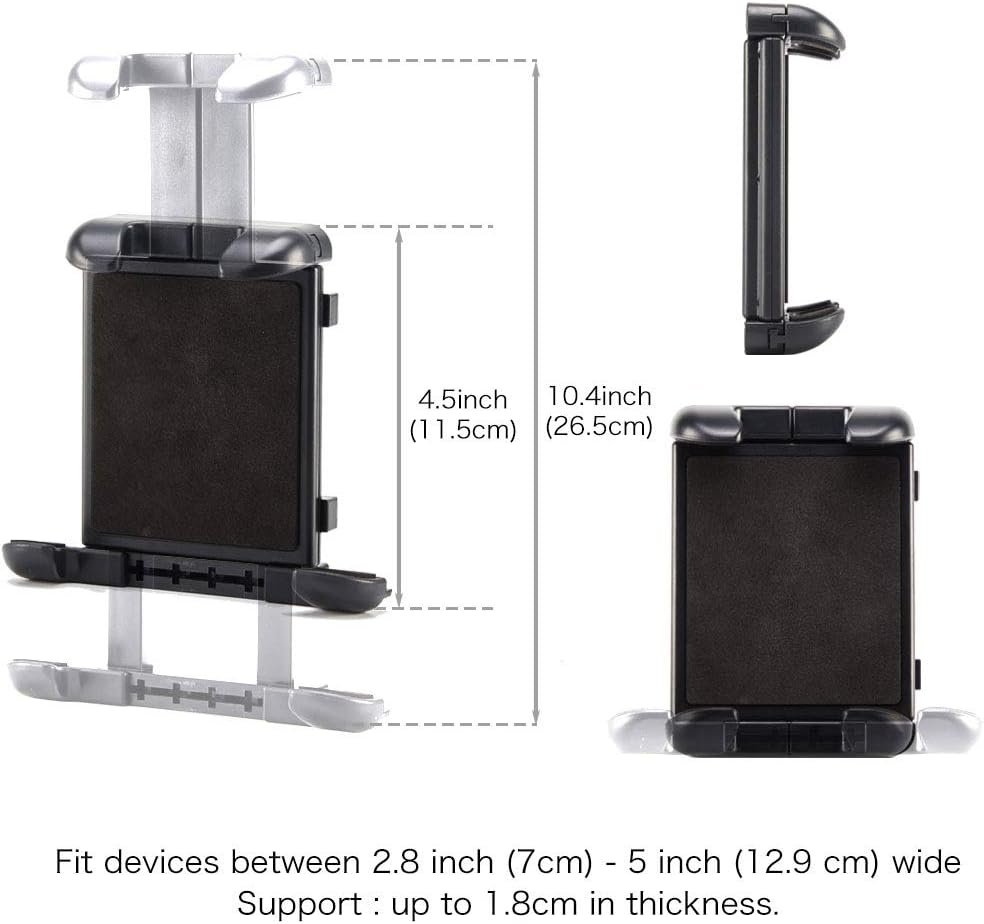
Image: Detailed measurements of the tablet cradle, indicating compatibility with devices between 4.5 and 10.4 inches in width and up to 1.8 cm in thickness.
Operating Instructions
Adjusting Viewing Angle
The mount features a 360-degree swivel ball joint for customized viewing angles. To adjust, twist the knob located near the tablet cradle to release the joint. Position your device to the desired angle (portrait or landscape), then tighten the knob firmly to secure it. This ensures the tablet remains steady during car rides.

Image: Step-by-step guide showing how to twist the knob to release and then adjust the ball head joint for optimal viewing, followed by tightening to secure.

Image: A tablet securely mounted behind the driver's seat, displaying content for a backseat passenger.

Image: A tablet securely mounted behind the passenger seat, displaying content for a backseat passenger.
Maintenance
- Cleaning: Wipe the mount with a soft, damp cloth. Do not use harsh chemicals or abrasive cleaners, as they may damage the finish or materials.
- Regular Checks: Periodically inspect all knobs and clamps to ensure they remain tight and secure. Vibrations during driving can sometimes loosen connections over time.
- Storage: When not in use for extended periods, you may collapse the telescoping arm or remove the mount entirely for storage. Removal is quick and easy by loosening the headrest clamps.
Troubleshooting
- Mount is wobbly: Ensure the headrest clamps are fully tightened around the headrest posts. Also, check that the central knob on the extension arm is tightened.
- Tablet droops or doesn't hold position: Tighten the knob on the 360-degree swivel ball joint. Ensure your device's weight does not exceed the mount's capacity (refer to specifications).
- Tablet does not fit the cradle: Verify your device's dimensions against the specified compatibility (4.5-10 inches wide, up to 1.8 cm thick). Do not force a device into the cradle if it is too large.
- Difficulty attaching to headrest: Ensure your vehicle's headrest has two unobstructed posts. Some headrests may have unique designs that are not compatible.
Specifications
| Feature | Detail |
|---|---|
| Brand | iKross |
| Model Number | 885157744416 |
| Compatible Devices | Tablets and Smartphones 4.5-10 inches wide, up to 1.8cm thick (e.g., Apple iPad, iPhone, Nintendo Switch, Amazon Kindle Fire, Samsung Galaxy Tab, Google Nexus, ASUS Memo Pad, Microsoft Surface, Huawei, Lenovo Idea Tab, Acer Iconia Tab) |
| Mounting Type | Headrest, Seat |
| Adjustable Extension Arm | Up to 8 inches / 20.3 cm |
| Rotation | 360-degree swivel ball joint |
| Color | Black |
| Item Weight | 9.9 ounces |
| Product Dimensions (LxWxH) | 7.56 x 4.02 x 5.75 inches |
Warranty Information
Specific warranty details for the iKross Universal Car Tablet Mount Holder are typically provided with the product packaging or available on the official iKross website. Please refer to these resources for information regarding warranty coverage, terms, and conditions.
Customer Support
For technical assistance, troubleshooting beyond this manual, or inquiries about your iKross product, please visit the official iKross website or contact their customer service department. Contact information can usually be found on the product packaging or their website.
You can visit the iKross Store on Amazon: iKross Store
 | 1135100759_IKHD26_MANUAL_NEW User Manual 1135100759 IKHD26 MANUAL NEW user iKross Universal Car Tablet Mount Holder Headrest Backseat Extendable Compatible with Apple iPad iPhone Smartphone Nintendo Switch Dual Adjustable Positions 885157744416 User Manual IKross iKross C1sWND i4gS m media amazon images I ||| 1135100759 IKHD26 MANUAL NEW user iKross Universal Car Tablet Mount Holder Headrest Backseat Extendable Compatible with Apple iPad iPhone Smartphone Nintendo Switch Dual Adjustable Positions 885157744416 User Manual IKross iKross C1sWND i4gS m media amazon images I ||| score:19 filesize: 5.68 M page_count: 1 document date: 2017-04-17 |
Ask a question about this manual
Ask about setup, troubleshooting, compatibility, parts, safety, or missing instructions. Manuals+ will review the question and use this page’s manual context to help answer it.