
Panasonic RX-D550
Panasonic RX-D550 Boombox Instruction Manual
Model: RX-D550
Brand: Panasonic
1. Introduction
This manual provides detailed instructions for the safe and efficient operation of your Panasonic RX-D550 Boombox. The RX-D550 is a high-power portable stereo system featuring AM/FM radio, Bluetooth connectivity, CD playback, and USB support. With its 20W output and Sound Booster technology, it delivers rich audio performance suitable for various environments.

Figure 1: Front view of the Panasonic RX-D550 Boombox, showing the main controls and display.
Please read this manual thoroughly before using the unit and retain it for future reference.
2. What's in the Box
Upon unpacking, ensure all the following items are present:
- Panasonic RX-D550 Boombox Unit
- Remote Control
- AC Power Cord
If any items are missing or damaged, please contact your retailer or Panasonic customer support.
3. Setup
3.1 Power Connection
The RX-D550 can be powered by AC mains or batteries for portable use.
- AC Power: Connect the supplied AC power cord to the AC IN terminal on the rear of the unit and then to a standard wall outlet (110-240 Volt compatible).
- Battery Power: Open the battery compartment on the bottom of the unit. Insert eight (8) R20/LR20 (UM-1) batteries (not supplied), ensuring correct polarity (+/-). Close the battery compartment securely.
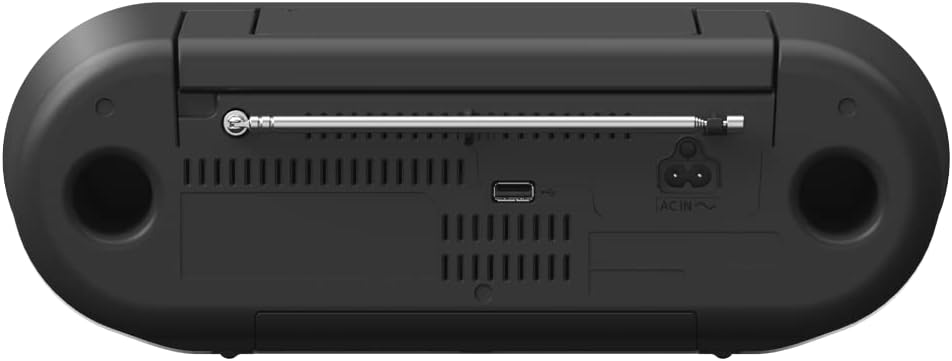
Figure 2: Rear view of the RX-D550, highlighting the AC IN terminal and USB port.
3.2 Antenna Adjustment
For optimal FM radio reception, fully extend the telescopic antenna located on the rear of the unit. Adjust its direction for the best signal quality.
4. Operating Instructions
4.1 Power On/Off
Press the [ /I] button on the unit or the remote control to turn the unit on or off.
4.2 Source Selection
Press the [CD], [USB], or [FM] buttons on the unit to select the desired input source. For Bluetooth, press the [0 -PAIRING] button.
4.3 CD Playback
- Press the [CD] button to select the CD source.
- Open the CD compartment lid by gently lifting it.
- Place a CD with the label side facing up.
- Close the CD compartment lid. The unit will begin reading the disc.
- Use the [ /II] button to play or pause, and the [ ] or [ ] buttons to skip tracks.

Figure 3: Top view of the RX-D550, showing the CD compartment.
4.4 FM Radio Tuning and Presets
- Press the [FM] button to select the FM radio source.
- Use the [ ] or [ ] buttons to manually tune to a station. Press and hold for automatic scanning.
- To store a preset: Tune to the desired station, then press and hold one of the numbered preset buttons ([1] to [5]) until the display confirms storage.
- To recall a preset: Simply press the corresponding numbered preset button.
4.5 Bluetooth Pairing
- Press the [0 -PAIRING] button on the unit. The Bluetooth indicator will flash, indicating pairing mode.
- On your Bluetooth device (e.g., smartphone, tablet), enable Bluetooth and search for available devices.
- Select "RX-D550" from the list of devices.
- Once connected, the Bluetooth indicator will glow steadily. You can now stream audio from your device.
4.6 USB Playback
- Insert a USB flash drive into the USB port on the rear of the unit.
- Press the [USB] button to select the USB source.
- The unit will automatically detect and begin playing compatible audio files (e.g., MP3).
- Use the playback controls ([ /II], [ ], [ ]) for navigation.
4.7 Sound Booster Equalizer
The Sound Booster feature enhances audio output:
- Press the [SOUND BOOSTER] button once for B-Boost to enhance bass and rhythm.
- Press the [SOUND BOOSTER] button twice for V-Boost to highlight vocals or spoken word.
4.8 Volume Control
Adjust the volume using the [VOLUME +] and [VOLUME -] buttons on the unit or the [VOL+] and [VOL-] buttons on the remote control.
4.9 Remote Control Usage
The supplied remote control allows convenient operation from a distance. Ensure the remote's line of sight to the unit's front panel is clear.
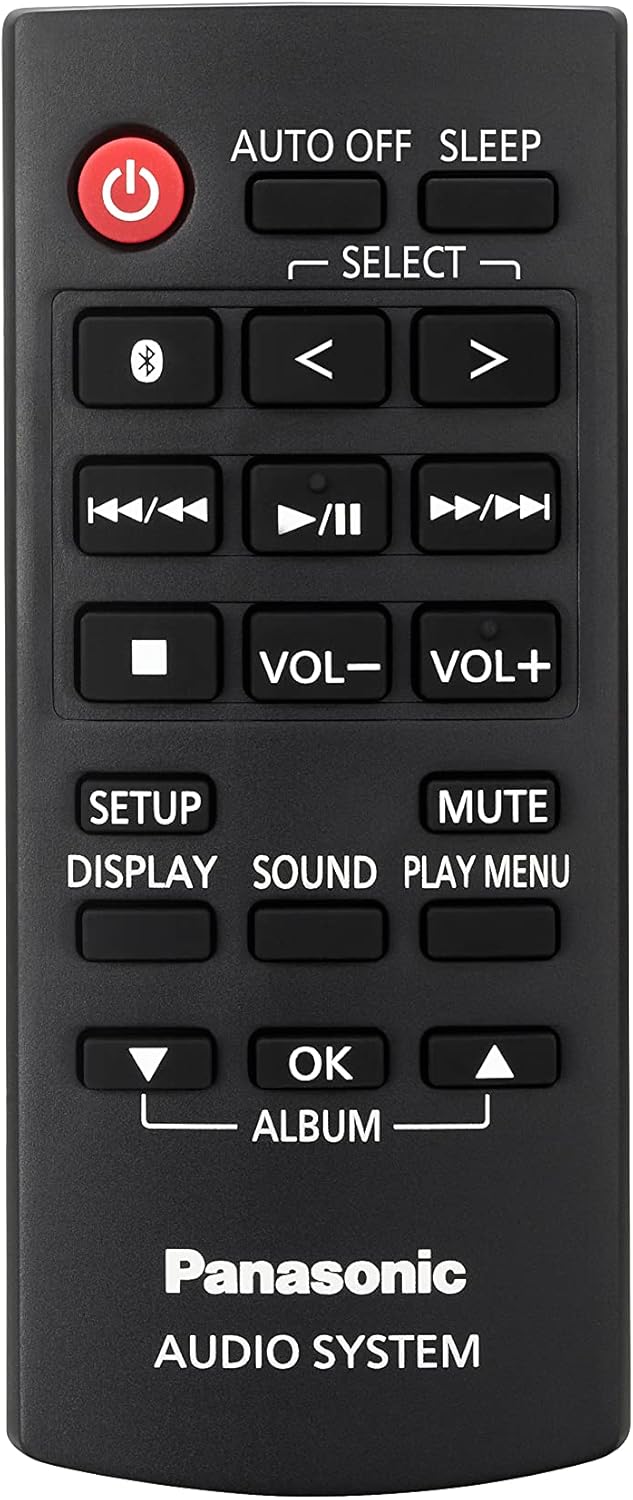
Figure 4: The remote control for the Panasonic RX-D550 Boombox, showing various function buttons.
Functions available on the remote include power, source selection, track skip, play/pause, stop, volume adjustment, mute, sound settings, and display options.
5. Maintenance
5.1 Cleaning
Wipe the unit with a soft, dry cloth. For stubborn stains, use a cloth lightly dampened with water and a mild detergent, then wipe dry immediately. Do not use abrasive cleaners, benzene, thinner, or alcohol, as these can damage the surface.
5.2 Storage
When not in use for extended periods, disconnect the AC power cord and remove batteries. Store the unit in a cool, dry place away from direct sunlight and extreme temperatures.
6. Troubleshooting
If you experience issues with your RX-D550, refer to the following table for common problems and solutions.
| Problem | Possible Cause | Solution |
|---|---|---|
| No power | Power cord not connected; Batteries depleted or incorrectly inserted. | Ensure AC cord is securely plugged in. Replace batteries or check polarity. |
| No sound | Volume too low; Mute function active; Incorrect source selected. | Increase volume. Press MUTE on remote. Select correct input source. |
| CD not playing | CD inserted incorrectly; Disc dirty or scratched; Disc format not supported. | Insert CD label-side up. Clean disc. Use compatible audio CDs. |
| Poor FM reception | Antenna not extended or positioned correctly; Interference. | Fully extend and adjust the telescopic antenna. Move unit away from other electronic devices. |
| Bluetooth pairing fails | Device too far; Bluetooth not enabled on device; Unit not in pairing mode. | Ensure device is within 10m. Enable Bluetooth on device. Press [0 -PAIRING] on unit. |
| USB playback issues | USB drive not formatted correctly; Incompatible file types; Drive corrupted. | Ensure USB drive is FAT16/FAT32. Use MP3 files. Try a different USB drive. |
7. Specifications
| Feature | Detail |
|---|---|
| Model Number | RX-D550 |
| Power Output | 20W (RMS) |
| Speaker Type | Stereo, 8cm full-range units |
| Connectivity | Bluetooth, USB |
| Media Playback | CD, CD-R/RW, MP3 (via USB) |
| Radio Tuner | FM |
| Power Supply | AC 110-240V, 50/60Hz or 8 x R20/LR20 (UM-1) batteries |
| Product Dimensions (L x W x H) | 13.6 x 9.4 x 5.25 inches (34.5 x 23.9 x 13.3 cm) |
| Item Weight | 6.64 pounds (3.01 kg) |
| Color | Black |
8. Warranty and Support
For warranty information, please refer to the warranty card included with your product or visit the official Panasonic website for your region. For technical support or service inquiries, please contact Panasonic customer service.
You can find contact information and frequently asked questions on the official Panasonic support website: na.panasonic.com/us/support
Ask a question about this manual
Ask about setup, troubleshooting, compatibility, parts, safety, or missing instructions. Manuals+ will review the question and use this page’s manual context to help answer it.