
Introduction
Thank you for purchasing the AKOR 54-Key Electronic Organ, model OR099G. This manual provides essential information for the safe and efficient operation of your new instrument. Please read it thoroughly before use and retain it for future reference.
This electronic organ features 54 keys, 16 musical instruments, 8 electronic sounds, 16 rhythms, 6 demonstration songs, 32 adjustable tempos, and adjustable volume. It also includes a microphone input, headphone output, and recording/playback functions. For convenience, it has an automatic shutdown feature.
Safety Instructions
- Do not expose the organ to direct sunlight, high temperatures, or high humidity.
- Avoid placing the organ near strong magnetic fields.
- Do not disassemble or modify the instrument. Refer all servicing to qualified personnel.
- Keep the organ away from water or other liquids to prevent electric shock or damage.
- Use only the specified power adapter or batteries. Ensure correct battery polarity.
- Remove batteries if the organ will not be used for an extended period.
- This product is not suitable for children under 3 years old due to small parts.
Package Contents
- AKOR 54-Key Electronic Organ (OR099G)
- Microphone
- Power Adapter
- User Manual (this document)
Product Overview
Familiarize yourself with the various parts and controls of your AKOR electronic organ.
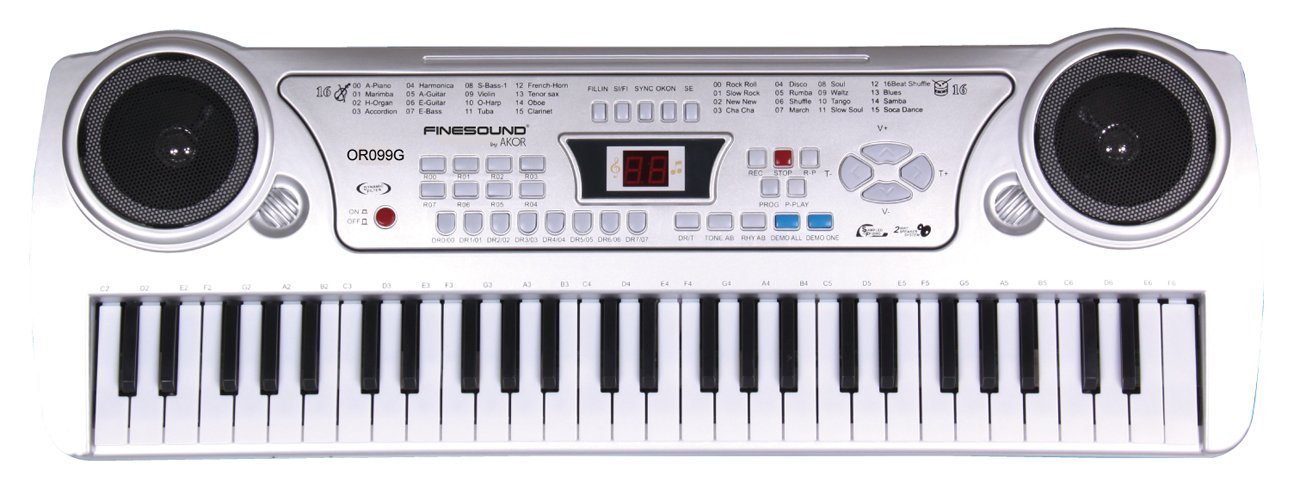
Figure 1: Top view of the AKOR 54-Key Electronic Organ OR099G. This image displays the full keyboard, integrated speakers on both sides, the central control panel with an LED display, instrument and rhythm selection buttons, volume and tempo controls, and recording functions.
Control Panel Layout:
- Speakers: Located on the left and right sides of the control panel, providing audio output.
- Power Switch (ON/OFF): Red button on the left side of the control panel to turn the organ on or off.
- LED Display: Central digital display showing current instrument, rhythm, or tempo settings.
- Instrument Selection: Buttons labeled 00-15 for selecting 16 different musical instruments (e.g., Piano, Marimba, Organ, Accordion, Harmonica, Guitar, Bass, Violin, Oboe, Clarinet, French Horn, Tenor Sax, Tuba).
- Rhythm Selection: Buttons labeled 00-15 for selecting 16 different rhythms (e.g., Rock Roll, Slow Rock, New New, Cha Cha, Disco, Soul, Rumba, Waltz, Tango, March, Slow Soul, 16 Beat Shuffle, Blues, Samba, Soca Dance).
- Tempo Control (T-/T+): Buttons to decrease or increase the tempo of rhythms and demo songs.
- Volume Control (V-/V+): Buttons to decrease or increase the overall volume.
- Recording Functions (REC, STOP, R-P): Buttons for recording your playing, stopping recording, and playing back recorded sequences.
- Demo Songs (DEMO ALL, DEMO ONE): Buttons to play all demonstration songs consecutively or a single demonstration song.
- Microphone Input: Jack for connecting the included microphone.
- Headphone Output: Jack for connecting headphones for private practice.
Setup
Power Supply:
- Battery Installation: Open the battery compartment on the underside of the organ. Insert 6 x LR6 (AA) batteries, ensuring correct polarity (+/-). Close the compartment securely.
- AC Adapter Connection: Alternatively, connect the provided AC power adapter to the DC IN jack on the organ and then plug it into a standard wall outlet.
- Power On: Press the red "ON/OFF" button to turn on the organ. The LED display will illuminate.
Connecting Accessories:
- Microphone: Plug the included microphone into the "MIC IN" jack.
- Headphones: For private listening, plug standard headphones into the "PHONES" jack. The internal speakers will be muted when headphones are connected.
Operating Instructions
Basic Operation:
- Volume Adjustment: Use the "V+" and "V-" buttons to increase or decrease the overall volume.
- Instrument Selection: Press any of the numbered buttons (00-15) in the "INSTRUMENT" section to select a desired instrument sound. The LED display will show the selected instrument number.
- Rhythm Selection: Press any of the numbered buttons (00-15) in the "RHYTHM" section to select a desired rhythm. The LED display will show the selected rhythm number.
- Tempo Adjustment: While a rhythm or demo song is playing, use the "T+" and "T-" buttons to adjust the tempo (speed). There are 32 tempo levels.
Demonstration Songs:
- Play All Demos: Press the "DEMO ALL" button to play all 6 demonstration songs consecutively.
- Play One Demo: Press the "DEMO ONE" button to play a single demonstration song. Press it again to cycle through the available demo songs.
- Stop Demo: Press the "STOP" button to stop the demonstration song playback.
Recording and Playback:
- Record: Press the "REC" button. The organ is now in recording mode. Play your desired melody on the keys.
- Stop Recording: Press the "STOP" button to end the recording.
- Playback: Press the "R-P" (Record-Play) button to listen to your recorded performance.
- Clear Recording: Recording a new melody will automatically overwrite the previous one.
Microphone Usage:
- Ensure the microphone is securely plugged into the "MIC IN" jack.
- Speak or sing into the microphone. Your voice will be amplified through the organ's speakers.
- Adjust the organ's main volume to control the microphone's output level.
Maintenance
- Cleaning: Wipe the surface of the organ with a soft, dry cloth. Do not use abrasive cleaners, solvents, or waxes.
- Storage: When not in use, store the organ in a clean, dry place away from extreme temperatures and direct sunlight.
- Battery Care: Remove batteries if the organ will not be used for an extended period to prevent leakage.
Troubleshooting
| Problem | Possible Cause | Solution |
|---|---|---|
| No power | Batteries are dead or incorrectly inserted; AC adapter not connected or faulty. | Replace batteries, check polarity. Ensure AC adapter is securely connected and functional. |
| No sound | Volume is too low; headphones are connected; instrument sound not selected. | Increase volume using "V+" button. Disconnect headphones. Select an instrument sound. |
| Microphone not working | Microphone not plugged in correctly; microphone faulty. | Ensure microphone is fully inserted into the "MIC IN" jack. Test with another microphone if available. |
| Automatic shutdown | Organ has an automatic power-off feature to save energy. | This is normal operation. Simply press the "ON/OFF" button again to restart. |
Specifications
- Model: OR099G
- Keys: 54
- Instruments: 16
- Electronic Sounds: 8
- Rhythms: 16
- Demonstration Songs: 6
- Tempo Levels: 32
- Functions: Volume adjustment, Tempo adjustment, Record, Playback, Microphone input, Headphone output, Automatic shutdown.
- Power: 6 x LR6 (AA) batteries (not included) or AC adapter (provided).
- Dimensions (L x W x H): Approximately 63 x 22.5 x 7 cm (24.8 x 8.9 x 2.8 inches)
- Material: Plastic
Warranty and Support
For warranty information or technical support, please refer to the retailer where you purchased the product or contact AKOR customer service through their official channels. Please retain your proof of purchase for any warranty claims.