
1. Product Overview
The D-Link DGS-1510-28P is a 28-Port Gigabit Stackable Smart Managed PoE+ Switch designed for SME/SMB networks. It features 24 10/100/1000BASE-T PoE/PoE+ ports, 2 Gigabit SFP ports, and 2 10-Gigabit SFP+ ports, with a total PoE power budget of 193W. This switch integrates advanced management and security functions, offering a less complex solution compared to fully managed switches while providing 10G port connectivity for high-bandwidth demands.
It supports physical stacking of up to 6 units and virtual stacking via D-Link's Single IP Management (SIM) for streamlined configuration and management. Key features include Layer 2 functionality, network maintenance tools, D-Link Safeguard Engine for protection against traffic flooding, 802.1X port-based authentication, Access Control Lists (ACL), ARP Spoofing Prevention, and DHCP Server Screening. The DGS-1510-28P is also IPv6 Ready Logo Phase 2 certified.
Key Features
- 24 PoE Gigabit Ports: Provides 24 Gigabit PoE+ Ports for high-speed networking, delivering up to 30W per port with a 193W total power budget for devices like wireless APs, IP cameras, and VoIP phones.
- 10GbE SFP+ Uplink Ports: Two 10GbE SFP+ ports facilitate high-speed uplinks and fiber connectivity, enhancing network flexibility and scalability.
- SFP Ports: Two additional SFP ports offer optical connectivity options for specific networking requirements.
- Physical and Virtual Stacking: Supports physical stacking of up to 6 units and virtual stacking of up to 32 units via D-Link's Single IP Management (SIM) for resilient and scalable networks.
- Intuitive Web-Based Management and Full CLI: Offers both an intuitive web interface and a full Command Line Interface for easy setup, monitoring, and management.
- Layer 3 Lite & Static Routing: Integrates IPv4/IPv6 routing and IP segmentation to boost network performance.
- Comprehensive Security Suite: Includes ACL, ARP Spoofing Prevention, IP-MAC-Port Binding, D-Link Safeguard Engine, and DoS Attack Prevention for robust network defense.
- Surveillance Mode with ONVIF Support: Streamlines IP surveillance network deployment by automatically detecting ONVIF-compliant devices and includes PD Alive for rebooting unresponsive PoE devices.
- NDAA Compliant: Meets strict regulatory standards, suitable for government and high-security enterprise projects.
- Energy-Efficient Operation: Utilizes D-Link Green 3.0 technology and IEEE 802.3az EEE for reduced power consumption.
2. Setup Guide
2.1. Package Contents
Verify that your package contains the following items:
- DGS-1510 Series Switch (DGS-1510-28P)
- Quick Installation Guide (QIG)
- AC Power Cord & Cable Clip
- Console Cable
- Mounting Kit (for rack installation)
- Four rubber feet (for desktop installation)
- Resource CD
2.2. Physical Installation
The DGS-1510-28P switch can be installed on a desktop or mounted in a standard 19-inch equipment rack.
Desktop Installation
For desktop placement, attach the four rubber feet to the bottom of the switch to prevent scratching and provide stability.

Figure 2.2.1: Front view of the DGS-1510-28P switch, showing 24 Gigabit PoE+ ports, 2 SFP ports, and 2 10GbE SFP+ uplink ports.
Rack Installation
Attach the provided mounting brackets to the sides of the switch and secure them with the included screws. Then, mount the switch into a standard 19-inch equipment rack using appropriate rack screws.

Figure 2.2.2: Rear view of the DGS-1510-28P switch, showing the AC power input, grounding screw, and security lock slot.
Connecting Power and Network Cables
- Connect the AC power cord to the power input on the rear panel of the switch and then to a power outlet.
- Connect network devices (computers, servers, IP cameras, access points) to the Gigabit Ethernet ports using standard Ethernet cables.
- For high-speed uplinks or fiber connections, insert compatible SFP/SFP+ transceivers into the SFP and 10GbE SFP+ ports and connect appropriate fiber optic cables.
3. Operating Instructions
3.1. Initial Configuration
The DGS-1510-28P can be configured via its web-based graphical user interface (GUI) or Command Line Interface (CLI). For initial setup, it is recommended to use the web GUI.
To access the web GUI, connect a computer directly to any of the switch's Ethernet ports. Configure your computer's IP address to be in the same subnet as the switch's default IP address (refer to the Quick Installation Guide for default IP). Open a web browser and enter the switch's IP address.

Figure 3.1.1: The intuitive web-based management interface allows for easy setup, monitoring, and management of the switch.
3.2. PoE+ Functionality
The switch's 24 PoE+ ports can deliver power and data over a single Ethernet cable to compatible devices such as IP cameras, wireless access points, and VoIP phones. The total power budget is 193W, with up to 30W available per port.
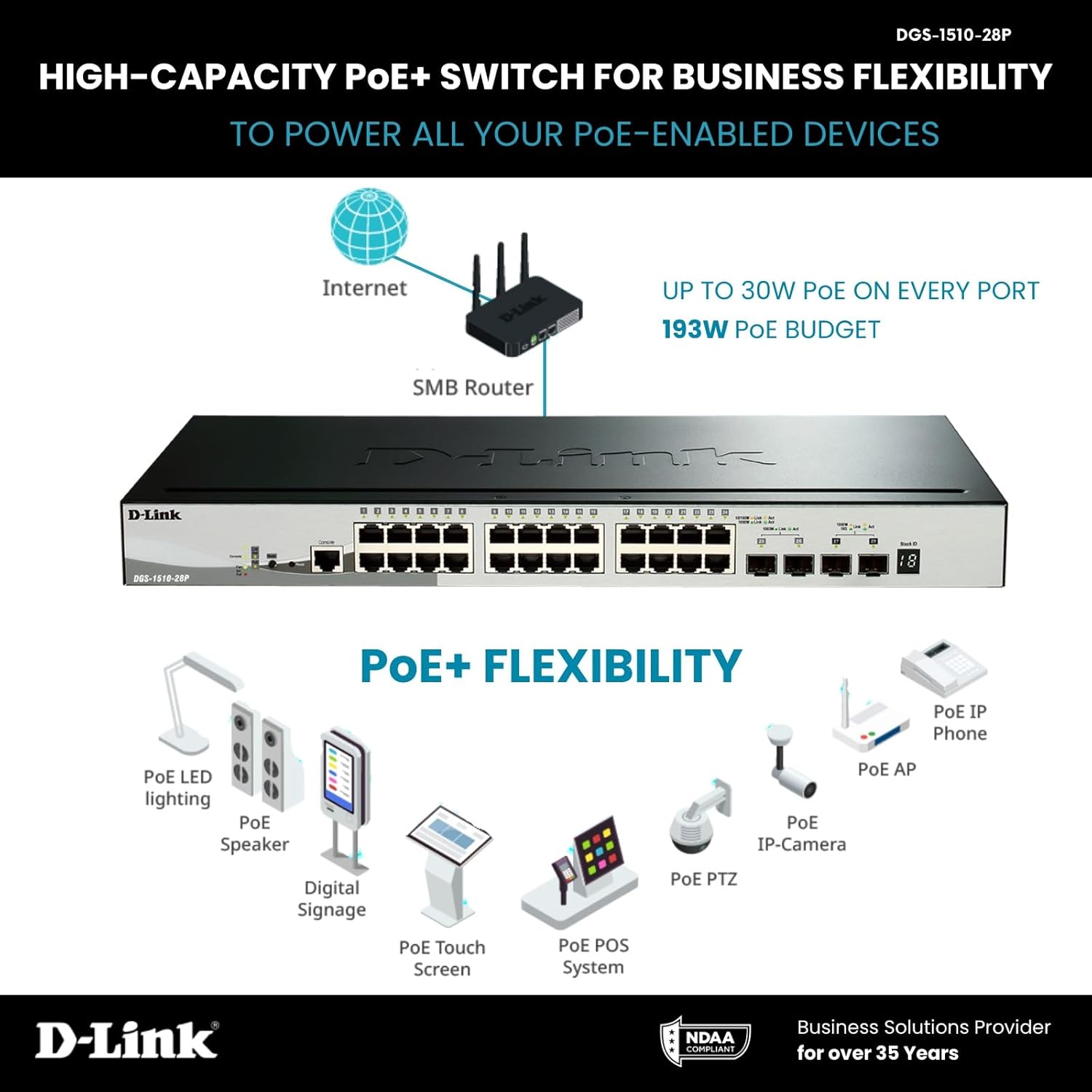
Figure 3.2.1: High-capacity PoE+ functionality allows the switch to power a wide range of PoE-enabled devices, simplifying network deployment.

Figure 3.2.2: Power over Ethernet (PoE) eliminates extra wiring, providing flexible device placement without reliance on nearby electrical outlets.
3.3. Stacking Capabilities
The DGS-1510-28P supports both physical and virtual stacking. Physical stacking allows up to 6 units to be consolidated into a single logical unit, managed as one. Virtual stacking via Single IP Management (SIM) allows up to 32 units to be managed from a single IP address, simplifying network administration.

Figure 3.3.1: 10G SFP+ stacking allows physical consolidation of up to 6 units, providing a total of 288 Gigabit ports for scalable network architecture.
3.4. Surveillance Mode
The switch features a dedicated Surveillance Mode with ONVIF support, designed to simplify the deployment and management of IP surveillance networks. This mode automatically detects ONVIF-compliant devices and segments them into a dedicated Auto Surveillance VLAN for efficient video traffic handling.

Figure 3.4.1: The Surveillance Mode in the web UI provides effortless management of your surveillance network, automatically organizing security devices.
Additionally, the PD Alive feature actively mitigates downtime by automatically rebooting unresponsive PoE devices, ensuring continuous network availability without manual intervention.

Figure 3.4.2: PD Alive ensures seamless network uptime by automatically detecting and rebooting unresponsive PoE devices, minimizing service interruptions.
4. Maintenance and Best Practices
- Firmware Updates: Regularly check the D-Link support website for the latest firmware versions. Updating firmware can improve performance, add new features, and address security vulnerabilities. The switch supports dual image for safe firmware upgrades.
- Physical Cleaning: Keep the switch and its ventilation openings clean and free from dust to ensure proper airflow and prevent overheating. Use a soft, dry cloth for cleaning.
- Environmental Conditions: Ensure the switch operates within its specified temperature and humidity ranges. Avoid placing it in direct sunlight, near heat sources, or in areas with high moisture.
- Cable Management: Organize network cables neatly to prevent accidental disconnections and improve airflow around the device.
- Power Protection: Connect the switch to a surge protector or an uninterruptible power supply (UPS) to protect against power fluctuations and outages.
5. Troubleshooting
This section provides solutions to common issues you might encounter with your DGS-1510-28P switch.
| Problem | Possible Cause / Solution |
|---|---|
| Switch does not power on. | Ensure the power cord is securely connected to the switch and a working power outlet. Verify the power outlet is active. |
| No network connectivity on a port. | Check the Ethernet cable connection at both ends. Verify the link/activity LED for the port is illuminated. Ensure the connected device is powered on and functioning correctly. |
| PoE device is not receiving power. | Confirm the device is PoE compatible. Check the PoE status LED for the port. Ensure the total PoE power budget (193W) is not exceeded. Verify the Ethernet cable is suitable for PoE. Utilize the PD Alive feature to automatically reboot unresponsive devices. |
| Cannot access web management interface. | Ensure your computer's IP address is in the same subnet as the switch. Verify the switch's IP address. Try clearing your browser's cache or using a different browser. Reset the switch to factory defaults if necessary (refer to the Quick Installation Guide for procedure). |
| Slow network performance. | Check for network loops (Spanning Tree Protocol should prevent this, but verify). Ensure cables are not damaged. Monitor network traffic for congestion. Consider upgrading to higher-speed uplinks if consistently high bandwidth is required. |
6. Technical Specifications
| Feature | Detail |
|---|---|
| Model | DGS-1510-28P |
| Switch Type | Smart Managed PoE+ Switch |
| Ports | 24 x 10/100/1000BASE-T PoE/PoE+ ports, 2 x Gigabit SFP ports, 2 x 10-Gigabit SFP+ ports |
| PoE Power Budget | 193W |
| Data Transfer Rate | 1000 Megabits Per Second (Gigabit Ethernet) |
| Stacking | Physical: Up to 6 units; Virtual: Up to 32 units (Single IP Management) |
| Layer Features | L2+/L3 Lite (Static Routing, VLANs, IGMP Snooping, LACP) |
| Security Features | ACL, ARP Spoofing Prevention, IP-MAC-Port Binding, D-Link Safeguard Engine, DoS Attack Prevention, 802.1X |
| Management | Web-based GUI, Command Line Interface (CLI) |
| Dimensions (LxWxH) | 8.26 x 17.32 x 1.73 inches |
| Item Weight | 5.65 pounds |
| Case Material | Metal |
| Compliance | NDAA Compliant, IPv6 Ready Logo Phase 2 |
7. Warranty and Support
The D-Link DGS-1510-28P Smart Managed PoE+ Switch is backed by D-Link's Lifetime Protection, ensuring long-term confidence in the quality and reliability of your network infrastructure.
For technical support, product documentation, and firmware updates, please visit the official D-Link support website. You can also refer to the included Resource CD for additional information.
For the most up-to-date information and support resources, please visit: www.dlink.com/support


