
Yosoo ACR122U
Yosoo ACR122U NFC Smart Card Reader/Writer User Manual
Model: ACR122U
Brand: Yosoo
Introduction
This manual provides comprehensive instructions for the setup, operation, maintenance, and troubleshooting of your Yosoo ACR122U NFC Smart Card Reader/Writer. Please read this manual carefully before using the device to ensure proper functionality and longevity.
The Yosoo ACR122U is a compact and efficient contactless smart card reader/writer designed for various applications, including e-government, e-banking, e-payment, and public transportation. It supports ISO 14443 Type A and B cards, Mifare, FeliCa, and all 4 types of NFC (ISO/IEC 18092) tags.
Product Overview

Figure 1: Yosoo ACR122U NFC Smart Card Reader/Writer. This image shows the compact, white rectangular device with the NFC logo prominently displayed on its surface.

Figure 2: Key components of the ACR122U. This image highlights the IC reader sense area, the LED indicator light, and the attached USB cable, providing a clear view of the device's functional parts.
The ACR122U is a USB-powered device, featuring an integrated antenna for contactless tag access. It is designed for ease of use and portability.
Setup Instructions
1. System Requirements
The ACR122U is compatible with a wide range of operating systems:
- Windows: Win98, ME, NT 4.0, 2003, 2003 R2, XP, Vista, 2008, 7, 2003 x64, 2003 R2 x64, XP x64, Vista x64, 2008 x64, 2008 R2 x64, 7 x64, x64, 2012 x64
- Android: 3.1 and later
- Other: CE 5.0
2. Connecting the Device
Connect the USB cable of the ACR122U reader to an available USB port on your computer or compatible Android device. The device is USB full-speed compliant and designed for plug-and-play functionality.
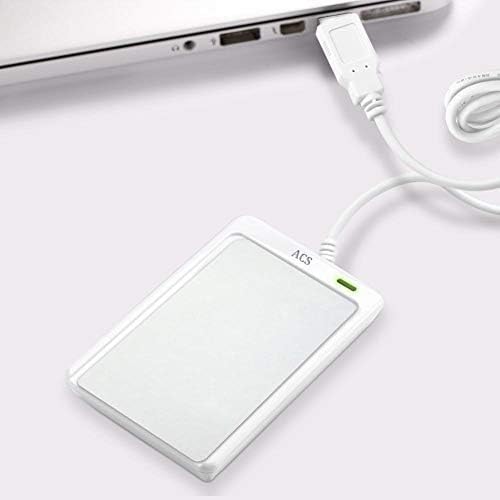
Figure 3: The ACR122U connected to a laptop via its USB cable. The device is shown lying flat next to the laptop, indicating a simple and direct connection.
3. Driver Installation
The ACR122U is CCID compliant and PC/SC compatible, meaning it often works with generic drivers provided by your operating system. In most cases, drivers will install automatically upon first connection.
If automatic installation does not occur, or if you require specific drivers or SDKs, please refer to the manufacturer's official website for the latest driver downloads. A mini-CD may be included with the product, but online resources are recommended for the most up-to-date software.
Operating Instructions
1. Placing Cards/Tags
To read or write to a contactless smart card or NFC tag, place the card or tag directly on the surface of the ACR122U reader, specifically over the IC reader sense area (refer to Figure 2). The reading distance is up to 50 mm, depending on the type of tag.

Figure 4: A smart card being placed on the ACR122U reader for data interaction. The card is held above the device's surface, demonstrating the contactless reading method.

Figure 5: An NFC tag (blue circular fob) being presented to the ACR122U reader. This illustrates the device's capability to interact with various NFC form factors.
2. Supported Card/Tag Types
The device supports a wide range of contactless technologies:
- ISO 14443 Type A and B
- Mifare
- FeliCa
- All 4 types of NFC (ISO/IEC 18092) tags
- New Ultralight C (via pseudo APDU)
- Plus SL1 (4-byte UID via pseudo APDU)
- SL3
It also features a user-controlled buzzer and a SAM socket for enhanced security applications.
3. Data Transfer Speed
The ACR122U offers fast and precise reading and writing speeds, up to 424 kbps.
Maintenance
To ensure the longevity and optimal performance of your Yosoo ACR122U reader, follow these general maintenance guidelines:
- Cleaning: Use a soft, dry cloth to clean the exterior of the device. Avoid using abrasive cleaners, solvents, or harsh chemicals, as these can damage the surface.
- Storage: Store the device in a cool, dry place away from direct sunlight and extreme temperatures.
- Handling: Handle the device with care. Avoid dropping it or subjecting it to strong impacts, which can damage internal components.
- Cable Care: Do not bend or crimp the USB cable excessively. Always grasp the plug, not the cable, when disconnecting it from a port.
Troubleshooting
If you encounter issues with your ACR122U reader, consider the following troubleshooting steps:
- Device Not Recognized:
- Ensure the USB cable is securely connected to both the reader and the computer/device.
- Try connecting to a different USB port.
- Restart your computer/device.
- Verify that the necessary drivers are installed. Check your operating system's Device Manager (Windows) or system information (macOS/Linux) for any unrecognized devices or driver errors.
- Reading/Writing Errors:
- Ensure the card/tag is placed correctly and firmly on the reader's sensing area.
- Check that the card/tag type is supported by the ACR122U (refer to "Supported Card/Tag Types" section).
- Ensure there are no metallic objects or other NFC/RFID devices interfering with the signal near the reader.
- Driver Issues (especially on macOS):
- Some users have reported challenges with driver installation or compatibility on macOS. It is crucial to obtain the correct and latest drivers from the manufacturer's official website. Generic drivers or older versions may not function correctly.
- If you are developing applications, ensure your software environment and libraries are correctly configured for the ACR122U.
- No Response from Buzzer:
- The buzzer is user-controlled. Ensure your application or software is configured to activate the buzzer.
If these steps do not resolve the issue, please contact customer support for further assistance.
Specifications
| Feature | Detail |
|---|---|
| Brand | Yosoo |
| Model | ACR122U |
| Color | White |
| Product Dimensions | 1.28 x 6.5 x 9.8 cm |
| Item Weight | 70 grams |
| Processor Speed | 13.56 MHz |
| Voltage | 5 Volt |
| Operating System Support | Windows (Win98 to Win10 x64), Android 3.1+, CE 5.0 |
| Connectivity Technology | USB Type A |
| Supported Media Types | NFC Tags, ISO 14443 Type A & B, Mifare, FeliCa |
| Special Features | Support for ISO 14443, Mifare, FeliCa, and NFC |

Figure 6: Dimensions of the ACR122U reader, showing its compact size for portability and ease of integration into various setups.
Warranty and Support
Warranty Information
Specific warranty details for the Yosoo ACR122U are not explicitly provided in the product information. For information regarding warranty coverage, please refer to the terms and conditions provided by your retailer or contact the manufacturer directly.
Please note that a 14-day return policy for refund or replacement is typically offered by sellers, but this is distinct from a manufacturer's warranty.
Customer Support
For technical assistance, driver updates, or any other inquiries, please contact Yosoo customer support or the seller from whom you purchased the device. You can often find support contact information on the product packaging or the retailer's website.
Visit the Yosoo Store on Amazon for more products and information.
Official Product Videos
No official product videos from the seller were found in the provided data.