
Introduction
Welcome to the world of scientific discovery with your new EXPLORE ONE Apollo 900x Microscope and 40mm Telescope Set. This comprehensive kit is designed to introduce users to both the microscopic world and the vastness of the cosmos. Please read this manual carefully before use to ensure proper setup, operation, and maintenance of your equipment.
Package Contents
Verify that all components listed below are present in your hard plastic carrying case.
- 40mm Telescope with Alt/Az Tripod
- 900x Microscope
- Projection Eyepiece
- Color Filters
- Prepared Slides
- Blank Slides
- Collection Tools (e.g., tweezers, dropper, stirring rod, specimen vials)
- Hard Plastic Carrying Case

Image: All components of the EXPLORE ONE Apollo set, including the telescope, microscope, and various accessories, neatly organized within the open carrying case.
Setup
Telescope Setup
- Remove the telescope and tripod from the carrying case.
- Extend the legs of the Alt/Az tripod and secure them firmly on a stable surface.
- Mount the telescope tube onto the tripod. Ensure it is securely fastened using the provided attachment points.
- Insert the desired eyepiece into the focuser.
- Remove the lens caps from the objective lens (front of the telescope) and the eyepiece.

Image: The 40mm telescope securely attached to its adjustable Alt/Azimuth tripod, ready for observation.
Microscope Setup
- Place the microscope on a stable, flat surface with adequate lighting.
- Ensure the light source (if battery-powered) has 2 AA batteries installed (batteries not included).
- Rotate the revolving nosepiece to select the lowest magnification objective lens (e.g., 5x).
- Place a prepared slide or your own specimen on a blank slide onto the stage, securing it with the stage clips.
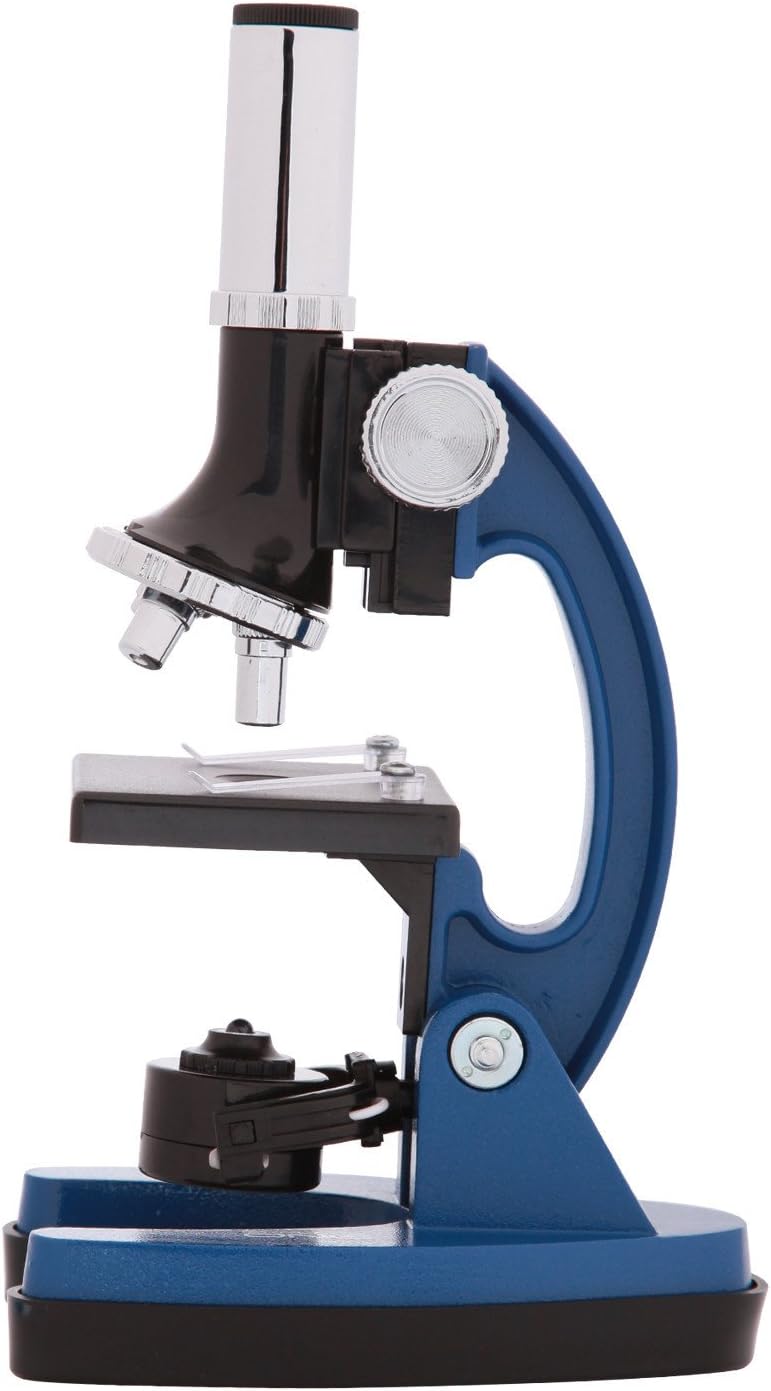
Image: A detailed view of the microscope's stage, objective lenses, and focus knobs, highlighting key operational parts.
Operating Instructions
Using the Telescope
- Point the telescope towards your desired celestial object or distant terrestrial target.
- Look through the eyepiece and slowly turn the focus knob until the image appears clear and sharp.
- To change magnification, carefully remove the current eyepiece and insert a different one. The set includes multiple eyepieces for varying magnifications.
- The Alt/Az mount allows for smooth vertical (altitude) and horizontal (azimuth) movement to track objects across the sky.
Using the Microscope
- With the lowest power objective lens in place and a slide on the stage, turn on the illumination source.
- Use the coarse adjustment knob to bring the specimen into approximate focus.
- Use the fine adjustment knob for precise focusing and to reveal intricate details.
- To increase magnification, rotate the nosepiece to a higher power objective (e.g., 20x or 60x). Re-focus using the fine adjustment knob as needed.
- Experiment with the included color filters by placing them under the stage to enhance contrast with certain specimens.
- The projection eyepiece can be inserted to project the image onto a surface for group viewing or tracing.
Maintenance
- Always handle optical components (lenses, eyepieces) with extreme care to avoid scratches or damage.
- Use a soft, lint-free cloth specifically designed for optics to clean lenses. Do not use abrasive materials, paper towels, or household cleaners.
- When not in use, store the telescope and microscope in their hard plastic carrying case to protect them from dust, moisture, and physical damage.
- Keep the equipment away from extreme temperatures, direct sunlight, and high humidity.
- Remove batteries from the microscope if it will not be used for an extended period to prevent potential leakage and damage.
Troubleshooting
- Problem: Image is blurry in the telescope.
- Solution: Adjust the focus knob slowly in both directions. Ensure all lens caps are removed. Check for condensation on the lenses, and allow the telescope to acclimate to ambient temperature if moved from a warm to cold environment.
- Problem: Image is dark or unclear in the microscope.
- Solution: Ensure the illumination is on and batteries are fresh. Adjust the mirror or light source for optimal illumination. Start with the lowest magnification and coarse focus before moving to higher powers and fine focus.
- Problem: Cannot see anything through the microscope.
- Solution: Verify a slide is correctly placed on the stage and secured with the clips. Ensure the objective lens is clicked into place directly over the specimen. Check that the light source is functioning and properly aligned.
Specifications
| Feature | Value |
|---|---|
| Model Number | 88-41101 |
| Telescope Objective Lens Diameter | 40 Millimeters |
| Telescope Mount Type | Altazimuth Mount |
| Microscope Magnification | 5x, 20x, 60x (up to 900x with projection eyepiece) |
| Focus Type | Manual Focus |
| Microscope Power Source | Battery Powered (2 AA batteries required) |
| Product Dimensions (Overall Package) | 5 x 13 x 23 inches |
| Item Weight (Overall Package) | 7 pounds |
| Included Accessories | Projection eyepiece, color filters, prepared slides, blank slides, collection tools, hard plastic carrying case |
Warranty and Support
Warranty information for the EXPLORE ONE Apollo 900x Microscope and 40mm Telescope Set is not provided within this instruction manual. For specific warranty details, technical support, or customer service inquiries, please refer to the product packaging, the manufacturer's official website, or contact EXPLORE ONE customer service directly.