
1. Product Overview
The Bright Starts 60245 Bounce Baby Activity Center is designed to provide a stimulating and engaging environment for your child. This multi-function activity center features a unique bouncing platform, a 360-degree rotating seat, and a variety of integrated toys to encourage play and development. The unit is adjustable to accommodate your child's growth.
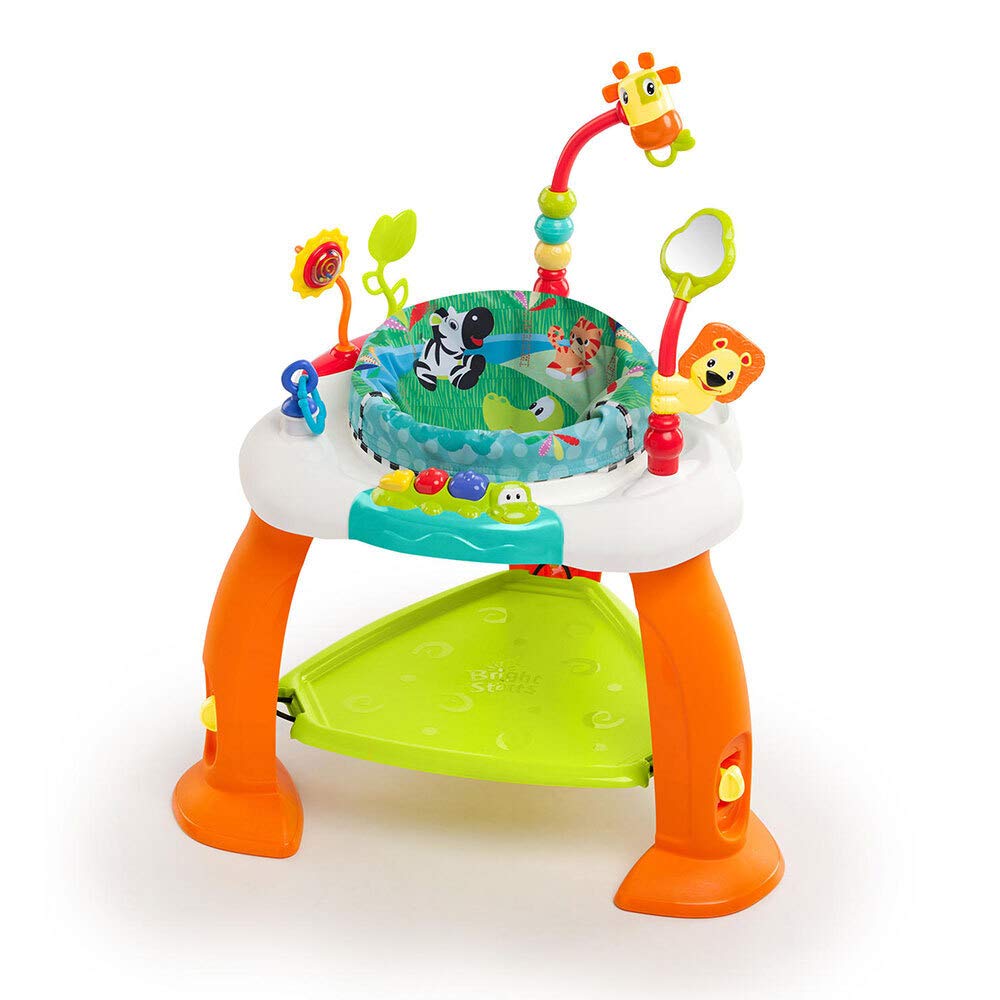
Image 1.1: The Bright Starts 60245 Bounce Baby Activity Center, showing a baby interacting with the various toys and the bouncing platform.
2. Safety Information
Please read and understand all instructions and warnings before assembly and use of this product. Failure to follow these instructions could result in serious injury.
- WARNING: Never leave child unattended. Always keep child in view while in the activity center.
- This product is intended for children who can hold their head up unassisted and who are not yet able to walk or climb out of the product.
- Maximum weight capacity: 25 lbs (11.3 kg).
- Use only on a flat, level surface. Do not use on elevated surfaces.
- Discontinue use if any part of the activity center becomes damaged or broken.
- Keep away from stairs, windows, and heat sources.
- Ensure all parts are securely fastened before each use.
3. Parts List
Before assembly, ensure all components are present:
- Activity Center Frame (legs and main tray)
- Bouncing Platform
- Fabric Seat Pad
- Integrated Toys (e.g., alligator with xylophone, giraffe, lion, flower, mirror)

Image 3.1: The activity center without a child, displaying the frame, bouncing platform, seat, and various attached toys.
4. Setup and Assembly
Assembly is generally straightforward. Follow these steps to set up your activity center:
- Unpack Components: Carefully remove all parts from the packaging.
- Assemble Frame: Connect the legs to the main tray according to the manufacturer's instructions. Ensure all connections click into place securely.
- Attach Bouncing Platform: Secure the bouncing platform to the base of the frame. Verify it is firmly attached and can support weight.
- Insert Seat Pad: Place the fabric seat pad into the designated opening in the main tray. Ensure the seat is properly aligned and secured around the edges.

Image 4.1: Demonstrates the process of inserting or removing the fabric seat pad from the activity center.
- Attach Toys: The activity center comes with various integrated toys. Ensure they are securely attached to the tray.
5. Operating Instructions
To use the Bright Starts Bounce Baby Activity Center:
- Place Child in Seat: Gently place your child into the fabric seat, ensuring their legs are positioned correctly through the leg openings. The seat should fit snugly and securely around your child.
- Bouncing Function: The unique bouncing platform allows your child to bounce up and down, promoting leg strength and coordination.
- 360-Degree Rotation: The seat rotates 360 degrees, providing your child with full access to all the surrounding toys and activities.
- Toy Interaction: Encourage your child to interact with the various toys, such as the alligator with its built-in xylophone, the giraffe, lion, flower, and mirror.

Image 5.1: Close-up of a baby's feet on the bouncing platform, illustrating the product's interactive bounce feature.
6. Height Adjustment
The activity center features three adjustable height positions to grow with your child. To adjust the height:
- Locate the height adjustment mechanism on the legs of the activity center.
- Press the release buttons or turn the adjustment knobs (depending on the specific mechanism) to unlock the current height setting.
- Raise or lower the bouncing platform to the desired height. Ensure your child's feet can comfortably touch the platform.
- Release the buttons/knobs to lock the platform into one of the three available positions. Verify it is securely locked before placing your child in the seat.

Image 6.1: A user's hands adjusting the height of the activity center's bouncing platform, highlighting the adjustment knob.
7. Maintenance and Cleaning
Regular maintenance ensures the longevity and hygiene of your activity center:
- Fabric Seat Pad: The seat pad is removable and machine washable. Use cold water on a gentle cycle. Do not bleach. Tumble dry low.
- Frame and Toys: Wipe down the plastic frame and attached toys with a damp cloth and mild soap. Rinse thoroughly and air dry. Do not immerse the entire unit in water.
- Inspection: Periodically check all screws, bolts, and connections to ensure they are tight and secure. Inspect for any signs of wear, damage, or loose parts.
8. Troubleshooting
If you encounter any issues with your Bright Starts Bounce Baby Activity Center, refer to the following common solutions:
- Toys not staying attached: Ensure the toys are fully inserted and locked into their designated slots on the tray. Check for any obstructions or damage to the attachment points.
- Seat not rotating smoothly: Verify that the seat pad is correctly installed and not obstructing the rotation mechanism. Ensure no debris is caught beneath the seat.
- Height adjustment difficulty: Make sure the adjustment mechanism is fully disengaged before attempting to change the height. Apply gentle, even pressure when raising or lowering.
- Unit feels unstable: Recheck all frame connections to ensure they are securely fastened. Ensure the activity center is placed on a flat, level surface.
If problems persist, contact Bright Starts customer support for further assistance.
9. Specifications
| Feature | Specification |
|---|---|
| Model Number | 60245 |
| Product Dimensions | 68.58 x 68.58 x 83.82 cm |
| Item Weight | 1.56 kg |
| Maximum Weight Capacity | 25 lbs (11.3 kg) |
| Age Range | Children (who can hold head up unassisted) |
| Height Positions | 3 adjustable positions |
| Batteries Required | No |
| Color | Multicolor |
10. Warranty and Support
For warranty information or customer support, please refer to the documentation included with your purchase or visit the official Bright Starts website. You may also contact Bright Starts customer service directly for assistance with product inquiries, parts replacement, or troubleshooting that cannot be resolved using this manual.
Online Support: www.brightstarts.com