
1. Introduction
This manual provides essential instructions for the safe and effective use of your Panasonic LUMIX S1R Full Frame Mirrorless Camera. The LUMIX S1R is equipped with a 47.3-megapixel full-frame MOS sensor, designed for high-resolution imaging and advanced video capabilities. Please read this manual thoroughly before using the camera and keep it for future reference.
2. Product Overview
Key Features:
- 47.3-Megapixel Full-Frame MOS Sensor: Delivers high resolution images with wide dynamic range and excellent high sensitivity performance (up to ISO 25600).
- L-Mount System: Utilizes the L-Mount standard for versatile lens compatibility, including the included 24-105mm F4 L-Mount S Series Lens.
- 4K Video Recording: Supports up to 4K 60P/50P video recording, along with 6K PHOTO functions and HLG photo capabilities.
- 187MP High Resolution Mode: A sensor-shift technology for capturing ultra-high-resolution still images, ideal for landscapes and fine art photography when using a tripod.
- Rugged Design: Dust, splash, and freeze-resistant construction (-10°C) ensures durability in various environmental conditions. The shutter unit is rated for approximately 400,000 cycles.
- Advanced AF System: High-speed, high-precision autofocus system for capturing precise moments.
Camera Components:
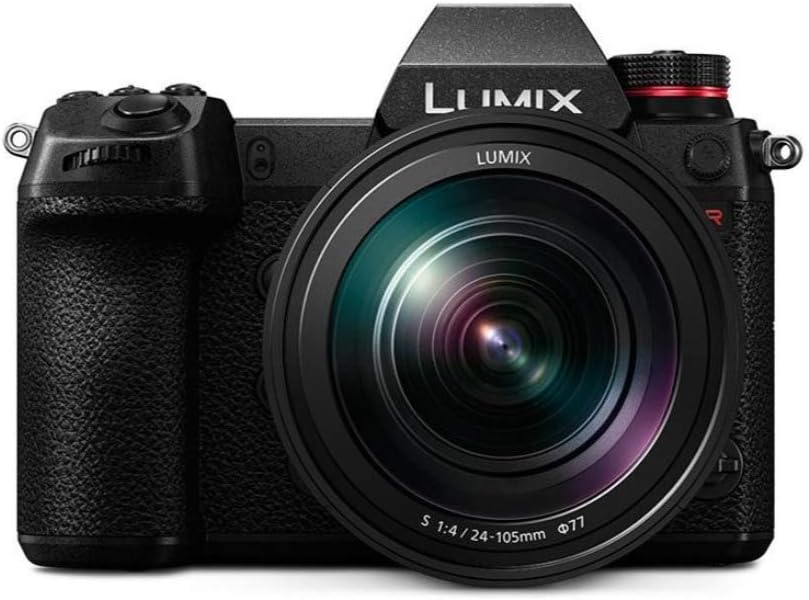
Figure 2.1: Front view of the Panasonic LUMIX S1R camera with the 24-105mm lens attached. This image displays the camera body, the attached lens with its focus and zoom rings, and the LUMIX branding.

Figure 2.2: Angled view of the Panasonic LUMIX S1R camera, showcasing the ergonomic grip, the L-mount lens, and various control dials and buttons on the top and side of the camera body.

Figure 2.3: Rear view of the Panasonic LUMIX S1R, highlighting the large LCD screen, electronic viewfinder, and the array of control buttons and joysticks for navigation and settings adjustment.

Figure 2.4: Top view of the Panasonic LUMIX S1R, showing the mode dial, secondary status display, hot shoe, and various function buttons for quick access to settings like ISO and White Balance.
3. Setup
3.1. Battery Installation and Charging
- Ensure the camera is powered off.
- Open the battery compartment cover located at the bottom of the camera.
- Insert the Panasonic DMW-BLJ31 battery with the correct orientation, ensuring it clicks into place.
- Close the battery compartment cover securely.
- Connect the camera to the AC adapter using the supplied USB cable to charge the battery. The charging indicator will illuminate.
3.2. Attaching the Lens
- Remove the body cap from the camera and the rear lens cap from the lens.
- Align the white mounting mark on the lens with the white mounting mark on the camera body.
- Insert the lens into the camera mount and turn it clockwise until it clicks into place.
- To remove the lens, press the lens release button on the camera body and turn the lens counter-clockwise.
3.3. Inserting Memory Cards
The LUMIX S1R supports SD UHS-II and XQD memory cards. It features two memory card slots.
- Open the memory card slot cover on the side of the camera.
- Insert the memory card(s) into the appropriate slot(s) until they click. Ensure the correct orientation.
- Close the memory card slot cover.
- Format new memory cards in the camera before first use to ensure optimal performance.
4. Operating the Camera
4.1. Power On/Off
To power on the camera, slide the power switch located on the top right of the camera body to the "ON" position. Slide it to "OFF" to power down.
4.2. Basic Photography Modes
The mode dial on the top left of the camera allows selection of various shooting modes:
- P (Program AE): The camera automatically sets both aperture and shutter speed for optimal exposure.
- A (Aperture Priority AE): You set the aperture, and the camera automatically sets the shutter speed. Ideal for controlling depth of field.
- S (Shutter Priority AE): You set the shutter speed, and the camera automatically sets the aperture. Ideal for controlling motion blur.
- M (Manual Exposure): You manually set both aperture and shutter speed.
- iA (Intelligent Auto): The camera automatically detects the scene and applies optimal settings.
4.3. Focusing
The LUMIX S1R features Contrast Detection Autofocus. You can select between various AF modes (e.g., Single AF, Continuous AF) and AF area modes (e.g., Pinpoint AF, Zone AF) via the menu system or dedicated buttons.
- Autofocus (AF): Half-press the shutter button to activate autofocus.
- Manual Focus (MF): Switch the lens or camera to MF mode and rotate the focus ring on the lens to adjust focus. Focus peaking and magnification aids are available in the viewfinder/LCD.
4.4. Recording Video
To start video recording, press the dedicated video record button, typically marked with a red dot, located near the shutter button or on the rear of the camera. The camera supports 4K UHD 2160p video at up to 60p/50p frame rates.
5. Advanced Features
5.1. High Resolution Mode
The 187MP High Resolution Mode utilizes sensor-shift technology to capture multiple images and combine them into a single, ultra-high-resolution photograph. This mode is particularly effective for static subjects like landscapes or architectural photography when the camera is mounted on a tripod. Motion correction capabilities can be toggled for scenes with slight movement.

Figure 5.1: Visual comparison demonstrating the enhanced detail captured using the High Resolution Mode compared to the Normal Mode. The magnified sections illustrate the significant increase in clarity and fine detail.
5.2. Connectivity
The LUMIX S1R supports Bluetooth and Wi-Fi (802.11ac) for wireless connectivity. This allows for remote control via a smartphone app, image transfer, and geotagging. HDMI output is available for connecting to external monitors or recorders.
6. Maintenance
6.1. Cleaning the Camera and Lens
- Use a soft, lint-free cloth to clean the camera body. For stubborn dirt, slightly dampen the cloth with water.
- For the lens, use a lens blower to remove dust, then gently wipe with a specialized lens cleaning cloth and solution if necessary.
- Avoid touching the sensor directly. If sensor cleaning is required, consult a professional service center.
6.2. Storage
Store the camera in a cool, dry place away from direct sunlight and extreme temperatures. If storing for an extended period, remove the battery.

Figure 6.1: An internal view of the Panasonic LUMIX S1R's durable shutter unit, designed for approximately 400,000 cycles. Proper maintenance helps ensure its longevity.
7. Troubleshooting
If you encounter issues with your camera, refer to the following common solutions before contacting support.
| Problem | Possible Cause / Solution |
|---|---|
| Camera does not power on. | Battery may be depleted or incorrectly inserted. Ensure battery is charged and properly seated. |
| Images are blurry. | Check focus settings (AF/MF), shutter speed (too slow for handheld), or lens cleanliness. Ensure image stabilization is active if needed. |
| Memory card error. | Card may be full, corrupted, or incompatible. Try reformatting the card (backup data first) or using a different card. |
| Video recording stops unexpectedly. | Memory card write speed may be insufficient for the selected video quality. Use a faster card (e.g., V60 or higher). Camera overheating can also cause this. |
8. Specifications
| Feature | Detail |
|---|---|
| Model Name | LUMIX S1R Full-Frame Mirrorless Digital Camera |
| Model Number | DC-S1RMK |
| Sensor Type | Full Frame (35mm) MOS Sensor |
| Effective Still Resolution | 47.3 MP |
| Lens Mount | L Mount |
| Included Lens | 24-105mm F4 L-Mount S Series Lens |
| Image Stabilization | Digital, Sensor-shift |
| Video Resolution | 4K UHD 2160p (up to 60p/50p) |
| ISO Sensitivity | Expanded ISO Minimum 50, Expanded ISO Maximum 25600 |
| Shutter Speed | Minimum 1/8000 Seconds |
| Viewfinder | Electronic (Approximately 0.74x to 0.78x magnification) |
| Screen Size | 3.2 Inches OLED (2,100,000 dots) |
| Memory Slots | 2 (SD UHS-II, XQD) |
| Connectivity | Bluetooth, HDMI, Built-in Wi-Fi (802.11ac) |
| Battery Type | Panasonic DMW-BLJ31 Lithium Ion |
| Water Resistance Level | Water Resistant (Dust/Splash/Freeze-resistant) |
| UPC | 885170356979 |
9. Warranty and Support
9.1. Manufacturer's Warranty
The Panasonic LUMIX S1R camera comes with a 1-year manufacturer's warranty. This warranty covers defects in materials and workmanship under normal use. Please retain your proof of purchase for warranty claims.
9.2. Customer Support
For technical assistance, service, or further information, please visit the official Panasonic support website or contact their customer service. You can also find more information and accessories at the Panasonic Store on Amazon.