
Introduction
Thank you for choosing the Orium 11696 RC Battery-Powered Wall Clock. This radio-controlled clock automatically synchronizes with a time signal, ensuring accurate timekeeping. This manual provides instructions for the proper setup, operation, and maintenance of your new clock.
Setup
1. Battery Installation
- Carefully remove the clock from its packaging.
- Locate the battery compartment on the back of the clock.
- Insert one (1) AA battery (not included) according to the polarity indicators (+ and -) inside the compartment.
- Close the battery compartment cover securely.
2. Initial Synchronization
- After battery installation, the clock hands will automatically move to the 12 o'clock position. This is the clock's reset position.
- Place the clock near a window or in an open area to facilitate reception of the radio time signal. Avoid placing it near electronic devices that may cause interference.
- The clock will then begin searching for the radio time signal. This process can take several minutes to several hours, depending on your location and signal strength.
- Once the signal is received, the clock will automatically set itself to the correct time.
3. Mounting the Clock
- Once the clock has successfully synchronized, choose a suitable location on a wall.
- Use a sturdy hook or screw (not included) appropriate for the clock's weight (approximately 0.52 kg).
- Hang the clock securely on the wall.
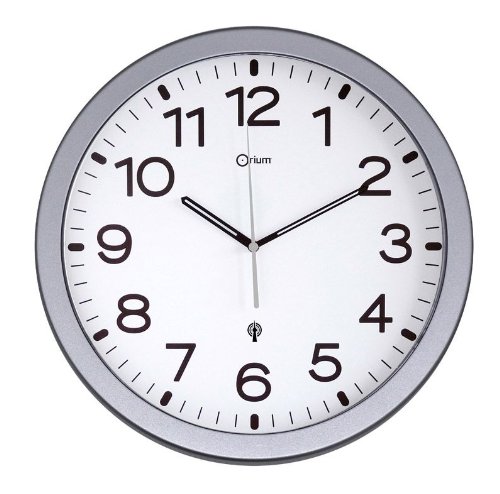
Image showing the front view of the Orium 11696 radio-controlled wall clock with a silver frame and a pendulum. This clock features a 30 cm diameter and is battery-powered.
Operating Instructions
Radio-Controlled Timekeeping
The Orium 11696 clock is equipped with a radio receiver that picks up a precise time signal. This signal ensures that your clock always displays the correct time, including automatic adjustments for Daylight Saving Time (DST) where applicable.
- The clock will periodically search for the time signal to maintain accuracy.
- If the signal is temporarily lost, the clock will continue to run on its internal quartz movement until the signal is re-established.
Manual Time Setting (If Signal is Unavailable)
In areas where the radio signal cannot be received, you may need to set the time manually. Refer to the back of the clock for a small adjustment wheel or button. Rotate the wheel or press the button to move the hands to the correct time. Note that manual setting will override the radio control until the clock successfully receives a signal again.
Pendulum Operation
The clock features a decorative pendulum. Ensure the pendulum is securely attached to its hook inside the clock casing. Once the clock is powered and set, the pendulum should swing freely. If it does not, gently give it a push to start its motion.
Maintenance
Battery Replacement
- When the clock hands stop moving or the time becomes inaccurate, it is likely time to replace the battery.
- Remove the old battery and dispose of it properly according to local regulations.
- Insert a new, fresh AA battery, observing the correct polarity.
- The clock will then attempt to re-synchronize with the radio time signal.
Cleaning
- To clean the clock, use a soft, dry cloth.
- Do not use abrasive cleaners, solvents, or chemical sprays, as these can damage the clock's finish or internal components.
- For the glass face, a slightly damp cloth can be used, followed by a dry cloth to prevent streaks.
Troubleshooting
| Problem | Possible Cause | Solution |
|---|---|---|
| Clock not running or hands stuck. | Dead or incorrectly installed battery. | Replace the battery with a fresh AA battery, ensuring correct polarity. |
| Clock not synchronizing with time signal. | Poor signal reception due to location or interference. | Move the clock to a different location, preferably near a window and away from electronic devices (TVs, computers, microwaves). Allow several hours for synchronization. |
| Clock displays incorrect time after synchronization. | Temporary signal interference or incorrect time zone setting (if applicable, though this model is typically auto-adjusting). | Remove the battery for 1 minute, then reinsert it to force a reset and re-synchronization. Ensure the clock is in a good reception area. |
| Pendulum not swinging. | Not properly attached or needs a manual start. | Ensure the pendulum is correctly hooked. Gently push it to initiate movement. |
Specifications
- Model Number: 11696
- Type: RC Battery-Powered Wall Clock with Pendulum
- Color: Silver
- Diameter: 30 cm
- Dimensions (Product): 30 x 30 x 4 cm (approximate)
- Weight (Product): 0.52 kg (approximate)
- Power Source: 1 x AA Battery (not included)
- Features: Radio-controlled time synchronization
Warranty Information
Orium products are manufactured to high-quality standards. For specific warranty details, please refer to the warranty card included with your purchase or contact Orium customer support. Keep your proof of purchase for any warranty claims.
Customer Support
If you encounter any issues or have questions regarding your Orium 11696 RC Battery-Powered Wall Clock that are not covered in this manual, please contact Orium customer support. Contact information can typically be found on the product packaging or the official Orium website.


