
Blood Pressure Monitor User Manual
Model: HCW-103HLC
Brand: Healthcare World
1. Introduction and Product Overview
Thank you for choosing the Healthcare World Blood Pressure Monitor. This device is designed for accurate and convenient measurement of blood pressure and pulse rate on the upper arm. It features automatic inflation, a World Health Organization (WHO) classification indicator, and irregular heartbeat detection. This manual provides essential information for the safe and effective use of your blood pressure monitor.
The monitor comes equipped with two cuffs: a standard cuff (22-36cm) and a large arm cuff (30-42cm), ensuring a comfortable and accurate fit for a wider range of users. It also includes memory groups for tracking readings over time.

Figure 1: Key features of the Healthcare World Blood Pressure Monitor, including intelligent inflation and memory functions.
2. Safety Information
Please read all safety information carefully before using the device. Improper use may lead to inaccurate readings or device damage.
- Consult Your Doctor: This device is for home use and should not replace professional medical advice. Always consult your doctor regarding your blood pressure readings and treatment.
- Cuff Size: Ensure you use the correct cuff size for your arm. Using an incorrect size can lead to inaccurate measurements.
- Avoid Self-Diagnosis: Do not self-diagnose or self-medicate based on the measurement results.
- Keep Out of Reach of Children: Store the device and its components out of reach of infants and children.
- Battery Safety: Do not mix old and new batteries. Do not mix alkaline, standard (carbon-zinc), or rechargeable (nickel-cadmium) batteries. Dispose of batteries properly.
- Environmental Conditions: Avoid using the device in extreme temperatures, humidity, or direct sunlight.
3. Product Components
Your Healthcare World Blood Pressure Monitor package includes the following items:
- Blood Pressure Monitor Unit
- Standard Arm Cuff (22-36cm)
- Large Arm Cuff (30-42cm)
- Instruction Manual (this document)
- Zipped Carrying Case
- Batteries (typically AA, quantity as specified on packaging)
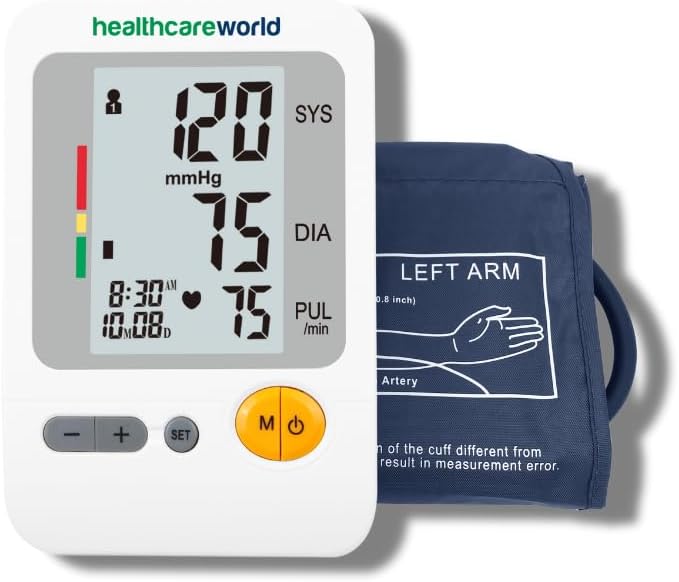
Figure 2: The Blood Pressure Monitor unit and one of the included arm cuffs.
4. Setup
4.1. Installing Batteries
- Open the battery compartment cover on the back of the monitor.
- Insert the specified type and number of batteries (e.g., 4 x AA batteries) according to the polarity indicators (+ and -) inside the compartment.
- Close the battery compartment cover securely.
4.2. Connecting the Arm Cuff
- Select the appropriate cuff size (standard or large) for your arm.
- Insert the air plug of the cuff firmly into the air jack on the side of the monitor unit. Ensure it is securely connected.
5. Operating Instructions
5.1. Preparing for Measurement
- Avoid eating, drinking alcohol, smoking, exercising, or bathing for 30 minutes before measurement.
- Rest for at least 5 minutes before taking a measurement.
- Sit in a comfortable position with your back supported and feet flat on the floor.
- Place your arm on a flat surface so the cuff is at heart level.
5.2. Applying the Arm Cuff

Figure 3: Step-by-step guide for cuff application and measurement.
- Slide your arm through the cuff loop. The air tube should run down the inside of your arm.
- Position the cuff so the bottom edge is approximately 1-2 cm (0.4-0.8 inches) above your elbow joint.
- Wrap the cuff snugly around your upper arm, ensuring it is not too tight or too loose. The indicator mark on the cuff should align with your brachial artery.
5.3. Taking a Measurement
- Once the cuff is correctly applied, press the Power ( ⑁ ) button to start the measurement.
- The cuff will automatically inflate. Remain still and silent during the measurement.
- Once the measurement is complete, the cuff will deflate, and your Systolic, Diastolic, and Pulse readings will be displayed on the screen.
5.4. Understanding Your Readings

Figure 4: Understanding the display and WHO classification indicator.
- SYS (Systolic Pressure): The top number, indicating the pressure in your arteries when your heart beats.
- DIA (Diastolic Pressure): The bottom number, indicating the pressure in your arteries between beats.
- PUL (Pulse Rate): Your heart rate, measured in beats per minute.
- WHO Indicator: The color bar on the left side of the display indicates your blood pressure classification according to the World Health Organization guidelines (e.g., green for normal, yellow for pre-hypertension, red for hypertension).
- Irregular Heartbeat Detection: If an irregular heartbeat is detected, a symbol will appear on the display. Consult your doctor if this symbol appears frequently.
5.5. Memory Function
The monitor stores previous readings. To view them:
- Press the Memory ( M ) button to access stored readings.
- Use the + or - buttons to scroll through individual measurements.
- The device supports multiple memory groups (e.g., 4 memory groups) and stores up to 99 readings per group.
6. Maintenance and Care
- Cleaning: Wipe the monitor unit and cuff with a soft, dry cloth. If necessary, use a slightly damp cloth with mild soap, then wipe dry. Do not use abrasive cleaners or immerse the unit in water.
- Storage: Store the device in its carrying case in a cool, dry place, away from direct sunlight and extreme temperatures.
- Battery Replacement: Replace all batteries when the low battery indicator appears on the display. Remove batteries if the device will not be used for an extended period.
- Avoid Damage: Do not drop the device or subject it to strong shocks. Do not attempt to disassemble or repair the unit yourself.
7. Troubleshooting
If you encounter issues with your blood pressure monitor, please refer to the following common problems and solutions:
| Problem | Possible Cause | Solution |
|---|---|---|
| No display when powered on | Batteries are dead or inserted incorrectly. | Check battery polarity or replace with new batteries. |
| Error message (e.g., 'E-1') | Cuff not applied correctly, movement during measurement, or air leakage. | Reapply cuff snugly, remain still, check cuff connection. |
| Inaccurate readings | Incorrect cuff size, improper arm position, or recent activity. | Ensure correct cuff size, position arm at heart level, rest before measurement. |
| Cuff does not inflate | Air tube disconnected or kinked. | Check that the air tube is securely connected and not bent. |
If the problem persists after trying these solutions, please contact Healthcare World customer support.
8. Specifications
| Feature | Detail |
|---|---|
| Model Number | HCW-103HLC |
| Brand | Healthcare World |
| Display Type | Digital |
| Power Source | Battery Powered |
| Cuff Sizes Included | Standard (22-36cm), Large (30-42cm) |
| Memory Capacity | Multiple memory groups, up to 99 readings per group |
| Special Features | WHO Indicator, Irregular Heartbeat Detection, Auto Inflation |
| Product Dimensions (approx.) | 19.6 x 13.4 x 9.4 cm |
| Product Weight (approx.) | 560 grams |

Figure 5: The Blood Pressure Monitor is CE Marked and fully certified.
9. Warranty and Support
For warranty information, please refer to the warranty card included with your product or contact Healthcare World customer support directly. Keep your purchase receipt as proof of purchase.
For technical support, troubleshooting assistance, or any questions regarding your Healthcare World Blood Pressure Monitor, please contact the manufacturer's customer service. Contact details can typically be found on the product packaging or the official Healthcare World website.