
Introduction
Thank you for purchasing the Capella CR25 CD Radio Alarm Clock. This manual provides important information regarding the setup, operation, and maintenance of your new device. Please read these instructions carefully before use and retain them for future reference.
Important Safety Instructions
- Do not expose this appliance to rain or moisture.
- Do not block any ventilation openings.
- Do not install near any heat sources such as radiators, heat registers, stoves, or other apparatus (including amplifiers) that produce heat.
- Protect the power cord from being walked on or pinched.
- Only use attachments/accessories specified by the manufacturer.
- Unplug this appliance during lightning storms or when unused for long periods of time.
- Refer all servicing to qualified service personnel.
Package Contents
Please check that all items are present:
- Capella CR25 CD Radio Alarm Clock
- AC Power Adapter
- User Manual (this document)
Product Overview
Familiarize yourself with the components of your Capella CR25.
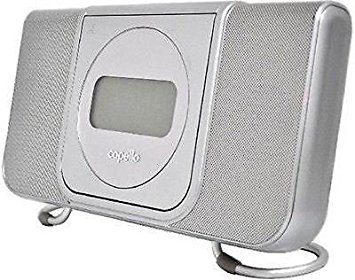
Image 1: Front view of the Capella CR25 CD Radio Alarm Clock. Shows the display, CD tray, and various control buttons.
Front Panel Controls:
- Display Screen: Shows time, radio frequency, CD track, and alarm status.
- CD Door: For inserting and removing CDs.
- Function Button: Switches between CD, Radio, and Line-in modes.
- Time Set Button: Used to set the current time.
- Alarm Set Button: Used to set and activate alarms.
- Tune/Skip Buttons: Adjust radio frequency or skip CD tracks.
- Volume Control: Adjusts audio output level.
- Snooze/Sleep Button: Activates snooze during an alarm or sets sleep timer.
Rear Panel Connections:
- AC Power Input: Connects to the power adapter.
- Line-in Jack: Connects external audio devices.
- Battery Compartment: For backup batteries (not included).
Setup
1. Power Connection
- Insert the small end of the AC power adapter into the AC Power Input jack on the rear of the unit.
- Plug the other end of the AC power adapter into a standard wall outlet.
- The unit will power on and the display will illuminate.
2. Battery Backup Installation (Optional)
The CR25 requires 2 x AAA batteries (not included) for time and alarm settings backup during a power outage.
- Open the battery compartment cover on the rear of the unit.
- Insert 2 x AAA batteries, observing the correct polarity (+ and -) as indicated inside the compartment.
- Close the battery compartment cover securely.
Note: Batteries are for backup only and will not power the unit for normal operation.
Operating Instructions
Setting the Time
- Press and hold the Time Set button until the hour digits flash on the display.
- Use the Tune/Skip buttons to adjust the hour. Pay attention to the AM/PM indicator.
- Press the Time Set button again; the minute digits will flash.
- Use the Tune/Skip buttons to adjust the minutes.
- Press the Time Set button one more time to confirm and exit time setting mode.
Radio Operation
- Press the Function button repeatedly until "FM" or "AM" appears on the display.
- Use the Tune/Skip buttons to manually tune to your desired radio station. Press and hold to auto-scan for the next available station.
- Adjust the Volume Control to your preferred listening level.
CD Player Operation
- Press the Function button repeatedly until "CD" appears on the display.
- Gently open the CD door.
- Place a CD with the label side facing up into the CD compartment.
- Close the CD door. The CD will begin to play automatically after reading.
- Use the Tune/Skip buttons to skip tracks.
- Press the Play/Pause button (if available, otherwise use Function to stop) to pause or resume playback.
Setting the Alarm
The CR25 allows you to set an alarm to wake you up with either the radio or a CD.
- Press and hold the Alarm Set button until the alarm hour digits flash.
- Use the Tune/Skip buttons to adjust the alarm hour (observe AM/PM).
- Press the Alarm Set button again; the alarm minute digits will flash.
- Use the Tune/Skip buttons to adjust the alarm minutes.
- Press the Alarm Set button again to select the alarm source (CD or Radio). Use Tune/Skip to choose.
- Press the Alarm Set button one more time to confirm and activate the alarm. An alarm icon will appear on the display.
Snooze Function
When the alarm sounds, press the Snooze/Sleep button to temporarily silence the alarm for approximately 9 minutes. The alarm will sound again after the snooze period.
Stopping the Alarm
To stop the alarm completely, press any button other than Snooze/Sleep. The alarm will reset for the next day.
Using the Line-in Jack
The Line-in jack allows you to connect an external audio device (e.g., MP3 player, smartphone) to play audio through the CR25's speakers.
- Connect one end of a 3.5mm audio cable (not included) to the Line-in jack on the rear of the CR25.
- Connect the other end of the audio cable to the headphone jack or audio output of your external device.
- Press the Function button repeatedly until "AUX" or "LINE IN" appears on the display.
- Start playback on your external device.
- Adjust the volume using both the external device's volume control and the CR25's Volume Control.
Maintenance
Cleaning
- Unplug the unit from the power outlet before cleaning.
- Use a soft, dry cloth to wipe the exterior surfaces.
- Do not use abrasive cleaners, waxes, or solvents as they may damage the finish.
- For the CD lens, use a specialized CD lens cleaner disc.
Storage
If you plan to store the unit for an extended period, remove the backup batteries to prevent leakage.
Troubleshooting
| Problem | Possible Cause | Solution |
|---|---|---|
| Unit does not power on. | Power adapter not connected or faulty. | Ensure the power adapter is securely plugged into the unit and a working wall outlet. Try a different outlet. |
| No sound from radio/CD. | Volume too low; incorrect function mode; CD inserted incorrectly. | Increase volume. Press Function to select correct mode (Radio, CD, Line-in). Ensure CD is inserted label-side up. |
| CD skips or does not play. | CD is dirty or scratched; CD door not closed properly. | Clean the CD with a soft cloth. Try a different CD. Ensure the CD door is fully closed. |
| Alarm does not sound. | Alarm not set or not activated; volume too low. | Verify alarm time and ensure the alarm icon is visible on the display. Increase alarm volume. |
| Time/alarm settings lost after power outage. | Backup batteries are not installed or are depleted. | Install new AAA backup batteries. |
Specifications
- Model: CR25
- Brand: Capella
- Power Source: AC Power Adapter (Input: 100-240V ~ 50/60Hz)
- Battery Backup: 2 x AAA batteries (not included)
- Material: Plastic
- Color: White
- Mounting Type: Tabletop
- Item Weight: Approximately 2.1 Pounds (0.95 kg)
- Features: CD Player, AM/FM Radio, Alarm Clock, Line-in Jack
- UPC: 818866001785
Warranty and Support
Capella products are designed for reliability and performance. For specific warranty information, please refer to the warranty card included with your purchase or visit the official Capella website. For technical support or service inquiries, please contact Capella customer service through their official channels.