
Introduction
Thank you for choosing the Invicta Analog Blue Dial Men's Watch, Model 15082. This manual provides essential information for the proper setup, operation, and maintenance of your timepiece. Please read these instructions carefully to ensure optimal performance and longevity of your watch.
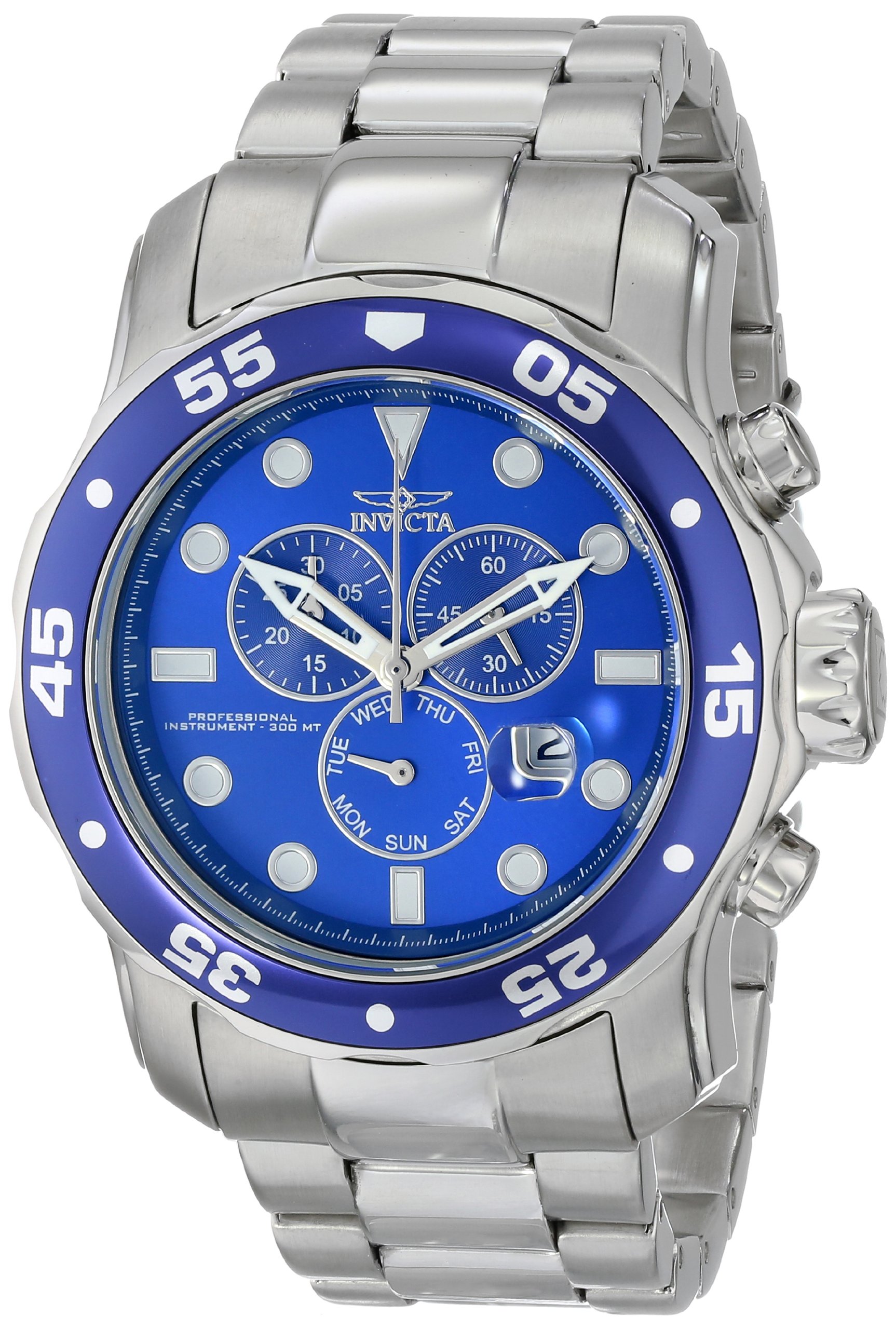
Image: Invicta Analog Blue Dial Men's Watch, Model 15082, showcasing its design.
Setup
1. Unboxing and Initial Inspection
Carefully remove your watch from its packaging. Inspect the watch for any visible damage. The watch comes in a protective box.

Image: The Invicta watch presented in its yellow brand box.
2. Setting the Time
- Pull the crown out to the second click position.
- Turn the crown to set the hour and minute hands to the desired time.
- Push the crown back into the normal position to start the watch.
3. Setting the Date (if applicable)
If your watch features a date display, pull the crown out to the first click position. Turn the crown to adjust the date. Push the crown back to the normal position. Avoid setting the date between 9 PM and 3 AM, as this can damage the movement.
4. Adjusting the Bracelet
The stainless steel bracelet can be adjusted by removing or adding links. It is recommended to have this procedure performed by a qualified watchmaker or jeweler to prevent damage to the bracelet or watch.

Image: Visual guide illustrating different watch case diameters for reference.
Operating Your Watch
1. Reading the Time
Your Invicta watch features a classic analog display with hour, minute, and second hands. The blue dial provides clear visibility.

Image: The Invicta watch displayed on a wrist, showing its fit and appearance.
2. Chronograph Function (if applicable)
If your model includes chronograph subdials, use the pushers located on either side of the crown to operate the stopwatch function.
- Start/Stop: Press the top pusher to start and stop the chronograph.
- Reset: Press the bottom pusher to reset the chronograph hands to zero when stopped.
3. Water Resistance
This watch is water resistant to 300 meters (30 ATM), making it suitable for professional marine activity and serious surface water sports, but not for saturation diving. Ensure the crown is fully pushed in before any contact with water. Do not operate the crown or pushers while the watch is wet or submerged.
Maintenance
1. Cleaning Your Watch
Wipe your watch regularly with a soft, dry cloth to remove dust and dirt. For the stainless steel bracelet, a slightly damp cloth can be used, followed by a dry cloth. Avoid using harsh chemicals or abrasive materials.
2. Battery Replacement
Your watch is powered by a Japanese Quartz movement and requires one product-specific battery. When the battery runs low, the second hand may start to move in two-second intervals (End-of-Life indicator). Battery replacement should be performed by a qualified watch technician to ensure proper sealing and water resistance.
3. Water Resistance Checks
It is recommended to have the water resistance of your watch checked annually, especially if it is frequently exposed to water or if the case back has been opened for battery replacement.
4. Storage
When not wearing your watch, store it in a cool, dry place away from direct sunlight, extreme temperatures, and strong magnetic fields.
Troubleshooting
- Watch not running: Check if the crown is fully pushed in. If the watch still does not run, the battery may need replacement.
- Incorrect time/date: Refer to the "Setting the Time" and "Setting the Date" sections. Ensure the crown is fully pushed in after adjustment.
- Condensation under crystal: This may indicate a loss of water resistance. Avoid further contact with water and have the watch inspected by a professional immediately.
For issues not covered here, please contact Invicta customer support or an authorized service center.
Specifications
| Model Number | 15082 |
| Brand | Invicta |
| Movement Type | Japanese Quartz |
| Display Type | Analog |
| Case Material | Stainless Steel |
| Case Diameter | 49 Millimetres |
| Case Thickness | 18 Millimetres |
| Band Material | Stainless Steel |
| Band Width | 26 Millimetres |
| Dial Colour | Blue |
| Crystal Material | Mineral |
| Water Resistance Depth | 300 Metres (30 ATM) |
| Closure Type | Push-Button |
| Item Weight | 25 Grams |
| Batteries | 1 Product Specific battery (included) |
Warranty and Support
Warranty Information
Invicta watches typically come with a manufacturer's warranty covering defects in materials and workmanship. Please refer to the warranty card included with your purchase for specific terms, conditions, and duration of the warranty. Keep your proof of purchase for warranty claims.
Customer Support
For further assistance, service, or inquiries regarding your Invicta watch, please visit the official Invicta website or contact their customer service department. Authorized service centers are equipped to handle repairs and maintenance.

