
1. Introduction
Thank you for choosing the Makita HP457DWE 18V Cordless Hammer Drill Driver. This tool is designed for drilling in wood, metal, and plastic, as well as for hammer drilling in masonry and for screwdriving tasks. This manual provides essential information for safe operation, maintenance, and troubleshooting to ensure optimal performance and longevity of your tool.
2. General Safety Instructions
Always follow basic safety precautions when using electric tools to reduce the risk of fire, electric shock, and personal injury.
- Work Area Safety: Keep your work area clean and well-lit. Cluttered or dark areas invite accidents. Do not operate power tools in explosive atmospheres, such as in the presence of flammable liquids, gases, or dust.
- Electrical Safety: Avoid body contact with earthed or grounded surfaces such as pipes, radiators, ranges, and refrigerators. Do not expose power tools to rain or wet conditions.
- Personal Safety: Always wear eye protection. Use hearing protection when operating hammer drills. Dress properly; avoid loose clothing or jewelry. Secure long hair.
- Tool Use and Care: Do not force the power tool. Use the correct power tool for your application. Disconnect the battery pack from the power tool before making any adjustments, changing accessories, or storing power tools.
- Battery Tool Use and Care: Recharge only with the charger specified by the manufacturer. Use power tools only with specifically designated battery packs.
3. Package Contents
Verify that all items are present and in good condition upon unpacking.
- 1 x Makita HP457DWE Cordless Hammer Drill Driver
- 2 x 18V 1.5 Ah Li-ion Batteries (BL1813G)
- 1 x DC18WA Charger
- 1 x Transport Case
- 1 x Double-ended bit (PH2 and S5 flat)
4. Product Overview
Familiarize yourself with the main components of your Makita HP457DWE drill driver.
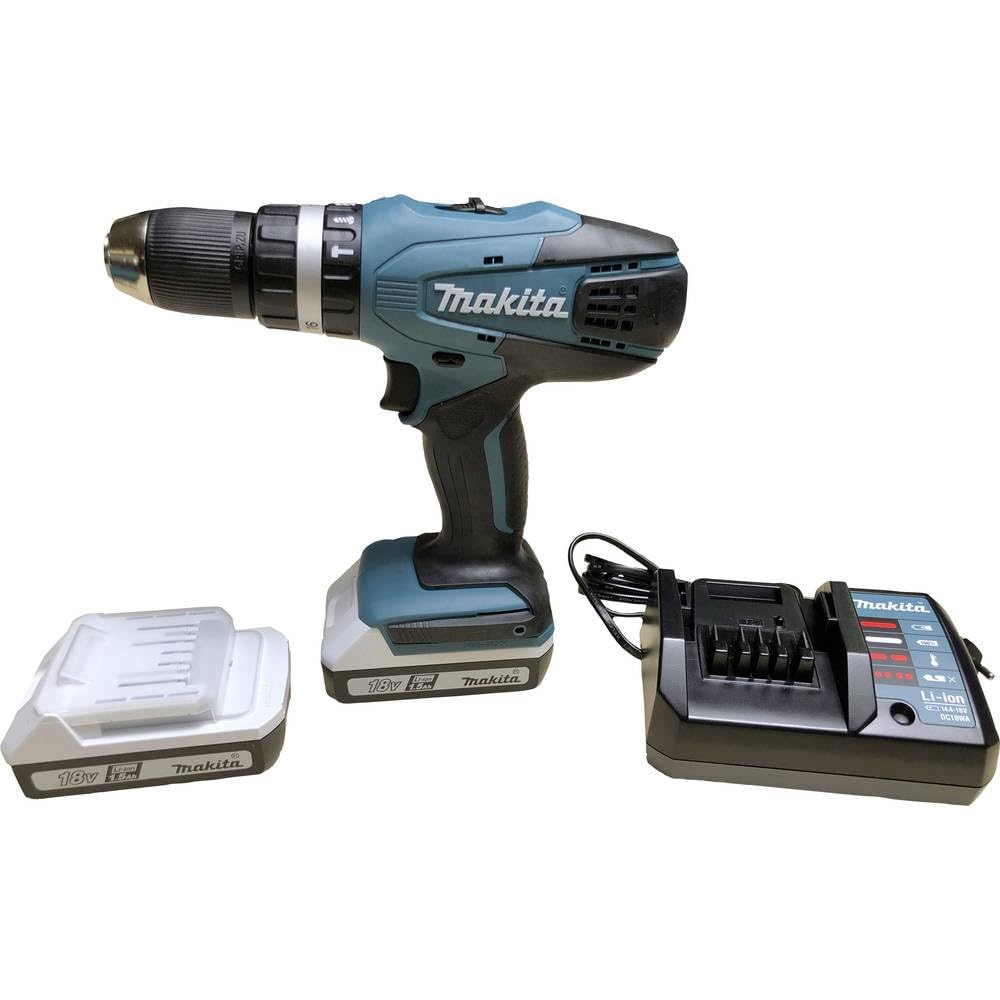
The Makita HP457DWE 18V Cordless Hammer Drill Driver, shown with its battery attached.
Key Components:
- Keyless Chuck: For quick and easy bit changes.
- Torque/Mode Selector Ring: Adjusts clutch settings for screwdriving or selects drilling/hammer drilling modes.
- Speed Selector Switch: Allows selection between high and low-speed ranges.
- Trigger Switch: Activates the tool and controls speed.
- Forward/Reverse Switch: Changes the direction of rotation.
- Battery Pack: Provides power to the tool.

A detailed view of the drill's keyless chuck and the adjustable torque/mode selection ring.
5. Setup
5.1 Battery Installation and Removal
- To Install: Align the battery pack with the grooves in the tool's handle and slide it in until it clicks into place. Ensure it is securely latched.
- To Remove: Press the release button on the battery pack and slide the battery out of the tool.
5.2 Battery Charging
Use only the specified Makita DC18WA charger for your 18V Li-ion batteries.
- Plug the charger into a standard power outlet.
- Insert the battery pack into the charger. The charging indicator light will show the charging status.
- A full charge typically takes approximately 60 minutes for a 1.5 Ah battery.
- Once charging is complete, remove the battery from the charger.
5.3 Bit Installation
- Ensure the tool is switched off and the battery is removed for safety.
- Rotate the chuck counter-clockwise to open the jaws.
- Insert the drill bit or screwdriver bit into the chuck as far as it will go.
- Rotate the chuck clockwise to tighten the jaws firmly around the bit. Ensure the bit is centered and secure.
6. Operating Instructions
6.1 Selecting Operating Mode
Rotate the torque/mode selector ring to choose the desired mode:
- Screwdriving Mode (1-16): For driving screws. Adjust the torque setting (1-16) to match the screw size and material. Lower numbers are for smaller screws or softer materials; higher numbers for larger screws or harder materials.
- Drilling Mode (Drill Symbol): For drilling into wood, metal, or plastic without hammer action.
- Hammer Drilling Mode (Hammer Symbol): For drilling into masonry or concrete.
6.2 Selecting Speed
Use the speed selector switch located on top of the tool:
- Position 1 (Low Speed): For heavy-duty applications, large diameter drilling, or screwdriving where high torque is required.
- Position 2 (High Speed): For faster drilling in smaller diameters or lighter materials.
6.3 Forward/Reverse Rotation
The forward/reverse switch is located above the trigger. Push it to the left for forward rotation (drilling/driving) and to the right for reverse rotation (removing screws or freeing jammed bits). Ensure the switch is in the center position to lock the trigger and prevent accidental startup.
6.4 Starting and Stopping the Tool
- To Start: Squeeze the trigger switch. The tool speed increases with increased pressure on the trigger.
- To Stop: Release the trigger switch. The electric brake will stop the chuck rotation quickly.
7. Maintenance
Regular maintenance ensures the longevity and safe operation of your tool.
- Cleaning: Regularly clean the tool's ventilation openings to prevent overheating. Use a soft, damp cloth to wipe down the exterior. Do not use harsh chemicals or abrasive cleaners.
- Chuck Maintenance: Keep the chuck jaws clean and free of debris to ensure proper bit gripping.
- Battery Care: Store batteries in a cool, dry place away from direct sunlight. Do not store fully discharged batteries for extended periods.
- Storage: When not in use, store the tool, batteries, and charger in the transport case in a secure, dry place out of reach of children.
8. Troubleshooting
Refer to this section for common issues and their solutions.
| Problem | Possible Cause | Solution |
|---|---|---|
| Tool does not start | Battery not charged or improperly installed; Forward/Reverse switch in center (locked) position. | Charge battery and ensure it is correctly installed; Move F/R switch to forward or reverse position. |
| Reduced power or performance | Low battery charge; Incorrect mode/speed/torque setting for the task. | Recharge battery; Adjust mode, speed, or torque setting appropriately. |
| Battery not charging | Charger not plugged in; Faulty battery or charger. | Check power connection; Contact Makita service for inspection. |
| Bit slips in chuck | Chuck not tightened sufficiently; Bit shank is dirty or damaged. | Tighten chuck firmly; Clean or replace bit. |
9. Specifications
Technical data for the Makita HP457DWE Cordless Hammer Drill Driver.
- Model Number: HP457DWE
- Voltage: 18 V
- Battery Type: Lithium-Ion
- Battery Capacity: 1.5 Ah
- Average Charging Time: 60 minutes
- Max. Rotation Speed: 1400 rpm
- Max. Torque: 42 Nm
- Chuck Size: 13 mm
- Number of Speeds: 2
- Torque Settings: 16 + Drill + Hammer Drill
- Drilling Capacity (Wood): 36 mm
- Drilling Capacity (Metal): 13 mm
- Vibration Hammer Drilling (ah): 7 m/s²
- Sound Pressure (Lpa): 81 dB (A)
- Sound Power (Lwa): 92 dB (A)
- Weight: 1.7 kg
- Dimensions (L x W x H): 24L x 8W x 24H cm
10. Warranty and Support
Makita products are manufactured under strict quality control. For warranty information, service, or technical support, please refer to the official Makita website or contact your local authorized Makita service center. Keep your purchase receipt as proof of purchase for warranty claims.
For further assistance, visit the official Makita website: www.makita.com


