
1. Introduction
The LEFOO LF10-W Water Pressure Switch is designed to automatically control the operation of well water pumps by sensing system pressure. This adjustable switch operates within a 30-50 PSI (pounds per square inch) range, ensuring reliable performance for your water system. It features a durable construction suitable for various water pump applications.
2. Product Features
- Corrosion Resistant and Non Metallic Cover: Ensures longevity and protection in various environments.
- No Wire Looping: Simplifies electrical connections.
- Straight Through Wiring: Facilitates easy and direct wiring.
- Visible Contacts 2 Pole Double Break: Allows for clear inspection of contact status and provides robust electrical disconnection.
- No Drift Pressure Settings: Maintains consistent pressure operation once set.
3. Safety Information
WARNING: This product contains chemicals known to the State of California to cause cancer and birth defects or other reproductive harm. Always handle with care and follow safety guidelines.
- Electrical Hazard: Always disconnect power to the pump circuit at the main breaker or fuse box before installing, servicing, or adjusting the pressure switch. Failure to do so can result in serious injury or death.
- Pressure Hazard: Relieve all system pressure before servicing the switch or any part of the water system.
- Professional Installation: Installation and wiring should be performed by a qualified electrician or plumber in accordance with all local and national electrical and plumbing codes.
- Proper Grounding: Ensure the pressure switch and pump motor are properly grounded.
- Operating Conditions: Do not exceed the maximum rated voltage or amperage of the switch.
4. Setup and Installation
Follow these general steps for installing the LEFOO LF10-W Water Pressure Switch. Always refer to local codes and consult a professional if unsure.
- Disconnect Power: Ensure all electrical power to the pump system is disconnected at the main circuit breaker.
- Relieve Pressure: Drain the water system to relieve all pressure.
- Mounting: The pressure switch typically mounts directly to a 1/4-inch NPT female pipe fitting on the pump or pressure tank. Apply thread sealant to the male threads of the fitting before installation. Tighten securely but do not overtighten.

Figure 1: Front view of the LEFOO LF10-W Water Pressure Switch, showing the 1/4-inch NPT pressure connection point at the bottom center of the metal plate. 
Figure 2: Close-up view of the pressure connection on the LEFOO LF10-W Water Pressure Switch, highlighting the threaded inlet for plumbing connection. - Electrical Wiring:
- Remove the non-metallic cover to access the wiring terminals.
- Connect the electrical supply wires and pump motor wires to the designated terminals inside the switch. The switch features "Straight Through Wiring" and "No Wire Looping" for simplified connections.
- Ensure all connections are tight and secure.
- Properly ground the switch and pump motor according to electrical codes.

Figure 3: Side view of the LEFOO LF10-W Water Pressure Switch, showing the conduit opening for electrical wiring access. - Replace Cover: Once wiring is complete and verified, replace the non-metallic cover securely.
5. Operation
The LEFOO LF10-W Water Pressure Switch automatically controls your well pump based on the system's water pressure. When the pressure drops to the cut-in setting (e.g., 30 PSI), the switch activates the pump. When the pressure rises to the cut-out setting (e.g., 50 PSI), the switch deactivates the pump.
Some models may include a manual lever. If present, this lever typically serves as a manual ON/OFF switch for the pump.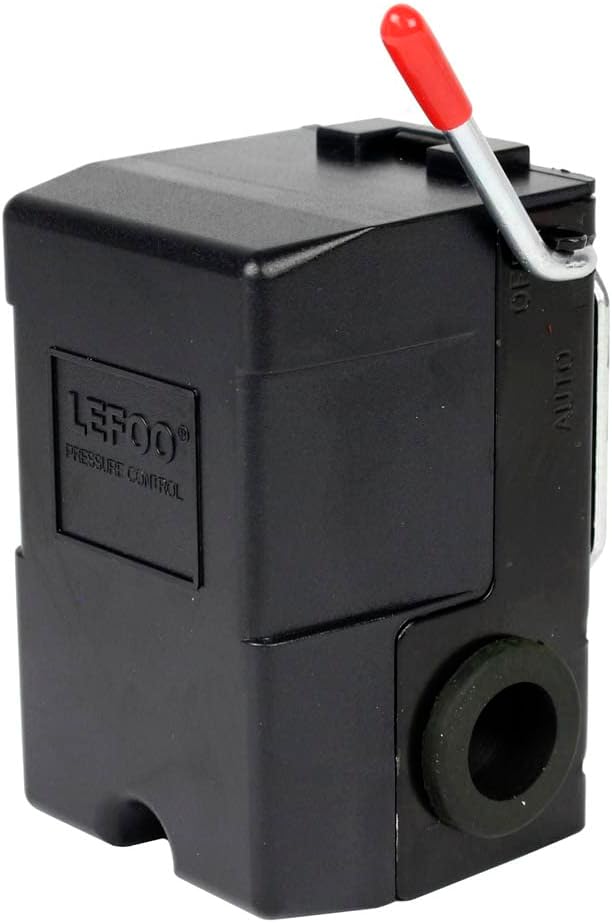
After installation and initial power-up, the pump should cycle on and off according to the factory-set or adjusted pressure range.
6. Pressure Adjustment (30-50 PSI)
The LEFOO LF10-W switch is factory-set for a 30-50 PSI operating range. If adjustment is necessary, follow these steps:
- Disconnect Power: Always disconnect electrical power to the pump system before making any adjustments.
- Remove Cover: Carefully remove the non-metallic cover to expose the internal components.
- Locate Adjustment Screws: Inside the switch, you will find adjustment screws. Typically, there is a main spring adjustment for the cut-out pressure and a differential spring adjustment for the cut-in pressure.
- Turning the main spring adjustment screw clockwise increases both cut-in and cut-out pressures.
- Turning the differential spring adjustment screw clockwise increases the differential (the difference between cut-in and cut-out pressure), effectively lowering the cut-in pressure while keeping the cut-out pressure relatively stable.
- Adjust Incrementally: Make small adjustments and then replace the cover, restore power, and observe the pump's cycling and pressure gauge readings. Repeat until the desired 30-50 PSI range is achieved.
- Restore Cover: Once adjustments are complete, ensure the cover is securely reinstalled to protect internal components.
Note: Excessive adjustment can damage the switch or lead to improper pump operation. Do not force adjustment screws.
7. Maintenance
Regular maintenance helps ensure the longevity and reliable operation of your pressure switch.
- Annual Inspection: Annually inspect the switch for any signs of corrosion, wear, or damage. Check electrical connections for tightness.
- Cleanliness: Keep the exterior of the switch clean and free from dirt, dust, and moisture.
- Pressure Tank Check: Periodically check the air pre-charge in your pressure tank, as incorrect tank pressure can affect switch cycling.
- Contact Points: The switch features "Visible Contacts 2 Pole Double Break." If contacts appear pitted or burned, the switch may need replacement. Always disconnect power before inspecting contacts.
8. Troubleshooting
| Problem | Possible Cause | Solution |
|---|---|---|
| Pump does not start. | No power to switch; faulty switch; low system pressure not reaching cut-in point; pump motor issue. | Check circuit breaker; verify wiring connections; manually engage lever (if present); check pump motor. |
| Pump runs continuously. | Pressure not reaching cut-out point; faulty switch; leak in system; pump losing prime. | Check for leaks; verify pressure gauge reading; adjust cut-out pressure; inspect switch contacts. |
| Pump cycles too frequently (short cycling). | Waterlogged pressure tank; leak in system; incorrect pressure switch settings. | Check and adjust pressure tank air charge; inspect for leaks; verify switch settings. |
| Inconsistent pressure readings. | Faulty pressure gauge; debris in pressure sensing port; switch malfunction. | Replace pressure gauge; clean sensing port (with power off and pressure relieved); replace switch if necessary. |
If troubleshooting steps do not resolve the issue, contact a qualified professional.
9. Specifications
| Brand | LEFOO |
| Model Number | LF10-W (Internal Model: 9842356) |
| Pressure Range | 30-50 PSI (Adjustable) |
| Voltage | 120V (AC) |
| Amperage | 20 Amps |
| Material | Plastic (Cover) |
| Color | Black |
| Item Type Name | Water Pressure Switch |
10. Warranty and Support
For warranty information or technical support regarding your LEFOO LF10-W Water Pressure Switch, please contact LEFOO customer service. Keep your purchase receipt for warranty claims.
Contact information can typically be found on the manufacturer's official website or through your point of purchase.

