
1. Introduction
This manual provides comprehensive instructions for the installation, operation, and maintenance of your EDEN 511-522 57289 External Thermal Self-Priming Filter. This compact and energy-efficient external filter is designed for freshwater and saltwater aquariums up to 100 liters, combining high filtration performance with an integrated 100W heating element to maintain a stable aquarium temperature. Please read these instructions carefully before use to ensure proper function and safety.

Figure 1: EDEN 511-522 57289 External Thermal Filter. This image shows the complete filter unit with its transparent media baskets and hose connections.
2. Safety Instructions
- Always disconnect the power supply before performing any maintenance, cleaning, or installation procedures.
- Ensure the filter is placed on a stable, level surface below the aquarium water level to facilitate proper self-priming and operation.
- Do not operate the filter if the power cord or plug is damaged.
- The integrated heater must always be fully submerged in water during operation to prevent overheating.
- Keep out of reach of children.
- This appliance is for indoor use only and specifically designed for aquariums.
- Ensure all connections are secure and leak-free before powering on the unit.
3. Package Contents
Verify that all components are present in the package:
- EDEN 511-522 57289 External Thermal Filter unit with integrated 100W heater
- Filter media (filter sponge, ceramic filter material)
- Hoses (2 pieces, 120 cm each)
- Hose adapter unit with integrated stop system
- Flow regulator
- Suction pipe
- Water diffuser (spray bar)
- Instruction Manual
4. Setup
4.1. Initial Assembly and Media Installation
- Unpack all components and inspect for any damage.
- Open the filter head by releasing the clips.
- Install the provided filter media into the baskets. The filter sponge typically goes into the first basket for mechanical filtration, followed by the ceramic material for biological filtration. Refer to the internal markings or diagrams for correct media layering.
- Ensure the integrated heater is securely placed within its designated compartment.
- Close the filter head, ensuring the clips are firmly secured to prevent leaks.

Figure 2: Filter unit with transparent housing showing the filter media. This illustrates the placement of the filter media within the baskets.

Figure 3: Another view of the filter media arrangement. This image provides a different angle of the filter media inside the unit.
4.2. Hose Connection and Placement
- Connect the hoses to the inlet and outlet nozzles on the filter head. Ensure a tight fit.
- Attach the suction pipe to the inlet hose and the water diffuser (spray bar) to the outlet hose.
- Position the suction pipe and water diffuser inside the aquarium. The suction pipe should be placed near the bottom, and the water diffuser near the surface for optimal water circulation and oxygen absorption.
- Place the filter unit on a stable surface below the aquarium's water level. This is crucial for the self-priming function.
4.3. Self-Priming and Start-up
- Ensure the filter is below the aquarium water level.
- Open the hose adapter stop system to allow water to flow from the aquarium into the filter. The filter will automatically fill with water.
- Once the filter is filled, plug the power cord into an electrical outlet. The pump will start, and water will begin to circulate.
- Check for any leaks at connections. If leaks occur, disconnect power, tighten connections, and restart.
- Adjust the flow rate using the integrated flow regulator if necessary.
5. Operating Instructions
5.1. Power On/Off
To turn the filter on, plug the power cord into a suitable electrical outlet. To turn it off, unplug the power cord. Always unplug the unit before any maintenance.
5.2. Flow Control
The filter is equipped with a flow regulator. Rotate the control knob on the hose adapter unit to increase or decrease the water flow rate according to your aquarium's needs.
5.3. Integrated Heater Operation
The EDEN 57289 features an integrated 100W heater to maintain a consistent water temperature. The heater is controlled by a thermostat.
- The temperature setting dial is located on the top of the filter head.
- Rotate the dial to set your desired water temperature. The recommended temperature for most tropical fish is between 24-26°C (75-79°F).
- Monitor the aquarium temperature with a separate thermometer for the first few days to ensure the heater maintains the desired temperature accurately.
- The heater will automatically turn on and off to maintain the set temperature.

Figure 4: Close-up view of the heater's temperature setting dial. The blue dial indicates the adjustable temperature range.

Figure 5: A hand adjusting the temperature dial on the integrated heater. This demonstrates how to set the desired water temperature.
6. Maintenance
Regular maintenance is essential for the efficient operation and longevity of your filter. Perform maintenance every 2-4 weeks, depending on aquarium bioload.
6.1. Cleaning the Filter Unit and Media
- Disconnect Power: Always unplug the filter from the electrical outlet.
- Stop Water Flow: Close the hose adapter stop system to prevent water from flowing out of the aquarium.
- Remove Filter Head: Release the clips and carefully lift the filter head. The integrated stop system prevents water from escaping the hoses.
- Clean Media: Remove the filter media baskets. Rinse the filter sponge and ceramic media in old aquarium water (from a water change) to preserve beneficial bacteria. Do not use tap water directly, as chlorine can harm bacteria.
- Clean Canister: Clean the inside of the filter canister and the impeller chamber with a brush to remove any sludge or debris.
- Reassemble: Place the cleaned media back into the baskets, ensuring correct order. Securely close the filter head.
- Restart: Reopen the hose adapter stop system and plug the filter back in. The filter will self-prime and resume operation.
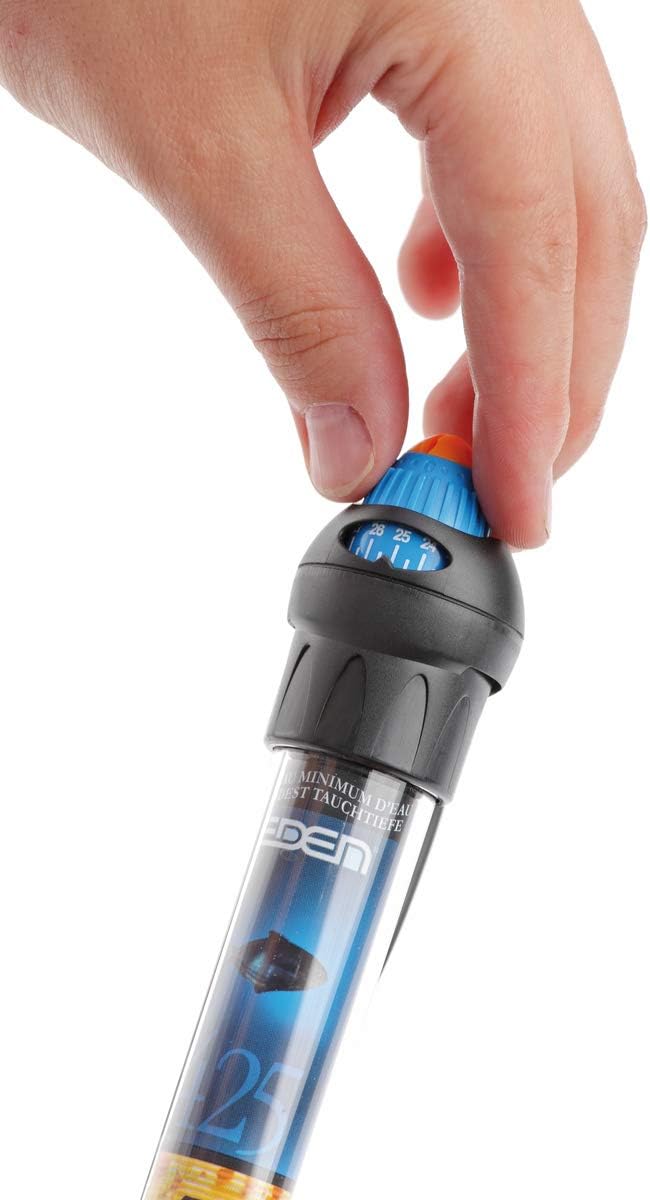
Figure 6: A hand holding the integrated heater unit. This shows the heater detached for cleaning or inspection.
6.2. Hose and Pipe Cleaning
Periodically, clean the hoses, suction pipe, and water diffuser to prevent blockages and maintain optimal flow. Use a flexible brush designed for aquarium hoses.
7. Troubleshooting
| Problem | Possible Cause | Solution |
|---|---|---|
| Filter not starting or low flow |
|
|
| Water leaking from filter |
|
|
| Heater not maintaining temperature |
|
|
| Excessive noise |
|
|
8. Specifications
| Model Number | 57289 |
| Brand | Eden |
| Aquarium Capacity | Up to 100 Liters (Freshwater and Seawater) |
| Integrated Heater Power | 100 W |
| Product Dimensions (L x W x H) | 18.5 x 18.5 x 31 cm |
| Product Weight | 2.28 Kilograms |
| Components Included | Filter unit, filter media, hoses, adapter, flow regulator, suction pipe, water diffuser |
9. Warranty and Support
The EDEN 511-522 57289 External Thermal Filter comes with a 3-year manufacturer's warranty. For warranty claims, technical support, or spare parts inquiries, please contact your retailer or the official Eden customer service. Keep your proof of purchase for warranty validation.
For further assistance, please visit the official Eden website or contact their customer support channels.