
1. Introduction and Overview
The V-Guard VG Crystal Voltage Stabilizer is designed to protect your television, DVD player, DTH, and other compatible electronic devices from voltage fluctuations. It ensures a stable power supply, thereby enhancing the lifespan and performance of your appliances.
Key Features:
- Primary switching technology for efficient operation.
- Performs reliably across a wide input voltage range.
- Generator compatibility for uninterrupted protection during power outages.
- Mains turn-on delay for safe device startup.
- Low / high voltage cut-off to prevent damage from extreme voltage conditions.
- Overload cut-off with automatic reset for circuit protection.
- Output voltage correction without interruption.
2. Safety Instructions
Please read and understand all safety instructions before operating the V-Guard VG Crystal Voltage Stabilizer. Failure to follow these instructions may result in electric shock, fire, or damage to the product or connected devices.
- Do not open the stabilizer casing. There are no user-serviceable parts inside. Refer all servicing to qualified service personnel.
- Ensure the stabilizer is placed in a well-ventilated area. Do not block ventilation openings.
- Keep the stabilizer away from water, moisture, and direct sunlight.
- Connect the stabilizer only to a properly grounded electrical outlet.
- Do not overload the stabilizer beyond its specified capacity. Refer to the specifications section for details.
- Always disconnect power before cleaning or performing any maintenance.
- If the stabilizer emits smoke, unusual odors, or makes abnormal noises, immediately disconnect it from the power supply and contact customer support.
3. Package Contents
Verify that all items are present in the package:
- 1 x V-Guard VG Crystal Voltage Stabilizer
- 1 x User Manual (this document)
4. Setup Instructions
Follow these steps to set up your V-Guard VG Crystal Voltage Stabilizer:
- Placement: Place the stabilizer on a flat, stable, and non-flammable surface. Ensure there is adequate space around the unit for proper ventilation. Avoid placing it near heat sources or in enclosed spaces.
- Power Off: Ensure the stabilizer's power switch is in the 'OFF' position before making any connections.
- Connect Device: Connect the power cord of your television, DVD player, DTH set-top box, or other compatible electronic device to the output socket(s) located on the V-Guard VG Crystal stabilizer.
- Connect to Mains: Plug the stabilizer's power cord into a standard, properly grounded wall electrical outlet.
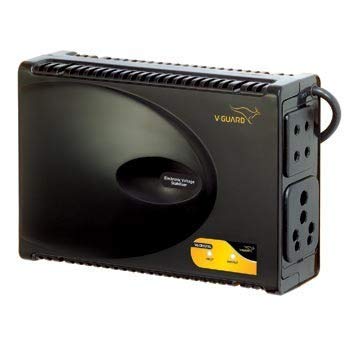
Image: V-Guard VG Crystal Voltage Stabilizer. This image illustrates the general appearance and connection points of the stabilizer.
5. Operating Instructions
Once the stabilizer is properly set up, follow these steps for operation:
- Power On Stabilizer: Switch on the wall electrical outlet, then turn the power switch on the V-Guard VG Crystal stabilizer to the 'ON' position.
- Startup Delay: The stabilizer will initiate a brief time delay (Mains Turn-On Delay) before providing stable output voltage to your connected device. This delay protects your appliance from immediate power surges during startup.
- Device Power On: After the delay period, the stabilizer will supply regulated power. You can then switch on your television or other connected device.
- Automatic Protection: The stabilizer continuously monitors the input voltage. If the voltage goes too low or too high, or if an overload occurs, the stabilizer will automatically cut off the power supply to protect your device. It will automatically reset and resume operation once conditions return to normal.
- Power Off: To turn off your system, first switch off your connected device, then turn off the stabilizer's power switch, and finally switch off the wall electrical outlet.
6. Maintenance
Proper maintenance ensures the longevity and optimal performance of your stabilizer:
- Cleaning: Wipe the exterior of the stabilizer with a soft, dry cloth. Do not use liquid cleaners, abrasive materials, or chemical solvents, as these can damage the casing or internal components.
- Ventilation: Regularly check that the ventilation slots are clear of dust, lint, and other obstructions. Blocked vents can lead to overheating.
- Connections: Periodically inspect the power cords and connections for any signs of damage, fraying, or loose contacts. Ensure all plugs are securely inserted.
- Storage: If storing the stabilizer for an extended period, disconnect it from the power supply and store it in a cool, dry place away from direct sunlight and moisture.
7. Troubleshooting
If you encounter issues with your V-Guard VG Crystal Voltage Stabilizer, refer to the following troubleshooting guide:
- No Power to Stabilizer:
- Check if the stabilizer's power switch is in the 'ON' position.
- Ensure the wall electrical outlet is functioning and switched on.
- Verify that the stabilizer's power cord is securely plugged into the wall outlet.
- Connected Device Not Receiving Power:
- Confirm that the connected device's power cord is firmly plugged into the stabilizer's output socket.
- Check if the stabilizer is in its startup delay phase. Wait for the delay to complete.
- The stabilizer might have activated its low/high voltage cut-off or overload cut-off. It should automatically reset once the voltage stabilizes or the overload is removed.
- Frequent Power Cut-offs:
- This may indicate severe and frequent voltage fluctuations in your mains supply.
- Ensure that the total power consumption of connected devices does not exceed the stabilizer's maximum capacity. Reduce the load if necessary.
- If the issue persists, consult a qualified electrician to check your household wiring and mains supply.
- Unusual Noise or Smell:
- Immediately disconnect the stabilizer from the power supply.
- Do not attempt to use the stabilizer. Contact V-Guard customer support for assistance.
If the problem persists after following these steps, please contact V-Guard customer support.
8. Specifications
| Feature | Description |
|---|---|
| Model Number | VG Crystal |
| Manufacturer | V-Guard |
| Item Weight | 2 kg 520 g |
| Included Components | Stabilizer |
| Input Voltage Range | Wide Input Range (Specific range varies by model variant, refer to product label) |
| Output Voltage | Stable Output Voltage (Regulated) |
| Application | Televisions, DVD, DTH, and other compatible electronic devices |
9. Warranty and Support
V-Guard products are manufactured to high-quality standards and typically come with a manufacturer's warranty. The specific terms, conditions, and duration of the warranty are provided with your purchase, usually on a warranty card or within the product packaging.
For technical assistance, service requests, or to make a warranty claim, please contact V-Guard customer support. You can find the most up-to-date contact information, including phone numbers and email addresses, on the official V-Guard website or on the product's packaging.
Additionally, extended warranty plans may be available for purchase from authorized retailers or service providers to offer additional protection beyond the standard manufacturer's warranty.


