
1. Introduction
This manual provides essential information for the safe and efficient operation of your Tripp Lite SmartPro SMX1500LCDT Uninterruptible Power Supply (UPS). The SMX1500LCDT is designed to provide reliable battery backup and AC power protection for connected electronic equipment against power disturbances such as blackouts, brownouts, power surges, and line noise.
Please read this manual thoroughly before installation and use to ensure proper functionality and to prevent damage to the unit or connected devices.
2. Safety Instructions
Observe the following safety precautions to prevent electric shock, fire, or injury:
- Indoor Use Only: This UPS is intended for indoor use in a controlled environment.
- Proper Grounding: Connect the UPS to a properly grounded AC power outlet. Do not remove the grounding prong from the power cord.
- Avoid Liquids: Do not expose the UPS to rain, moisture, or spill any liquids onto it.
- Ventilation: Ensure adequate ventilation around the UPS. Do not block ventilation openings.
- Battery Safety: Batteries can present a risk of electrical shock and high short-circuit current. Observe proper handling procedures. Refer to the maintenance section for battery replacement.
- Servicing: There are no user-serviceable parts inside the UPS except for the battery. Refer servicing to qualified service personnel.
- Overload Protection: Do not overload the UPS outlets. Ensure the total load does not exceed the unit's capacity.
3. Package Contents
Verify that all items are present upon unpacking:
- Tripp Lite SmartPro SMX1500LCDT UPS Unit
- User Manual (this document)
- USB Cable
- PowerAlert Software CD (or download instructions)
4. Setup
4.1 Placement
Place the UPS in a cool, dry, indoor environment, away from direct sunlight, heat sources, and excessive moisture. Ensure adequate airflow around the unit.
4.2 Connecting to AC Power
Connect the UPS power cord to a properly grounded 230V AC outlet. The UPS will begin charging its internal battery. Allow the battery to charge for at least 8 hours before connecting critical equipment.
4.3 Connecting Equipment
The SMX1500LCDT features eight IEC-320-C13 outlets. Eight outlets provide both battery backup and surge protection, while two outlets provide surge protection only. Connect critical equipment (e.g., computers, monitors) to the battery/surge protected outlets. Connect non-critical equipment (e.g., printers, scanners) to the surge-only protected outlets.
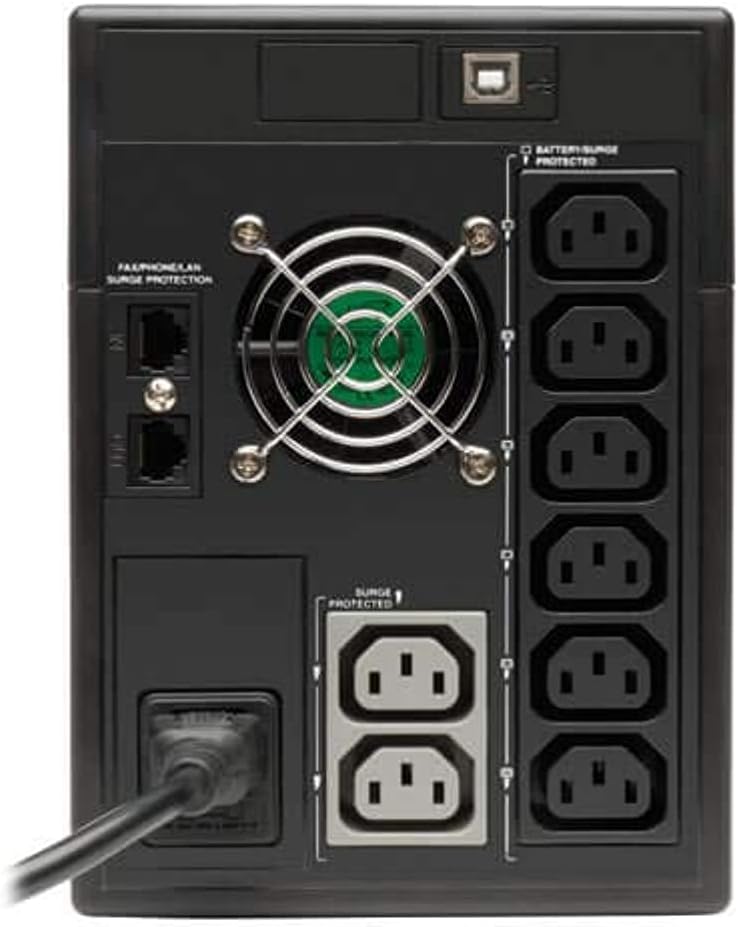
Figure 1: Rear panel of the SMX1500LCDT UPS, illustrating the C13 outlets for battery/surge protection and surge-only protection.
4.4 Software Installation (Optional)
For advanced monitoring and automatic unattended system shutdown during prolonged power failures, install Tripp Lite's PowerAlert software. Connect the UPS to your computer using the provided USB cable. Follow the instructions provided with the software for installation.
5. Operating
5.1 Powering On/Off
To turn on the UPS, press and hold the power button located on the front panel until you hear a beep. To turn off the UPS, press and hold the power button again until the unit powers down.

Figure 2: Front panel of the SMX1500LCDT UPS, showing the LCD display and control buttons.
5.2 LCD Display Functions
The front-panel LCD provides real-time operational data. Use the 'TEST' and 'MUTE' buttons to navigate through display screens and configure settings. Information displayed includes:
- Input Voltage (V)
- Output Voltage (V)
- Battery Charge Level (%)
- Load Level (W or %)
- Estimated Runtime (minutes)
- Operating Mode (On Line, On Battery, AVR)
5.3 Battery Backup Operation
During a power outage, the UPS automatically switches to battery mode, providing power to connected equipment. An audible alarm will sound, and the LCD will indicate 'On Battery' mode. The duration of battery backup depends on the connected load.
5.4 Automatic Voltage Regulation (AVR)
The UPS features Automatic Voltage Regulation (AVR) to correct minor voltage fluctuations (brownouts and overvoltages) without switching to battery power. This extends battery life and ensures stable power delivery to your equipment.
6. Maintenance
6.1 Battery Replacement
The internal battery is user-replaceable. Refer to the specific battery replacement instructions provided by Tripp Lite or contact customer support for guidance. Always use genuine Tripp Lite replacement batteries to ensure compatibility and safety. Disconnect the UPS from AC power and all connected equipment before attempting battery replacement.
6.2 Cleaning
Clean the exterior of the UPS with a soft, dry cloth. Do not use liquid or aerosol cleaners. Ensure ventilation openings are free from dust and debris.
7. Troubleshooting
Refer to the table below for common issues and their solutions:
| Problem | Possible Cause | Solution |
|---|---|---|
| UPS does not turn on | No AC input power; Battery discharged | Check AC power connection; Allow battery to charge for 8+ hours. |
| UPS beeps continuously | Overload; On battery mode; Battery fault | Reduce connected load; Save work and shut down equipment; Contact support for battery fault. |
| Short battery runtime | Battery not fully charged; Battery nearing end of life; Overload | Allow battery to charge; Replace battery; Reduce connected load. |
| LCD shows error code (e.g., F02) | Internal fault or battery issue | Refer to the full user manual for specific error code meanings or contact Tripp Lite technical support. |
8. Specifications
Key technical specifications for the Tripp Lite SMX1500LCDT UPS:
| Feature | Specification |
|---|---|
| Model Number | SMX1500LCDT |
| Capacity (VA/Watts) | 1500VA / 900W |
| Input Voltage | 230V AC |
| Output Voltage | 230V AC |
| Voltage Correction Range | 170V to 280V |
| Outlets | 8 x C13 IEC 60320 (6 Battery/Surge, 2 Surge Only) |
| Surge Protection Rating | 455 Joules |
| Battery Type | Sealed Lead Acid |
| Typical Runtime (Half Load) | 10 minutes |
| Dimensions (D x W x H) | 11.4" x 19.25" x 9.25" (290mm x 489mm x 235mm) |
| Weight | 24.7 lbs (11.2 kg) |
9. Warranty and Support
9.1 Product Warranty
The Tripp Lite SMX1500LCDT UPS is covered by a 2-year limited manufacturer's warranty. This warranty covers defects in materials and workmanship under normal use. Please retain your proof of purchase for warranty claims.
9.2 Technical Support
For technical assistance, troubleshooting, or warranty inquiries, please contact Tripp Lite customer support. Visit the official Tripp Lite website for contact information, FAQs, and additional resources.


