
1. Introduction
The Sloan EBV-500-A Side-Mount Sensor Retrofit Flushometer is designed to convert existing manual flushometers into touchless, sensor-operated units. This system enhances hygiene in commercial restrooms by reducing surface contact and ensures efficient water usage. It is suitable for both urinal and toilet applications.

Image 1.1: The Sloan EBV-500-A Side-Mount Sensor Retrofit Flushometer unit.
2. Safety Information
- Always turn off the main water supply to the fixture before attempting any installation, maintenance, or repair.
- Wear appropriate personal protective equipment (PPE), such as safety glasses and gloves, during installation and maintenance.
- Ensure all connections are secure and watertight to prevent leaks.
- Do not use harsh chemicals or abrasive cleaners on the unit, as this may damage the finish or internal components.
3. Package Contents
Verify that all components are present before beginning installation:
- Sloan EBV-500-A Side-Mount Sensor Retrofit Unit
- Mounting hardware
- Installation wrench
- Batteries (typically pre-installed)
4. Setup and Installation
This retrofit unit is designed for straightforward conversion of existing manual flushometers. Follow these steps for proper installation:
- Turn Off Water Supply: Locate and turn off the main water supply valve to the urinal or toilet fixture.
- Remove Manual Handle: Carefully remove the existing manual flush handle from the flushometer body.
- Install EBV-500-A Unit: Position the EBV-500-A unit onto the flushometer body, ensuring proper alignment.
- Secure the Unit: Tighten the securing nut firmly using the provided installation wrench. For a more secure fit, a larger crescent wrench can be used to snug it up.
- Remove Sensor Sticker: If present, remove any protective sticker covering the sensor lens.
- Sensor Calibration: Step back from the fixture and allow approximately 2 minutes for the sensor to calibrate itself.
- Restore Water Supply: Slowly turn the main water supply valve back on.
- Check for Leaks: Inspect all connections for any signs of water leakage. Tighten connections as necessary.
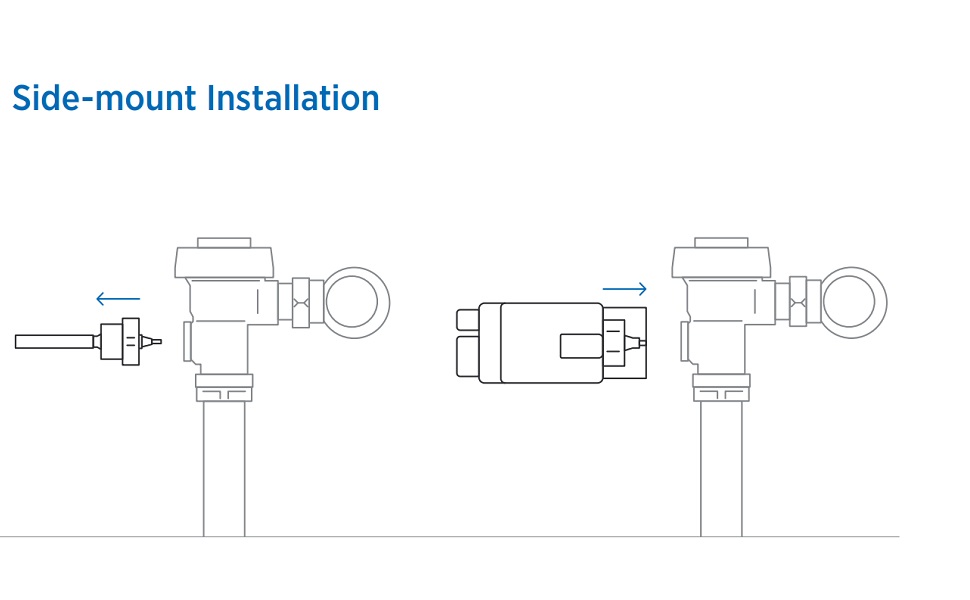
Image 4.1: Diagram illustrating the side-mount installation process.

Image 4.2: The EBV-500-A unit installed on a toilet flushometer.
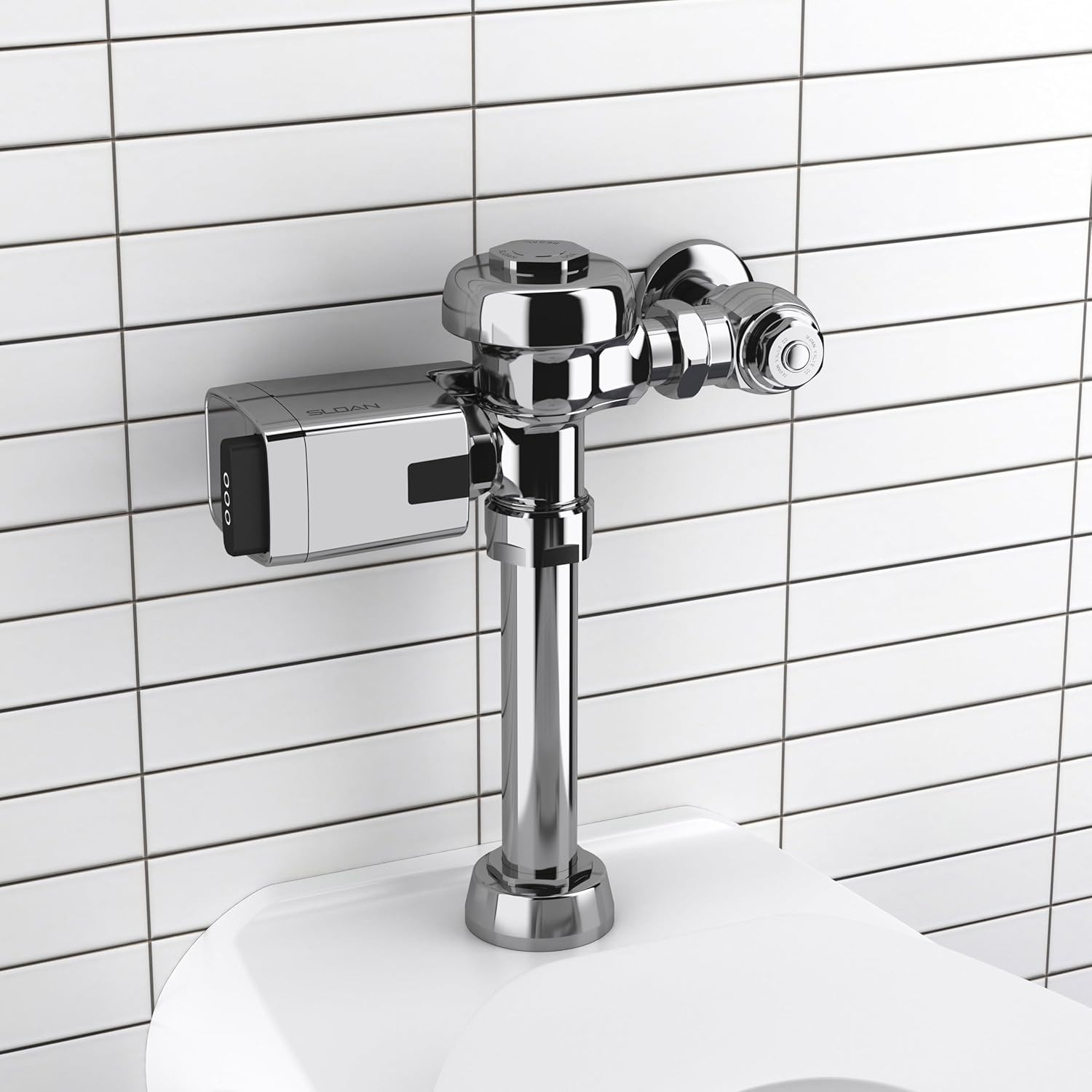
Image 4.3: The EBV-500-A unit installed on a urinal flushometer.
5. Operating Instructions
The EBV-500-A flushometer operates automatically, providing a touchless experience:
- Automatic Activation: The infrared side-mount sensor detects the user. After the user departs, the flushometer automatically activates, initiating a flush cycle.
- Manual Override Button: A non-hold open mechanical override button is integrated into the unit, allowing for manual flushing when desired. Press the button to activate a flush.
- Sentinel Flush: To maintain optimal hygiene and prevent stagnant water, the unit performs a 72-hour sentinel flush. This ensures the system flushes periodically even during extended periods of infrequent use.
- Extended Battery Life: The unit is powered by batteries with an estimated life of three years, based on approximately 4,000 flush cycles per month.
6. Maintenance
Proper maintenance ensures the longevity and optimal performance of your Sloan EBV-500-A flushometer:
- Cleaning: Regularly clean the sensor lens and the exterior of the unit with a soft, damp cloth. Avoid using abrasive cleaners, solvents, or harsh chemicals, as these can damage the chrome finish and sensor components.
- Battery Replacement: Replace batteries when the low battery indicator (if applicable) illuminates or if flush cycles become inconsistent or cease. To replace batteries, turn off the water supply, carefully remove the unit, replace the batteries, and then re-install and recalibrate as per the installation steps.
- Diaphragm Inspection: For issues related to flush volume or consistency, a professional plumber may need to inspect the flushometer diaphragm.
7. Troubleshooting
Refer to the following table for common issues and their solutions:
| Problem | Possible Cause | Solution |
|---|---|---|
| No flush when sensor activated | Water supply off, dirty sensor lens, dead batteries, sensor obstruction. | Check water supply valve. Clean sensor lens. Replace batteries. Remove any objects blocking the sensor's view. |
| Continuous flush | Sensor obstruction, improper calibration, faulty diaphragm. | Remove obstructions from sensor's view. Re-calibrate sensor (power cycle). If issue persists, contact a professional plumber to inspect the diaphragm. |
| Weak or incomplete flush | Low water pressure, partially closed stop valve, clogged diaphragm. | Verify adequate water pressure. Ensure the stop valve is fully open. Contact a professional plumber to inspect and clean/replace the diaphragm. |
| Manual override button not working | Mechanical issue with button or internal linkage. | Ensure the button is not jammed. If the issue persists, contact Sloan customer support for assistance. |
8. Specifications
- Model: EBV-500-A
- Manufacturer Part Number: 3325500
- Material: Brass
- Exterior Finish: Polished Chrome
- Dimensions (L x W x H): 15.2 x 12.7 x 17.8 cm (approximately 6 x 5 x 7 inches)
- Item Weight: Approximately 1 Pound
- Input Connection Size: 2 Inches
- Output Connection Size: 4 Inches
- Valve Type: Flushometer Valve
- Energy Compliance: ADA Compliant
- GTIN/UPC: 671254400139
9. Warranty and Support
This Sloan product is covered by a manufacturer's warranty. For detailed information regarding warranty terms, conditions, and duration, please refer to the official Sloan website or contact their customer service department directly.
For technical assistance, troubleshooting beyond this manual, or to inquire about replacement parts, please contact Sloan customer support. When contacting support, have your product model number (EBV-500-A) and purchase information readily available.
Returns and exchanges are subject to the retailer's policy where the product was purchased. Please consult your purchase receipt or the retailer's website for their specific return guidelines, such as a 30-day return window.


