
Introduction
This manual provides essential instructions for the safe and efficient operation of your Grundig Micro 75 DAB+ digital pocket radio. Please read this manual thoroughly before using the device and retain it for future reference.
Safety Information
- Do not expose the device to extreme temperatures, direct sunlight, or high humidity.
- Avoid dropping or subjecting the device to strong impacts.
- Do not attempt to disassemble or modify the device. This will void the warranty.
- Use only the provided USB cable for charging.
- Keep the device away from water and other liquids.
- Dispose of the battery and device according to local regulations.
Package Contents
Ensure all items are present in the package:
- Grundig Micro 75 DAB+ Pocket Radio
- User Manual
- Warranty Card
- Stereo Headphones
- USB Cable
- Carrying Strap
Product Overview
The Grundig Micro 75 DAB+ is a compact digital pocket radio featuring DAB/DAB+ and FM reception. It includes a built-in rechargeable battery, a micro-USB port for charging, and a headphone jack for private listening.
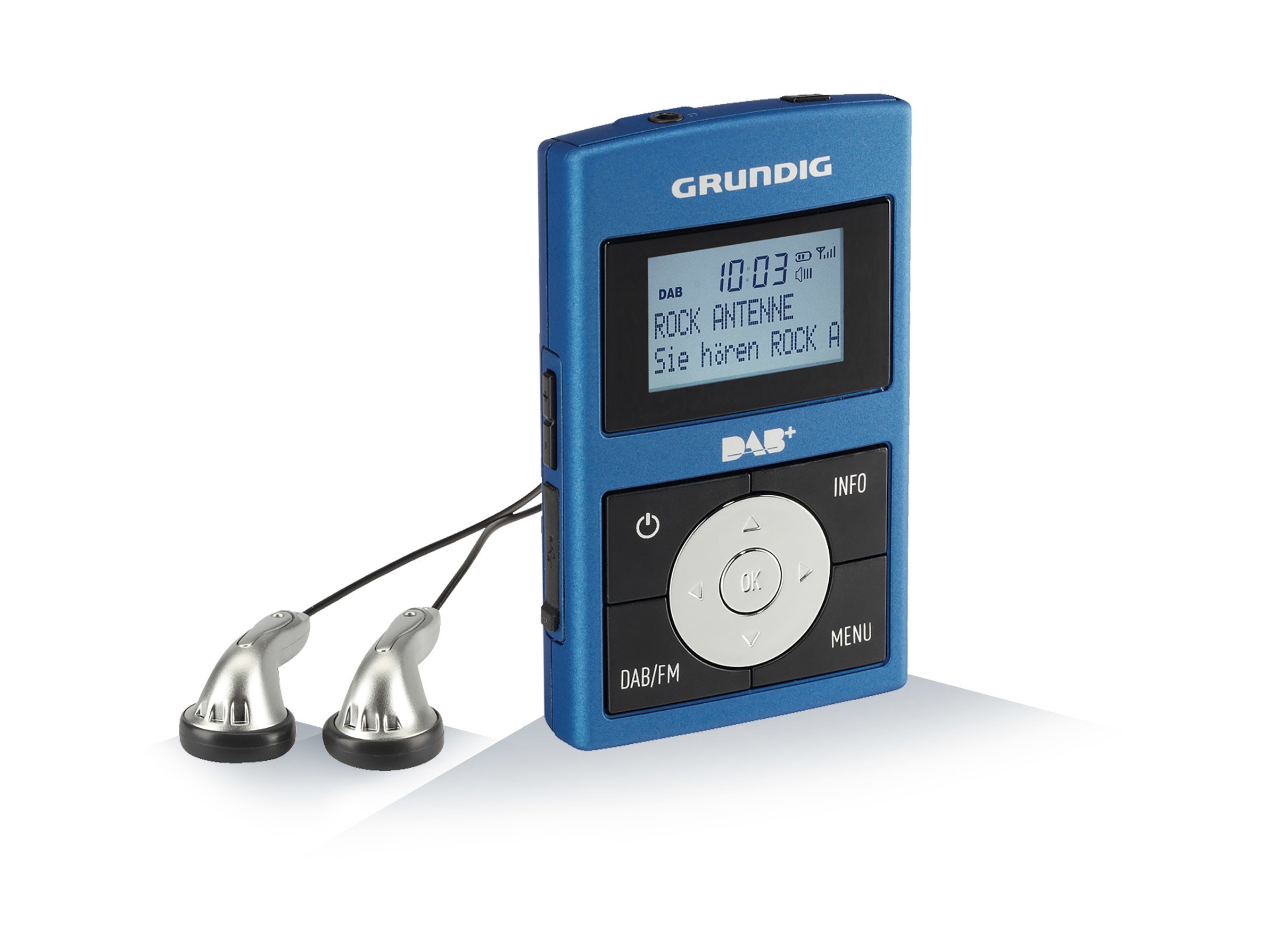
Image: Front view of the Grundig Micro 75 DAB+ Pocket Radio, showing the display, control buttons, and compact design.
Key Features:
- DAB/DAB+ and RDS-FM PLL tuner for optimal reception.
- Built-in rechargeable Lithium-Polymer battery.
- Micro-USB port for battery charging.
- 6 preset equalizer settings: Normal, Classic, Jazz, Pop, Rock, Speech.
- Headphone output for personal listening.
Setup
1. Charging the Battery
- Connect the supplied USB cable to the micro-USB port on the radio.
- Connect the other end of the USB cable to a compatible USB power adapter (not included) or a computer's USB port.
- The charging indicator will illuminate. The battery is fully charged when the indicator changes color or turns off (refer to the display for battery status).
- A full charge provides extended portable use.
2. Initial Power On and Antenna
- Extend the telescopic antenna fully for best reception.
- Press and hold the Power button to turn on the radio.
- Upon first use, the radio may automatically initiate a DAB station scan.
Operating Instructions
Power On/Off
Press and hold the Power button to turn the radio on or off.
Volume Control
Use the Volume Up and Volume Down buttons to adjust the listening level.
DAB/DAB+ Radio Mode
- Press the Mode button to select DAB mode.
- If no stations are found or you are in a new location, perform a full scan: Navigate to the Scan option in the menu and confirm. The radio will search for available DAB/DAB+ stations.
- Use the Up/Down navigation buttons to browse through the list of found stations.
- Press the Select/Enter button to tune into a station.
- To save a station as a preset, press and hold the Preset button, then use navigation buttons to choose a preset number and confirm.
FM Radio Mode
- Press the Mode button to select FM mode.
- To automatically scan for stations, press and hold the Scan button. The radio will search and stop at the next strong station.
- To manually tune, use the Up/Down navigation buttons to adjust the frequency in small increments.
- To save a station as a preset, press and hold the Preset button, then use navigation buttons to choose a preset number and confirm.
Equalizer Settings
The radio features 6 preset equalizer settings to optimize audio output:
- Normal
- Classic
- Jazz
- Pop
- Rock
- Speech
Access these settings via the menu and select your preferred sound profile.
Headphone Usage
Insert the supplied stereo headphones into the headphone jack for private listening. The internal speaker will automatically mute when headphones are connected.
Maintenance
Cleaning
Wipe the radio with a soft, dry cloth. Do not use abrasive cleaners or solvents.
Battery Care
To prolong battery life, avoid fully discharging the battery frequently. Recharge the battery regularly, even if the radio is not in use for extended periods.
Troubleshooting
| Problem | Possible Cause / Solution |
|---|---|
| No power / Radio does not turn on. | Battery is discharged. Charge the battery using the supplied USB cable. |
| Poor radio reception (DAB/FM). |
|
| No sound from headphones. |
|
| Buttons are unresponsive. | The device might be frozen. Try turning it off and on again. If the issue persists, allow the battery to fully discharge and then recharge. |
Specifications
| Model Number: | Micro 75 DAB+ |
| Brand: | Grundig |
| Tuner Technology: | DAB, FM (RDS-FM PLL) |
| Power Source: | Battery-Powered (Built-in Lithium-ion) |
| Battery Type: | 1 Lithium ion battery (included) |
| Connectivity: | USB (for charging) |
| Special Features: | 6 Equalizer Presets (Normal, Classic, Jazz, Pop, Rock, Speech) |
| Product Dimensions: | 2 x 6 x 9.7 cm |
| Weight: | 100 g |
| Color: | Metallic Blue/Grey |
Warranty and Support
Your Grundig Micro 75 DAB+ radio comes with a manufacturer's warranty. Please refer to the included warranty card for detailed terms and conditions. For technical support or service inquiries, please contact your local Grundig service center or visit the official Grundig website.
Note: Keep your proof of purchase for warranty claims.