
1. Introduction and Overview
The Cushcraft A50-6S is a high-performance 6-element Yagi antenna designed for the 6-meter band (50-54 MHz). Engineered using computer-aided modeling and advanced test range techniques, this antenna offers optimized performance with enhanced gain and clean radiation patterns, ensuring excellent front-to-back ratios. The S-model design provides broad bandwidth, maintaining stable performance even in varying weather conditions. Constructed with durable stainless steel hardware, the A50-6S is built for long-term, trouble-free operation, allowing users to enjoy reliable communication on the 6-meter band.
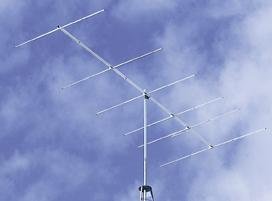
Figure 1: Assembled Cushcraft A50-6S 6 Element 6 Meter Yagi Antenna.
2. Setup and Installation
Proper setup is crucial for optimal antenna performance and safety. This section provides general guidelines for installing your A50-6S antenna. Always refer to the detailed assembly instructions included in the product packaging for specific steps and diagrams.
2.1 Safety Precautions
- Always observe local electrical codes and safety regulations.
- Avoid installing the antenna near power lines or other electrical hazards.
- Use appropriate safety gear, including gloves and eye protection.
- Ensure the mounting structure is robust enough to support the antenna's weight and withstand wind loads.
- Consider grounding the antenna system for lightning protection.
2.2 Assembly
Assemble the antenna elements and boom according to the provided diagrams. Ensure all stainless steel hardware is securely fastened. Do not overtighten, but ensure a firm connection to prevent movement and maintain electrical integrity.
2.3 Mounting
Mount the assembled antenna to a mast or tower using appropriate mounting hardware. Ensure the antenna is oriented correctly for your desired radiation pattern. The antenna should be mounted as high as safely possible and clear of obstructions for optimal performance.
2.4 Coaxial Cable Connection
Connect a high-quality 50-ohm coaxial cable from your radio transceiver to the antenna's feed point. Ensure the connector is properly installed and weatherproofed to prevent moisture ingress, which can degrade performance and damage the antenna.
3. Operating Instructions
Once the Cushcraft A50-6S antenna is properly installed, it is ready for operation. This antenna is designed for the 6-meter amateur radio band (50-54 MHz).
3.1 Initial Checks
- Before transmitting, always check the Standing Wave Ratio (SWR) of your antenna system using an SWR meter. The A50-6S is designed for broad bandwidth, but minor adjustments or cable issues can affect SWR.
- An SWR reading close to 1:1 (e.g., 1.5:1 or lower) indicates efficient power transfer. High SWR can damage your transceiver.
3.2 Transmitting Power
The A50-6S antenna is rated for a maximum power of 1000 Watts PEP (Peak Envelope Power). Ensure your transceiver's output power does not exceed this limit to prevent antenna damage and ensure safe operation.
3.3 Directional Operation
As a Yagi antenna, the A50-6S is highly directional. For best results, rotate the antenna using a rotator (if installed) to point towards the desired communication direction. This maximizes signal strength for both transmitting and receiving.
4. Maintenance
The Cushcraft A50-6S antenna is constructed with stainless steel hardware for long-term durability and minimal maintenance. However, periodic inspection and basic care will ensure continued optimal performance.
4.1 Regular Inspection
- Periodically inspect all hardware for tightness, especially after severe weather conditions.
- Check coaxial cable connections for signs of corrosion or damage. Ensure weatherproof seals are intact.
- Examine the antenna elements and boom for any physical damage, bends, or cracks.
- Verify the integrity of the mounting structure and mast.
4.2 Cleaning
If necessary, gently clean the antenna elements with a soft cloth and mild soap and water to remove dirt, salt, or environmental buildup. Rinse thoroughly with fresh water. Avoid using abrasive cleaners or solvents that could damage the antenna's finish or materials.
5. Troubleshooting
This section provides guidance for common issues you might encounter with your A50-6S antenna. Always ensure safety precautions are followed when inspecting or working on the antenna system.
5.1 High SWR Readings
- Check Coaxial Cable: Inspect the coaxial cable for kinks, damage, or faulty connectors. A damaged cable is a common cause of high SWR.
- Verify Connections: Ensure all connections at the antenna feed point and to the radio are secure and free of corrosion.
- Antenna Integrity: Visually inspect the antenna elements for any bends, breaks, or missing parts that could affect its electrical characteristics.
- Clearance: Ensure the antenna is clear of nearby metallic objects, trees, or structures that could detune it.
5.2 Poor Signal Reception/Transmission
- Antenna Direction: Confirm the antenna is pointed in the correct direction for the desired communication path.
- Coaxial Cable Loss: Long or poor-quality coaxial cables can introduce significant signal loss. Consider using a shorter run or higher-quality cable if possible.
- Radio Settings: Verify your transceiver settings (frequency, mode, power output) are correct for the 6-meter band.
- Environmental Factors: Atmospheric conditions can significantly impact 6-meter propagation.
6. Specifications
The following table outlines the key specifications for the Cushcraft A50-6S 6 Element 6 Meter Yagi Antenna:
| Feature | Specification |
|---|---|
| Brand | Cushcraft |
| Model Number | A50-6S |
| Frequency Range | 50 - 54 MHz |
| Number of Elements | 6 |
| Gain (dBi) | 11.6 |
| Max. Power (PEP) | 1000 Watts |
| Hardware Material | Stainless Steel |
| Item Weight | 21.6 pounds |
| UPC | 712265209561 |
7. Warranty and Support
For information regarding warranty coverage, technical support, or replacement parts for your Cushcraft A50-6S antenna, please refer to the warranty card included with your product or visit the official Cushcraft website. Contact details for customer service are typically provided in the product packaging or on the manufacturer's support pages.

