
1. Product Overview
The Omron HEM-7132 is an automatic blood pressure monitor designed for home use. It utilizes oscillometric technology to measure blood pressure and pulse rate. Key features include a comfortable arm cuff, memory storage, and detection for irregular heartbeats and body movement during measurement.
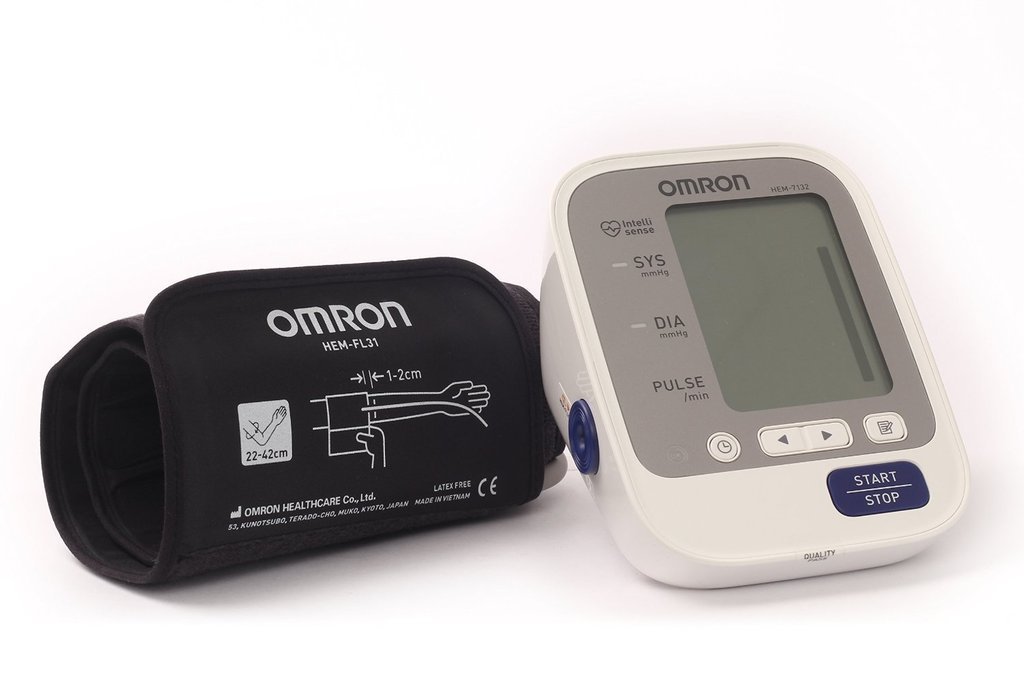
Image 1.1: Omron HEM-7132 Blood Pressure Monitor with Fit Cuff. This image displays the main unit with its LCD screen and the attached arm cuff.
Key Features:
- IntelliSense Technology for comfortable and accurate measurements.
- 60-measurement memory with date and time stamp.
- Detection for irregular heartbeats.
- Body movement detection during measurement.
- Blood pressure level indicator.
- Easy-fit arm cuff (fits arm circumference 22-42 cm).
- One-touch operation.
2. Setup
2.1. Battery Installation
The Omron HEM-7132 requires 4 AA batteries. To install:
- Open the battery compartment cover located on the back of the main unit.
- Insert four AA batteries according to the polarity indicators (+/-) inside the compartment.
- Close the battery compartment cover securely.
Note: Ensure batteries are inserted correctly. Incorrect installation may prevent the device from operating.
2.2. Attaching the Arm Cuff
The arm cuff connects to the main unit via an air tube. To attach:
- Locate the air jack on the side of the main unit.
- Firmly insert the air plug from the cuff into the air jack until it clicks into place.
Important: The cuff is designed for arm circumferences between 22 cm and 42 cm. Using an incorrect cuff size may lead to inaccurate readings.
2.3. Setting Date and Time
Setting the date and time ensures accurate recording of your measurements in the memory. Refer to the detailed instructions in the included instruction manual for specific steps on how to set the date and time on your device.
3. Operating Instructions
3.1. Preparing for Measurement
- Avoid eating, drinking alcohol or caffeine, smoking, and exercising for at least 30 minutes before taking a measurement.
- Rest for at least 5 minutes before starting the measurement.
- Sit in a chair with your feet flat on the floor and your back supported.
- Place your arm on a table so the cuff is at heart level.
- Remove tight-fitting clothing from your upper arm.
3.2. Applying the Arm Cuff
Proper cuff placement is crucial for accurate readings:
- Wrap the cuff around your upper arm, approximately 1-2 cm above your elbow.
- Ensure the air tube runs down the center of your arm, aligned with your middle finger.
- The bottom edge of the cuff should be above the elbow joint.
- Secure the cuff snugly with the fabric fastener. It should be tight enough so that only two fingers can fit between the cuff and your arm.
- The "Green Indicator" on the device will illuminate if the cuff is wrapped correctly, providing assurance of a reliable reading.
Description: This section describes how to correctly position the arm cuff on the upper arm, ensuring the air tube is aligned and the cuff is secured properly for an accurate blood pressure measurement.
3.3. Taking a Measurement
- Press the START/STOP button. The cuff will begin to inflate automatically.
- Remain still and silent during the measurement. Avoid talking or moving your arm.
- Once the measurement is complete, the cuff will deflate, and your systolic pressure, diastolic pressure, and pulse rate will be displayed on the LCD screen simultaneously.
- The reading will be automatically stored in the device's memory.
Recommendation: For consistent results, measure your blood pressure at the same time each day. Taking multiple readings (e.g., three consecutive readings) and averaging them can provide a more accurate representation of your blood pressure.
3.4. Understanding Your Readings
The monitor displays three values:
- Systolic Pressure (SYS): The top number, indicating the pressure in your arteries when your heart beats.
- Diastolic Pressure (DIA): The bottom number, indicating the pressure in your arteries when your heart rests between beats.
- Pulse Rate: Your heart rate, measured in beats per minute.
The device also features:
- Blood Pressure Level Indicator: A visual indicator on the display helps classify your blood pressure reading according to established guidelines.
- Irregular Heartbeat Detection: If an irregular heartbeat is detected more than twice during a measurement, an icon will appear on the display. Consult your doctor if this icon appears frequently.
- Body Movement Detection: If significant body movement occurs during a measurement, a body movement error icon will appear. This indicates the reading may be inaccurate, and you should retake the measurement.
Reference: Consult your healthcare professional for interpretation of your blood pressure readings and for personalized health advice.
3.5. Memory Function
The Omron HEM-7132 stores up to 60 measurements with date and time. To review past readings, press the MEMORY button. The device will display the average of the last three readings, followed by individual readings from most recent to oldest.
4. Maintenance
4.1. Cleaning the Unit
- Wipe the main unit and cuff with a soft, dry cloth.
- If necessary, use a soft cloth lightly moistened with water and a mild soap, then wipe dry.
- Do not use abrasive cleaners, alcohol, or benzene.
- Do not wash the cuff or immerse the unit in water.
4.2. Storage
- Store the device in a clean, dry place, away from direct sunlight, extreme temperatures, and humidity.
- Avoid storing the unit where it may be exposed to strong vibrations or shocks.
- If the unit will not be used for an extended period, remove the batteries to prevent leakage.
5. Troubleshooting
| Problem | Possible Cause | Solution |
|---|---|---|
| No power / Display blank | Batteries are dead or incorrectly installed. | Replace all four AA batteries with new ones, ensuring correct polarity. |
| Error message (e.g., "E1", "E2") or inaccurate readings | Cuff not applied correctly, body movement during measurement, or air leakage. | Re-apply the cuff as per instructions (Section 3.2). Remain still and silent during measurement. Check cuff and air tube for damage or loose connections. |
| Irregular Heartbeat icon appears frequently | Detection of an irregular heartbeat rhythm. | This is an indicator, not a malfunction. Consult your doctor for advice if this occurs often. |
| Battery drains quickly | Old batteries or frequent use. | Replace with new, high-quality AA batteries. If the issue persists with new batteries, contact customer support. |
For other error messages or persistent issues, refer to the comprehensive troubleshooting section in your full instruction manual or contact Omron customer support.
6. Specifications
| Feature | Detail |
|---|---|
| Model | HEM-7132 |
| Measurement Method | Oscillometric method |
| Display Type | LCD (74mm x 54mm) |
| Memory | 60 measurements with date and time |
| Cuff Size | Fits arm circumference 22-42 cm |
| Power Source | 4 "AA" batteries |
| Battery Life | Approximately 1000 measurements (with new alkaline batteries) |
| Unit Dimensions (W x H x L) | 107 mm x 79 mm x 141 mm |
| Unit Weight (without batteries) | 280 g |
| Manufacturer | OMRON Corporation |
7. Warranty and Support
7.1. Warranty Information
The Omron HEM-7132 Blood Pressure Monitor comes with a 1-year manufacturer's warranty from the date of purchase. Please retain your proof of purchase for warranty claims. The warranty covers defects in materials and workmanship under normal use.
For full warranty terms and conditions, please refer to the warranty card included with your product or visit the official Omron website.
7.2. Customer Support
If you have any questions, require assistance with your device, or need to report a problem, please contact Omron customer support. Contact details can typically be found in the product packaging or on the official Omron website for your region.
Online Resources: For additional information, FAQs, and support, visit the Omron Healthcare website.


