
1. Introduction and Overview
The edi-tronic Funkgong ZTB-042 Wireless Doorbell is a versatile device designed for various applications. It can serve as a traditional doorbell for homes and businesses, or as a personal call system for patient care in gardens, hobby rooms, or basements. This manual provides detailed instructions for the proper installation, operation, and maintenance of your wireless doorbell system.

Figure 1.1: The edi-tronic ZTB-042 Wireless Doorbell system, showing both the receiver (left) and the transmitter (right).
2. Package Contents
Please check the package for the following components:
- 1x Wireless Doorbell Receiver (Gong)
- 1x Wireless Doorbell Transmitter (Button)
- 1x CR2032 3V Battery (for transmitter, pre-installed or included separately)
- Screws and wall plugs for mounting
- 1x 3M Adhesive Pad (for transmitter mounting)
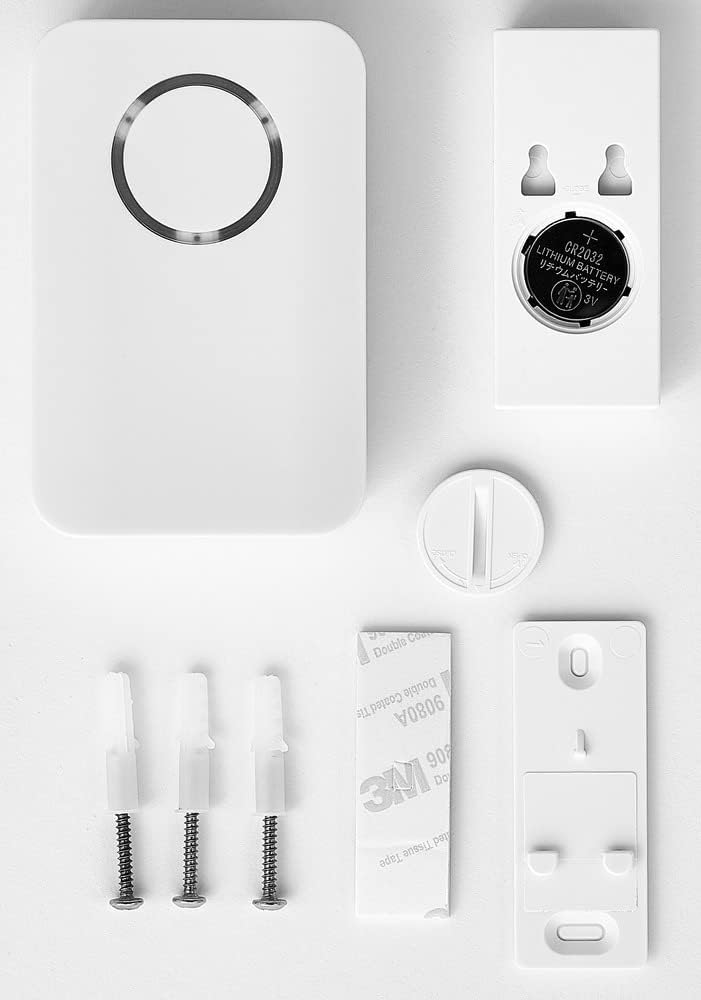
Figure 2.1: All included components: receiver, transmitter, CR2032 battery, mounting screws, wall plugs, and 3M adhesive pad.
3. Setup and Installation
3.1. Transmitter (Doorbell Button) Installation
- Battery Insertion: The CR2032 3V battery is typically pre-installed. If not, open the transmitter casing and insert the battery with the positive (+) side facing up.
- Mounting Location: Choose a suitable location near your door or desired activation point. Ensure the surface is clean and dry.
- Mounting Options:
- Adhesive Pad: Peel off the protective film from the 3M adhesive pad and firmly press the transmitter onto the chosen surface for at least 30 seconds.
- Screws: Use the provided screws and wall plugs to securely attach the transmitter to the wall. Mark the drill holes, drill, insert plugs, and then screw the transmitter into place.
- Nameplate: The transmitter includes a nameplate slot. Insert your name or desired label into this slot.

Figure 3.1: The transmitter mounted on a door frame, showing the nameplate area.

Figure 3.2: A detailed view of the transmitter with a customizable nameplate.
3.2. Receiver (Gong) Setup
- Battery Insertion: The receiver requires 2x AA/Mignon batteries (not included). Open the battery compartment on the back of the receiver and insert the batteries, observing the correct polarity (+/-).
- Placement: Place the receiver in a central location within your home or desired area where you wish to hear the chime. Ensure it is within the 100m range of the transmitter.

Figure 3.3: Rear view of the receiver, indicating the battery compartment and mounting points.

Figure 3.4: The receiver positioned on a table, ready for use.
4. Operating Instructions
4.1. Ringing the Doorbell
Press the button on the transmitter. The transmitter's LED will light up to indicate activation. The receiver will then play the selected melody and its LED ring will illuminate.
4.2. Changing Melodies
The receiver offers 30 selectable melodies. To change the melody, locate the melody selection button on the receiver (refer to the product diagram if available). Press this button repeatedly to cycle through the available melodies until you find your preferred one. The selected melody will be saved.
4.3. Adjusting Volume
The receiver's volume can be adjusted up to 85 dB. Locate the volume control button or switch on the receiver. Adjust it to your desired sound level.
4.4. Alternative Use Cases
Beyond a standard doorbell, the ZTB-042 can function as a personal call system. For example, it can be placed next to a bed for patient care, allowing easy notification when assistance is needed.

Figure 4.1: The transmitter used as a personal call button in a bedroom setting.
5. Features
- Wireless operation for easy installation without cables.
- Includes battery for the transmitter (CR2032).
- Offers a selection of 30 distinct melodies.
- Provides both optical (LED) and acoustic (chime) indications.
- Operating range of up to 100 meters in open field conditions.
- Transmitter is IP44 rated, offering protection against splashing water.
6. Technical Specifications
6.1. Wireless Transmitter (Button)
- Range: Up to 100 m (open field)
- Transmission Frequency: 433 MHz
- Indicator: LED illuminates upon operation
- Protection Type: IP44 (splash-proof)
- Power Supply: 1x CR2032 3V battery (included)
- Dimensions: 73 x 32 x 20 mm
- Weight: 30 g
6.2. Wireless Receiver (Gong)
- Power Supply: 2x AA / Mignon batteries (not included)
- Indicator: LED ring illuminates upon signal reception
- Volume: Up to 85 dB, adjustable
- Dimensions: 98 x 64 x 29 mm
- Weight: 74 g
- Melodies: 30 selectable ringtones
6.3. General Product Information
- Manufacturer: edi-tronic
- Model Number: ZTB-042
- Part Number: 12954
- Color: White
7. Maintenance
- Cleaning: Wipe the doorbell and transmitter with a soft, dry cloth. Do not use abrasive cleaners or solvents.
- Battery Replacement (Transmitter): When the transmitter's LED no longer illuminates or the range decreases, replace the CR2032 battery. Open the casing, remove the old battery, and insert a new one with the correct polarity.
- Battery Replacement (Receiver): If the receiver's volume decreases or it stops chiming, replace the 2x AA batteries. Open the battery compartment, remove old batteries, and insert new ones with correct polarity.
- Environmental Protection: Dispose of old batteries according to local regulations. Do not dispose of the product with household waste; refer to local electronic waste disposal guidelines.
8. Troubleshooting
- Doorbell not chiming:
- Check if the receiver batteries (2x AA) are correctly inserted and not depleted.
- Check if the transmitter battery (CR2032) is correctly inserted and not depleted. The transmitter's LED should light up when pressed.
- Ensure the receiver is within range of the transmitter (max 100m in open field). Walls and other obstacles can reduce the effective range.
- Verify there are no strong interference sources nearby (e.g., other wireless devices).
- Low volume:
- Adjust the volume setting on the receiver.
- Replace the receiver batteries if they are low.
- Transmitter LED not lighting up:
- Replace the CR2032 battery in the transmitter.
- Ensure the battery is inserted with the correct polarity.
9. Warranty and Support
For warranty information and customer support, please refer to the documentation provided with your purchase or contact your retailer. Keep your proof of purchase for any warranty claims.