
1. Product Overview
The Sony a7 is a full-frame mirrorless digital camera designed for high-quality imaging in a compact and portable form factor. It features a 24.3 MP 35mm full-frame sensor, offering rich detail and a wide dynamic range. The camera incorporates a true-to-life 2.4 million dot OLED electronic viewfinder and a tilting 3.0-inch LCD for flexible framing and viewing.
Key features include:
- 24.3 MP Full-Frame Sensor: Delivers high-resolution images with excellent low-light performance.
- Fast Hybrid AF: Combines phase-detection and contrast-detection for responsive and accurate autofocus.
- BIONZ X Image Processor: Enables high-speed continuous shooting up to 5 frames per second and 14-bit RAW output.
- E-mount Lens System: Compatible with Sony's E-mount lenses, including full-frame specific lenses.
- Wi-Fi and NFC Connectivity: Allows for easy sharing and remote control via smartphones and tablets.
- XGA OLED Tru-Finder: Provides a clear and detailed view of your scene.
- 3.0-inch Tilting LCD: Facilitates shooting from various angles.
- Full HD Movie Recording: Captures 1920 x 1080 HD video at 24p/60i/60p.
2. Unpacking the Box
Verify that all items are present in the packaging:
- Sony a7 Camera Body
- Rechargeable Battery (NP-FW50)
- AC Adapter (AC-UB10)
- Micro USB Cable
- Shoulder Strap
- Body Cap
- Accessory Shoe Cap
- Eyepiece Cup
- Power Cord
3. Camera Components

Figure 3.1: Front view of the Sony a7 camera body, showing the E-mount lens mount and full-frame sensor.
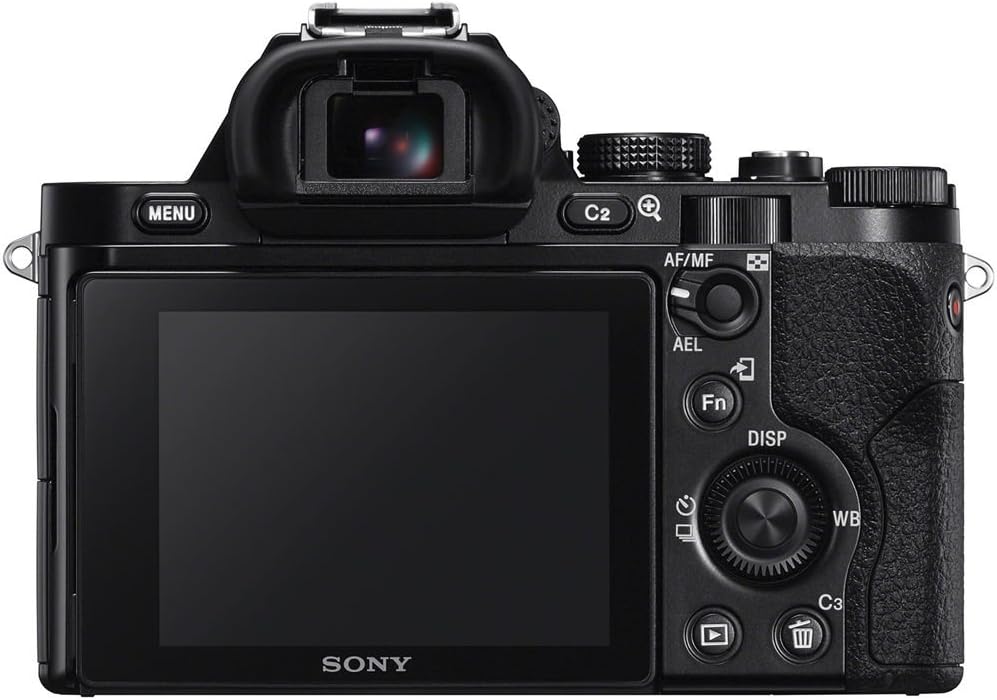
Figure 3.2: Rear view of the Sony a7, displaying the electronic viewfinder, LCD screen, and control buttons.

Figure 3.3: The Sony a7 with its 3.0-inch LCD screen tilted upwards for high-angle shooting.

Figure 3.4: The Sony a7 with its LCD screen tilted, revealing the battery and memory card compartment.

Figure 3.5: Side view of the Sony a7, highlighting the ergonomic grip and Wi-Fi/NFC indicators.

Figure 3.6: Top view of the Sony a7, showing the mode dial, exposure compensation dial, and hot shoe.
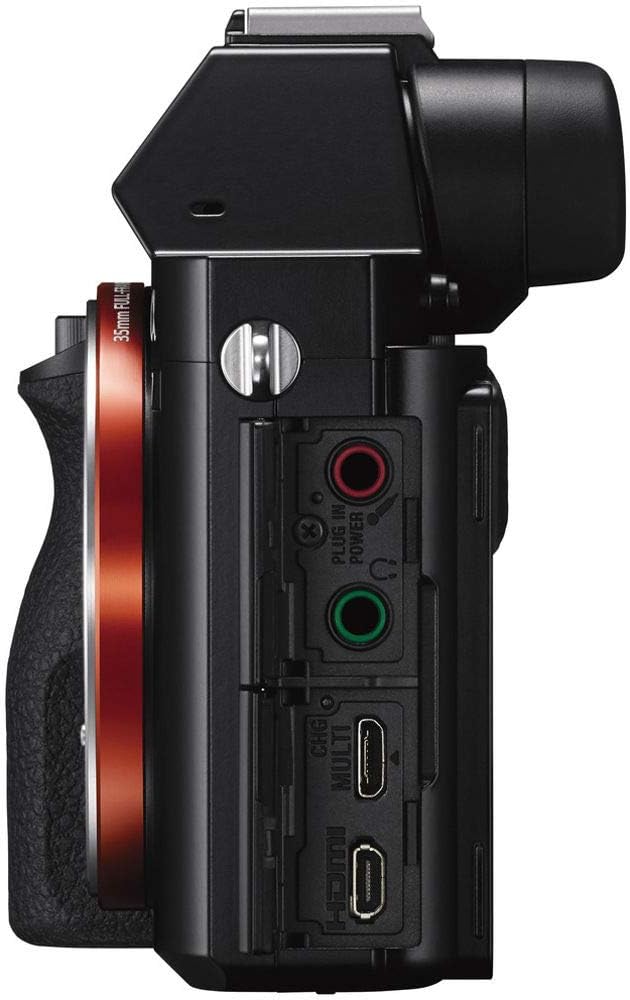
Figure 3.7: Side view of the Sony a7, displaying the various input/output ports including HDMI, USB, and microphone/headphone jacks.

Figure 3.8: The Sony a7 camera held in a hand, illustrating its compact size.
4. Setup
4.1 Charging the Battery
Before initial use, fully charge the supplied NP-FW50 rechargeable battery. Connect the camera to the AC adapter using the Micro USB cable, then plug the AC adapter into a power outlet. The charging indicator will illuminate during charging and turn off when complete.
4.2 Inserting the Battery and Memory Card
- Open the battery/memory card cover located on the bottom of the camera.
- Insert the NP-FW50 battery with the arrow facing inward until it locks into place.
- Insert a compatible memory card (SD/SDHC/SDXC or Memory Stick Duo/Pro Duo/Pro-HG Duo) into the slot until it clicks. Ensure the card is oriented correctly.
- Close the cover securely.
4.3 Attaching a Lens
The Sony a7 uses the E-mount lens system. To attach a lens:
- Remove the body cap from the camera and the rear lens cap from the lens.
- Align the white index mark on the lens with the white index mark on the camera body.
- Mount the lens by turning it clockwise until it clicks into place.
To detach a lens, press the lens release button on the camera body and turn the lens counter-clockwise.
4.4 Initial Settings
Upon first power-on, the camera will prompt you to set the date, time, and language. Follow the on-screen instructions.
5. Operating the Camera
5.1 Power On/Off
To power on the camera, slide the ON/OFF switch located on the top plate. Slide it again to power off.
5.2 Shooting Modes
Rotate the mode dial on the top of the camera to select a shooting mode:
- AUTO: Camera automatically optimizes settings for the scene.
- P (Program Auto): Camera sets aperture and shutter speed, while you control other settings.
- A (Aperture Priority): You set the aperture, and the camera sets the shutter speed.
- S (Shutter Priority): You set the shutter speed, and the camera sets the aperture.
- M (Manual Exposure): You control both aperture and shutter speed.
- SCN (Scene Selection): Choose from various scene modes like Landscape, Portrait, Macro, Night Portrait, Night Scene, Sports, Sunset, Handheld Twilight, and Anti-motion Blur.
5.3 Focusing
The a7 features Fast Hybrid AF, combining 117 phase-detection AF points and 25 contrast-detection AF points for quick and precise focusing. Focus modes include Continuous-Servo AF (AF-C), Manual Focus (MF), and Single-Servo AF (AF-S).
- Eye AF: This feature detects and focuses on a subject's eye, ensuring sharp portraits even with shallow depth of field. Assign it to a customizable button for quick access.
- Focus Area: Select from Wide, Zone, Center, Flexible Spot, or Expand Flexible Spot.
5.4 Exposure Control
Adjust exposure using the exposure compensation dial or by setting aperture and shutter speed in manual modes. Metering options include Multi, Center-weighted, and Spot.
5.5 White Balance
Set the white balance to match the light source for accurate color reproduction. Options include Auto, Daylight, Flash, and custom settings.
5.6 Image Quality Settings
The camera supports both JPEG and 14-bit RAW image formats. You can select JPEG quality levels (Basic, Normal, Fine) and choose to shoot RAW, JPEG, or RAW+JPEG.
5.7 Video Recording
To record video, press the dedicated MOVIE button. The camera supports Full HD (1920 x 1080) recording at 24p, 60i, or 60p frame rates. Uncompressed HDMI output is available for external recorders. Video files can be saved in AVCHD or MP4 format.
5.8 Using the Viewfinder and LCD
The XGA OLED Tru-Finder provides a high-contrast, detailed electronic view. The 3.0-inch (921k dots) Xtra Fine LCD display can be tilted up approximately 84° and down approximately 45° for flexible shooting angles. WhiteMagic technology enhances visibility in bright daylight.
5.9 Connectivity
- Wi-Fi/NFC: Connect to smartphones and tablets for one-touch sharing and remote control using the PlayMemories Mobile app. NFC allows for quick pairing with compatible Android devices.
- HDMI: Output video and images to an external monitor or 4K TV.
- USB: Connect to a computer for image transfer or remote camera control.
5.10 Continuous Shooting and Self-Timer
The camera can shoot continuously at up to 5 frames per second. A 10-second self-timer is also available.
6. Maintenance
6.1 Cleaning
- Camera Body: Wipe with a soft, dry cloth. For stubborn dirt, use a cloth lightly dampened with water or a mild cleaning solution.
- Lens: Use a lens brush to remove dust, then a lens cleaning cloth with lens cleaning fluid. Avoid touching the glass directly.
- Sensor: Due to the interchangeable lens design, the sensor can accumulate dust. Use a blower brush to gently remove dust. For persistent dust, professional cleaning is recommended. Avoid touching the sensor directly.
- LCD Screen: Use a soft, dry cloth.
6.2 Battery Care
- Store batteries in a cool, dry place when not in use.
- Avoid fully discharging batteries frequently to prolong their lifespan.
- If the camera will not be used for an extended period, remove the battery.
7. Troubleshooting
This section addresses common issues. For more detailed troubleshooting, refer to the comprehensive user guide available on the Sony support website.
- Camera does not power on: Ensure the battery is fully charged and correctly inserted. Check if the battery terminals are clean.
- Images are blurry: Check focus mode and focus area settings. Ensure the lens is clean. Increase shutter speed in low light or use image stabilization if available on your lens.
- No image on LCD/viewfinder: Check if the display mode is set correctly (e.g., automatic switching between EVF and LCD).
- Wi-Fi/NFC connection issues: Ensure Wi-Fi/NFC is enabled on both the camera and the smart device. Check network settings and try restarting both devices.
- Short battery life: Battery performance can decrease over time. Ensure you are using genuine Sony batteries. Reduce screen brightness, turn off Wi-Fi/NFC when not in use, and power off the camera between shots to conserve power.
8. Specifications
| Feature | Specification |
|---|---|
| Model Name | Sony A7 (ILCE7/B) |
| Photo Sensor Resolution | 24.3 MP Effective, 24.7 MP Total |
| Photo Sensor Size | Full Frame (35mm) |
| Photo Sensor Technology | CMOS |
| Compatible Mountings | Sony E-mount Full Frame |
| Supported File Format | JPEG (DCF 2.0, EXIF 2.3), RAW (ARW 2.3) |
| Bit Depth | 14 Bit |
| Image Stabilization | No (Lens-based stabilization may be available) |
| Optical Zoom | 4x (Digital Zoom) |
| Expanded ISO Range | 50 - 25600 |
| Metering Description | Multi, Center-weighted, Spot |
| Exposure Control | Aperture priority, Automatic, Program, Shutter priority |
| White Balance Settings | Auto, Daylight, Flash torch |
| Self Timer | 10 Seconds |
| Screen Size | 3 Inches |
| Display Type | LCD (Tilting) |
| Display Resolution | 921,000 dots (1,230,000 max) |
| Flash Memory Type | SD/SDHC/SDXC, Memory Stick Duo/Pro Duo/Pro-HG Duo |
| Memory Slots Available | 2 |
| Write Speed | 5 fps (Continuous Shooting) |
| Maximum Shutter Speed | 1/8000 Seconds |
| Minimum Shutter Speed | 30 seconds |
| Connectivity Technology | HDMI, NFC, USB, Wi-Fi |
| Video Resolution | FHD 1080p |
| Video Capture Format | MPEG-4, AVCHD |
| Viewfinder | Electronic (XGA OLED Tru-Finder) |
| Auto Focus Technology | Fast Hybrid AF (Phase Detection, Contrast Detection) |
| Autofocus Points | 117 (Phase Detection), 25 (Contrast Detection) |
| Battery Type | Lithium Ion (NP-FW50) |
| Item Weight | 1.04 Pounds (Body Only) |
9. Warranty and Support
9.1 Warranty Information
The Sony a7 camera typically comes with a 1-year coverage for parts and 1-year coverage for labor from the date of purchase. Please retain your proof of purchase for warranty claims. This warranty covers manufacturing defects under normal use. For specific terms and conditions, refer to the warranty card included with your product or visit the official Sony support website.
Legal Disclaimer: This product is sold with a full 14-day satisfaction guarantee and a full 90-day parts and labor warranty from the seller (if purchased from a third-party seller offering this specific warranty). Please verify warranty details with your specific retailer at the time of purchase.
9.2 Customer Support
For further assistance, technical support, or service inquiries, please visit the official Sony support website or contact Sony customer service directly. You can find contact information and detailed FAQs on their website.


