
PHILIPS 69034400
MST CosmoWhite CPO-TT Xtra 60W/628 E27 User Manual
Brand: PHILIPS | Model: 69034400
Product Overview
The PHILIPS MST CosmoWhite CPO-TT Xtra 60W/628 E27 is a new generation ceramic metal halide tubular lamp designed for outdoor applications. It provides efficient and pleasant white light, making it suitable for various lighting needs where high-quality illumination is required.
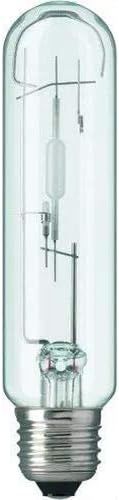
Image: A clear, tubular ceramic metal halide lamp with an E27 screw base. The internal structure, including the arc tube and support wires, is visible through the transparent glass envelope.
Setup and Installation
Before installing the lamp, ensure the power supply is turned off at the main switch to prevent electrical shock. This lamp is designed for fixtures with an E27 screw base.
- Safety First: Always disconnect power before handling electrical components. Allow the existing lamp (if any) to cool down completely before removal.
- Check Compatibility: Verify that your fixture is compatible with an E27 base and the 60 Watts power requirement of this lamp.
- Installation: Carefully screw the MST CosmoWhite CPO-TT Xtra lamp into the E27 socket until it is finger-tight. Do not overtighten.
- Power On: Once the lamp is securely installed, restore power to the fixture.
Note: This lamp is a ceramic metal halide type and may require a compatible ballast for proper operation. Consult your fixture's manual if unsure.
Operating Instructions
Operating the PHILIPS MST CosmoWhite CPO-TT Xtra lamp is straightforward once installed correctly.
- Turning On: Activate the light switch connected to the fixture. The lamp will illuminate, providing its characteristic white light.
- Warm-up Time: Ceramic metal halide lamps typically require a short warm-up period to reach full brightness and stable color. This may take a few minutes.
- Turning Off: Deactivate the light switch to turn off the lamp.
- Restrike Time: If the lamp is turned off and then immediately turned back on, it may not re-ignite instantly. Ceramic metal halide lamps require a cool-down period before they can be re-ignited (restrike). This can take several minutes.
Maintenance
Proper maintenance ensures the longevity and optimal performance of your PHILIPS MST CosmoWhite CPO-TT Xtra lamp.
- Cleaning: Ensure the lamp is off and cool before cleaning. Gently wipe the exterior of the lamp with a soft, dry, lint-free cloth. Do not use liquid cleaners or abrasive materials, as they can damage the lamp's surface or internal components.
- Replacement: When the lamp reaches the end of its life or its light output significantly diminishes, replace it with a new PHILIPS MST CosmoWhite CPO-TT Xtra 60W/628 E27 lamp. Always turn off the power and allow the lamp to cool before attempting replacement.
- Disposal: Dispose of old lamps according to local regulations for electronic waste or hazardous materials, as they may contain small amounts of mercury.
Troubleshooting
If you encounter issues with your PHILIPS MST CosmoWhite CPO-TT Xtra lamp, refer to the following common problems and solutions:
| Problem | Possible Cause | Solution |
|---|---|---|
| Lamp does not light up. | No power to the fixture, lamp not screwed in properly, faulty lamp, or incompatible ballast. | Check power supply and circuit breaker. Ensure lamp is securely screwed into the socket. Test with a known working lamp. Verify ballast compatibility. |
| Lamp flickers or cycles on/off. | Lamp nearing end of life, incorrect voltage, or ballast issue. | Replace the lamp. Ensure correct voltage supply. Consult an electrician if ballast is suspected. |
| Lamp takes too long to warm up or restrike. | Normal characteristic of ceramic metal halide lamps, or lamp degradation. | Allow sufficient warm-up/cool-down time. If excessively long, consider lamp replacement. |
Specifications
Detailed technical specifications for the PHILIPS MST CosmoWhite CPO-TT Xtra 60W/628 E27 lamp:
| Brand | PHILIPS |
| Model Number | 69034400 |
| Product Dimensions (L x W x H) | 29 x 20 x 18 cm |
| Item Weight | 54.43 grams |
| Power | 60 Watts |
| Cap Type / Bulb Base | E27 |
| Light Type | Metal Halide (Ceramic) |
| Shape | Tubular |
| Color Rendering Index (CRI) | 70 |
| Special Feature | Energy Efficiency |
Warranty Information
This product is subject to the return policy of the retailer from which it was purchased. For specific details regarding returns or replacements, please refer to the purchase terms and conditions provided by your seller. As per available information, a 30-day refund/replacement policy may apply from the date of purchase.
For any manufacturing defects or issues not covered by standard return policies, please contact PHILIPS customer support directly.
Support and Contact
For further assistance, technical support, or inquiries regarding the PHILIPS MST CosmoWhite CPO-TT Xtra 60W/628 E27 lamp, please contact PHILIPS customer service.
You can find more information and contact details on the official PHILIPS website or by visiting the PHILIPS Brand Store on Amazon.
Ask a question about this manual
Ask about setup, troubleshooting, compatibility, parts, safety, or missing instructions. Manuals+ will review the question and use this page’s manual context to help answer it.