
Centurion Pro ECM16SQU
V-Green 165 Variable Speed Motor User Manual
Model: ECM16SQU | Brand: Centurion Pro
1. Introduction
This manual provides detailed instructions for the safe and efficient installation, operation, and maintenance of the V-Green 165 Variable Speed Motor. Designed with durable TEFC construction and advanced ECM technology, this motor offers significant energy efficiency, making it an ideal replacement option for pool pump systems. Please read this manual thoroughly before attempting any installation or operation.
2. Safety Information
Always observe the following safety precautions to reduce the risk of injury, electric shock, fire, or damage to the motor.
- Electrical Hazard: Installation and servicing must be performed by a qualified electrician or certified service technician in accordance with all national and local electrical codes.
- Disconnect Power: Always disconnect power to the motor at the circuit breaker before performing any installation, maintenance, or troubleshooting.
- Proper Grounding: Ensure the motor is properly grounded to prevent electrical shock.
- Ventilation: Ensure adequate ventilation around the motor to prevent overheating.
- Moving Parts: Keep hands, hair, and loose clothing away from moving parts during operation.
3. Product Overview
The V-Green 165 Variable Speed Motor is engineered for high performance and energy savings. It features a Totally Enclosed Fan Cooled (TEFC) design for enhanced durability and an Electronically Commutated Motor (ECM) for superior efficiency and quiet operation. The integrated control panel allows for flexible programming of speed settings.
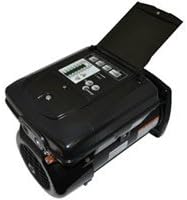
Figure 3.1: The V-Green 165 Variable Speed Motor, showing its robust housing and integrated control panel for speed adjustments and programming.
Key Features:
- Variable Speed Control: Allows for precise adjustment of motor speed to optimize energy consumption.
- ECM Technology: Provides high efficiency and reduced operating costs.
- TEFC Construction: Ensures durability and protection from environmental elements.
- Integrated Control Panel: User-friendly interface for programming and monitoring.
4. Setup and Installation
Installation of the V-Green 165 Variable Speed Motor should only be performed by qualified personnel. Ensure all local and national electrical codes are followed.
Installation Steps:
- Power Disconnection: Turn off all power to the existing pump system at the main circuit breaker. Verify power is off using a voltage tester.
- Drain System: Drain the pump and plumbing system to prevent water spillage during motor removal.
- Remove Old Motor: Disconnect all wiring from the old motor. Carefully unbolt and remove the old motor from the pump housing.
- Inspect Pump Seal: Inspect the pump seal and replace if necessary. A new seal is recommended with any motor replacement.
- Mount New Motor: Align the V-Green 165 motor with the pump housing and secure it using the appropriate bolts. Ensure a tight, secure fit.
- Wiring: Connect the electrical wiring to the new motor according to the wiring diagram provided on the motor's label and in the detailed installation guide (refer to manufacturer's website for full guide). Ensure all connections are secure and insulated.
- Grounding: Connect the motor to a proper electrical ground.
- Power On: Once all connections are secure and verified, restore power at the circuit breaker.
- Initial Start-up: Follow the operating instructions for initial start-up and programming.
5. Operating Instructions
The V-Green 165 motor features an intuitive control panel for setting and adjusting speeds. Refer to the detailed programming guide for specific instructions on setting schedules and custom speeds.
Basic Operation:
- Power On/Off: Use the main power switch or circuit breaker to turn the motor on or off.
- Speed Adjustment: The control panel allows you to select predefined speeds or program custom speeds. Typically, lower speeds are used for filtration and higher speeds for cleaning or spa jets.
- Programming: Utilize the control panel buttons to navigate menus and set daily operating schedules, including different speeds for various times of the day.
- Monitoring: The display on the control panel provides real-time information on motor speed, power consumption, and operational status.
6. Maintenance
Regular maintenance ensures the longevity and optimal performance of your V-Green 165 Variable Speed Motor.
- Keep Clean: Periodically clean the exterior of the motor and the cooling fins to ensure proper heat dissipation. Use a soft, dry cloth. Do not use water or solvents directly on the motor.
- Check Ventilation: Ensure that the motor's fan and vents are free from debris, leaves, or other obstructions.
- Inspect Wiring: Annually inspect all electrical connections for tightness and signs of wear or corrosion.
- Listen for Unusual Noises: Pay attention to any unusual sounds, such as grinding or squealing, which may indicate a problem.
- Professional Inspection: Consider having a qualified technician inspect the motor and pump system annually.
7. Troubleshooting
This section addresses common issues you might encounter with your V-Green 165 Variable Speed Motor. For problems not listed here, contact customer support.
| Problem | Possible Cause | Solution |
|---|---|---|
| Motor does not start | No power; tripped breaker; faulty wiring; motor overload. | Check circuit breaker; verify power supply; inspect wiring (by qualified personnel); allow motor to cool if overloaded. |
| Motor runs hot | Poor ventilation; continuous high-speed operation; low voltage. | Clear obstructions from vents; consider running at lower speeds; consult electrician for voltage check. |
| Unusual noise from motor | Worn bearings; debris in fan; pump cavitation. | Contact qualified technician for inspection; clear fan area; check pump for proper water flow. |
| Control panel not responding | Power interruption; internal fault. | Cycle power to the motor (turn off and on at breaker); if issue persists, contact support. |
8. Specifications
| Attribute | Detail |
|---|---|
| Model Number | ECM16SQU |
| Brand | Centurion Pro |
| Manufacturer | Regal Beloit Corporation |
| Item Weight | 28 pounds |
| Product Dimensions | 16 x 16 x 36 inches |
| Item Package Quantity | 1 |
| Speed | 3450 RPM (Max) |
| UPC | 786674069672 |
9. Warranty and Support
For information regarding the product warranty, please refer to the warranty card included with your purchase or visit the official Centurion Pro or Regal Beloit Corporation website. For technical support, troubleshooting assistance beyond this manual, or to inquire about replacement parts, please contact the manufacturer's customer service department. Contact details can typically be found on the manufacturer's website or on your purchase documentation.