
1. Introduction
Thank you for choosing the SitePro DL24 Digital Box Level. This manual provides essential information for the safe and effective operation, maintenance, and troubleshooting of your new digital level. Please read this manual thoroughly before use and retain it for future reference.
The SitePro DL24 is a 24-inch digital box level designed for precise angle measurements in degrees, percent, or inches/feet. It features an LED back-lit display, audible sound, and rugged aluminum construction for durability.
2. Safety Information
Always observe the following safety precautions to prevent injury and damage to the device:
- Do not expose the device to extreme temperatures, direct sunlight, or high humidity.
- Keep the device away from strong magnetic fields.
- Do not attempt to disassemble or modify the device. Repairs should only be performed by qualified personnel.
- Ensure the battery compartment is dry and free of corrosion before inserting batteries.
- Dispose of batteries according to local regulations.
- Clean the device with a soft, dry cloth. Do not use abrasive cleaners or solvents.
3. Package Contents
Verify that all items are present in the package:
- SitePro DL24 Digital Box Level
- Batteries (pre-installed or separate)
- Carrying Case
- User Manual (this document)

Figure 3.1: Full view of the SitePro DL24 Digital Box Level.
4. Product Overview
Familiarize yourself with the components of your digital level:

Figure 4.1: Close-up of the digital display and control panel.
- On/Off Button: Powers the device on or off.
- %, mm/m Button: Toggles between measurement units (degrees, percent, mm/m, in/ft).
- Reference Button: Sets the current angle as a relative zero point.
- Calibrate Button: Initiates the calibration process.
- Hold Button: Freezes the current measurement on the display.
- Sound/Backlight Button: Toggles the audible sound and display backlight.
- Digital Display: Shows angle measurements, battery status, and unit indicators.
- Vial Levels: Traditional bubble vials for quick visual checks.
5. Setup
5.1 Battery Installation
The DL24 Digital Box Level requires batteries for operation. If batteries are not pre-installed or need replacement:
- Locate the battery compartment cover, typically on the side or back of the unit.
- Open the cover by sliding or unscrewing it.
- Insert the required batteries, ensuring correct polarity (+/-) as indicated inside the compartment.
- Close the battery compartment cover securely.
Note: Always use fresh batteries and ensure the compartment is dry to prevent corrosion.
6. Operating Instructions
6.1 Power On/Off
- Press the On/Off button to turn the level on. The display will illuminate.
- Press and hold the On/Off button for a few seconds to turn the level off.
6.2 Changing Measurement Units
The DL24 can display measurements in degrees (°), percent (%), or inches/feet (in/ft).
- Press the %, mm/m button repeatedly to cycle through the available units. The current unit will be indicated on the display.
6.3 Absolute and Relative Angle Measurement
- Absolute Measurement: This is the default mode, measuring the angle relative to a true horizontal (0°) or vertical (90°) plane.
- Relative Measurement: To measure the angle difference between two surfaces, place the level on the first surface and press the Reference button. The display will show '0.0°' (or 'REF'). Move the level to the second surface, and the display will show the angle relative to the first surface. Press Reference again to return to absolute measurement.
6.4 Hold Function
- Press the Hold button to freeze the current measurement on the display. This is useful for reading angles in difficult-to-view positions.
- Press the Hold button again to release the measurement and return to live reading.
6.5 Calibration
For optimal accuracy, periodic calibration is recommended. Refer to the specific instructions provided with your device for the exact calibration procedure. Generally, it involves:
- Place the level on a flat, stable surface.
- Press the Calibrate button. The display may show a calibration prompt.
- Follow the on-screen instructions, which typically involve rotating the level 180 degrees and pressing the Calibrate button again.
6.6 Sound and Backlight
- Press the Sound/Backlight button to toggle the audible sound indicator on or off.
- Press and hold the Sound/Backlight button to turn the display backlight on or off.
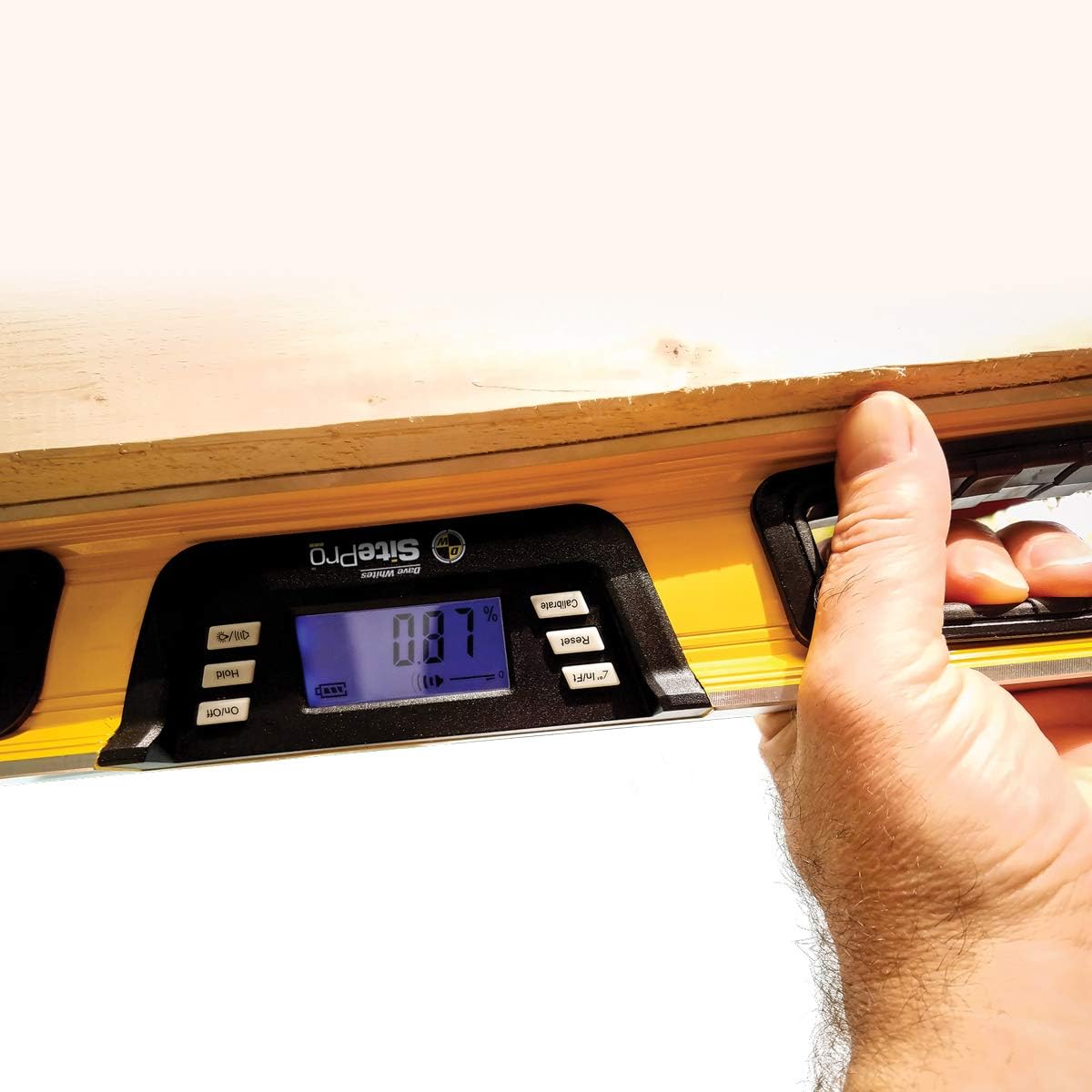
Figure 6.1: The DL24 Digital Box Level in use, displaying a percentage angle.
7. Maintenance
- Cleaning: Wipe the level with a soft, damp cloth. Do not use harsh chemicals or abrasive materials. Ensure the display and sensor areas are clean for accurate readings.
- Storage: Store the level in its protective carrying case in a dry environment when not in use. Remove batteries if storing for extended periods to prevent leakage and corrosion.
- Battery Replacement: Replace batteries promptly when the low battery indicator appears on the display.
8. Troubleshooting
| Problem | Possible Cause | Solution |
|---|---|---|
| Device does not power on. | Dead or incorrectly installed batteries. | Replace batteries with new ones, ensuring correct polarity. Check for corrosion in the battery compartment. |
| Inaccurate readings. | Device needs calibration; sensor obstruction; extreme temperature changes. | Perform calibration as per Section 6.5. Ensure the measuring surface is clean. Allow the device to acclimate to ambient temperature. |
| Display is dim or flickering. | Low battery power. | Replace batteries. |
| Audible sound not working. | Sound feature is turned off. | Press the Sound/Backlight button to toggle the sound on. |
9. Specifications
- Model: 29-DL24
- Length: 24 inches
- Measuring Range: 0–360° (4 x 90°)
- Measuring Accuracy: 0° and 90°, ±0.1°; -1° to 89°, ±0.2°
- Units: Degrees (°), Percent (%), mm/m, in/ft
- Display: LED Back-lit
- Construction Material: Aluminum
- Features: Absolute and relative angle measurement, Hold/lock function, Audible sound, Backlight.
10. Warranty and Support
SitePro products are manufactured to high-quality standards. For warranty information, technical support, or service inquiries, please refer to the warranty card included with your product or visit the official SitePro website. Please have your model number (29-DL24) and purchase date available when contacting support.
For further assistance, you may visit the SitePro Store on Amazon.