
LogiLink AA0045
LogiLink AA0045 USB Adapter for Tablet/Smartphone
Instruction Manual
Introduction
Thank you for choosing the LogiLink AA0045 USB Adapter. This manual provides essential information for the proper installation, operation, and maintenance of your device. Please read this manual thoroughly before using the product to ensure optimal performance and safety.
Product Overview
The LogiLink AA0045 is a compact and lightweight USB adapter designed to facilitate connectivity between various devices, primarily tablets and smartphones. It features a single USB port for versatile use.
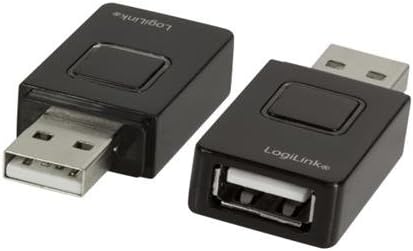
Image: The LogiLink AA0045 USB Adapter. This image displays two black USB adapters. One adapter has a USB-A male connector extending from one end and a button on its top surface. The other adapter has a USB-A female port on one end, a USB-A male connector on the opposite end, and a similar button on its top surface. Both adapters feature the 'LogiLink' brand name printed on them.
Setup Instructions
- Identify Ports: Locate the appropriate USB port on your host device (e.g., computer, power adapter) and the device you wish to connect (e.g., tablet, smartphone).
- Connect Adapter: Insert the male USB-A connector of the LogiLink AA0045 adapter into the USB port of your host device. Ensure a firm connection.
- Connect Peripheral: Plug your tablet or smartphone's USB cable into the female USB-A port of the LogiLink AA0045 adapter.
- Verify Connection: Confirm that your device recognizes the connection. For charging, check if the charging indicator on your tablet or smartphone is active. For data transfer, verify that the device appears in your host device's file explorer.
Note: This adapter is designed for simple plug-and-play functionality and typically does not require driver installation.
Operating Instructions
The LogiLink AA0045 USB Adapter functions as a pass-through connector for USB devices. Its primary uses include:
- Charging: Connect your tablet or smartphone to a power source (e.g., wall charger, computer USB port) via the adapter for charging.
- Data Transfer: Use the adapter to connect your tablet or smartphone to a computer for transferring files, photos, or other data.
- Peripheral Connection: In some cases, the adapter can be used to connect other USB peripherals (e.g., USB flash drives, keyboards) to compatible tablets or smartphones that support USB On-The-Go (OTG) functionality, provided the adapter configuration supports it.
Important Considerations:
- Ensure both the host device and the connected device are powered on for proper operation.
- Always handle the adapter by its body, avoiding pulling on the cables.
- Disconnect devices safely according to your operating system's guidelines to prevent data corruption.
Maintenance
To ensure the longevity and proper functioning of your LogiLink AA0045 USB Adapter, follow these maintenance guidelines:
- Cleaning: Use a soft, dry cloth to clean the adapter. Avoid using liquid cleaners or solvents, which can damage the device.
- Storage: Store the adapter in a cool, dry place away from direct sunlight and extreme temperatures.
- Handling: Avoid dropping the adapter or subjecting it to strong impacts. Do not bend or twist the connectors excessively.
- Moisture: Keep the adapter away from water and high humidity.
Troubleshooting
| Problem | Possible Cause | Solution |
|---|---|---|
| Device not recognized. | Loose connection, incompatible device, or host port issue. |
|
| Slow charging. | Low power output from host port, or cable issue. |
|
| Adapter feels hot. | Normal operation under load, or excessive current draw. |
|
Specifications
| Brand | LogiLink |
| Model Number | AA0045 |
| Color | Black |
| Connector Type | USB |
| Total USB Ports | 1 |
| Compatible Devices | Tablets, Smartphones |
| Special Features | Lightweight |
| Dimensions (L x W x H) | 16.3 x 9.7 x 1.5 cm (approximate) |
Warranty and Support
For information regarding warranty terms and conditions, please refer to the documentation provided with your purchase or visit the official LogiLink website. For technical support or further assistance, please contact LogiLink customer service through their official channels.
Ask a question about this manual
Ask about setup, troubleshooting, compatibility, parts, safety, or missing instructions. Manuals+ will review the question and use this page’s manual context to help answer it.