Introduction
This manual provides comprehensive instructions for the proper setup, operation, and maintenance of your BENINCA TO.GO 4 WV 433 MHz Remote Control. Please read this manual carefully before using the device to ensure safe and efficient operation. Keep this manual for future reference.
Product Overview
The BENINCA TO.GO 4 WV is a 4-channel remote control operating at 433 MHz, designed primarily for BENINCA automation systems, such as gate openers and garage door systems. It features rolling code technology for enhanced security. The remote control is equipped with four buttons, allowing for control of up to four different functions or devices.
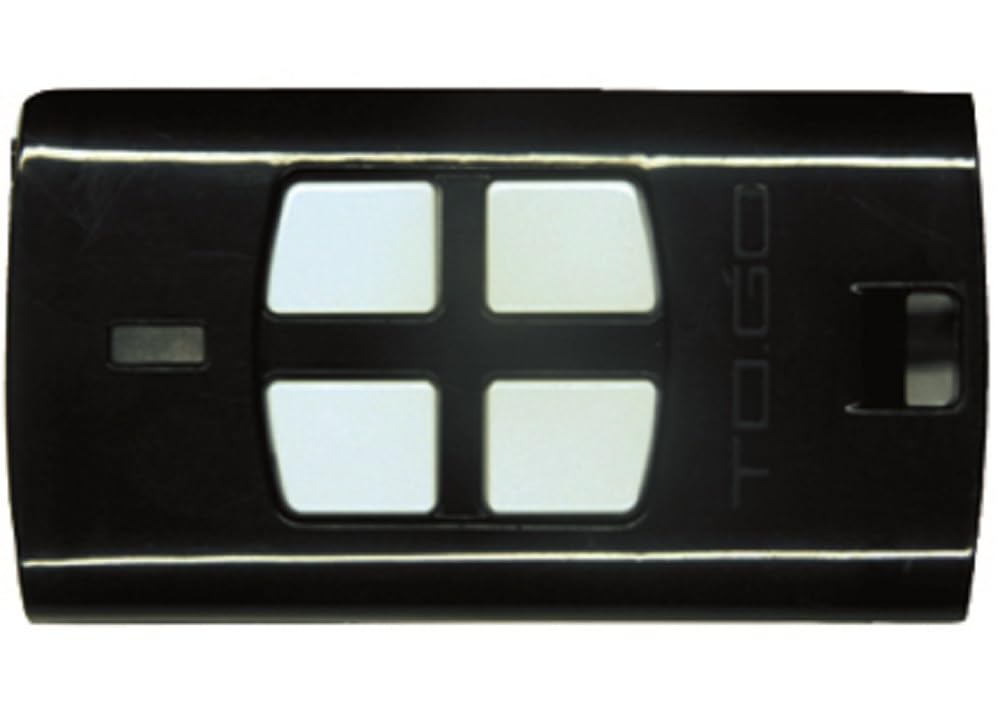
Figure 1: BENINCA TO.GO 4 WV 433 MHz Remote Control. This image displays the black remote control with its four distinct buttons, ready for use with compatible automation systems.
Setup
1. Programming the Remote Control
The BENINCA TO.GO 4 WV remote control uses rolling code technology and must be programmed to your BENINCA receiver unit. The exact programming procedure may vary depending on your specific receiver model. Always refer to the instruction manual of your BENINCA automation system (gate opener, garage door opener, etc.) for detailed programming steps.
General Programming Steps (Consult your receiver's manual for specifics):
- Locate the programming button on your BENINCA receiver unit. This button is often labeled "PROG," "MEMO," or similar.
- Press and hold the programming button on the receiver until an indicator light (LED) on the receiver illuminates or flashes, indicating it is in programming mode.
- While the receiver is in programming mode, press the desired button on your new BENINCA TO.GO 4 WV remote control that you wish to assign to a function.
- The receiver's indicator light should change (e.g., flash rapidly, turn solid, or turn off) to confirm successful programming.
- Wait a few seconds for the receiver to exit programming mode automatically, or press the programming button again briefly to exit.
- Test the remote control to ensure it operates the automation system correctly.
Note: If you are replacing an existing remote, some systems may require you to program the new remote directly from an already working remote. Refer to your system's manual for "remote-to-remote" programming instructions if applicable.
2. Battery Installation/Replacement
The BENINCA TO.GO 4 WV remote control typically comes with batteries pre-installed. When the remote's range decreases significantly or it stops responding, the battery may need replacement.
- Locate the battery compartment on the back or side of the remote control. This may involve removing a small screw or prying open a cover with a small flat-head screwdriver.
- Carefully remove the old battery, noting its polarity (+/-).
- Insert a new battery of the correct type (e.g., CR2032 or similar, consult the remote's casing or original battery for type) with the correct polarity.
- Close the battery compartment securely.
- Test the remote control.
Always dispose of used batteries responsibly according to local regulations.
Operating Instructions
Once programmed, operating the BENINCA TO.GO 4 WV remote control is straightforward.
- Button Functions: Each of the four buttons on the remote control corresponds to a specific function or device that it was programmed to control (e.g., open gate, close gate, pedestrian access, garage door).
- Activating a Function: To activate a programmed function, simply press and release the corresponding button on the remote control. The automation system should respond accordingly.
- Operating Range: The maximum operating range for this remote control is approximately 10 meters (33 feet) under optimal conditions. Obstacles, interference, and battery level can affect this range.
- Indicator Light: Some remote models may have a small LED indicator that illuminates when a button is pressed, confirming that a signal is being transmitted.
Maintenance
- Cleaning: Clean the remote control periodically with a soft, dry cloth. Do not use abrasive cleaners, solvents, or spray directly onto the device.
- Avoid Moisture: Keep the remote control dry. Exposure to water or high humidity can damage internal components.
- Temperature: Avoid exposing the remote control to extreme temperatures (hot or cold) or direct sunlight for extended periods.
- Impact: Protect the remote control from drops and strong impacts, which can cause internal damage.
- Battery Life: Replace the battery when the operating range decreases or the remote becomes unresponsive. Refer to the "Battery Installation/Replacement" section for instructions.
Troubleshooting
| Problem | Possible Cause | Solution |
|---|---|---|
| Remote control does not work. |
|
|
| Reduced operating range. |
|
|
| Remote control works intermittently. |
|
|
Specifications
| Brand | SICE |
| Model Number | 2613006 |
| Color | Black |
| Connectivity Technology | Infrared (Note: Product description implies RF 433MHz rolling code, which is typical for gate remotes. "Infrared" from specifications might be a generic entry for universal remotes. For this specific BENINCA TO.GO, 433MHz RF is the primary technology.) |
| Number of Buttons | 4 |
| Maximum Range | 10 Meters (approximately 33 feet) |
| Compatible Devices | Air conditioner, TV decoder, Television (Note: While listed in specifications, the primary intended use for BENINCA TO.GO remotes is typically for gate/garage automation systems.) |
| International Article Code (EAN/UPC) | 08033075188450 |
Warranty and Support
For warranty information and technical support, please refer to the documentation provided with your original purchase or contact the retailer/manufacturer directly. Keep your proof of purchase for warranty claims.
For further assistance, you may visit the official BENINCA website or contact their customer service department.


