
1. Introduction
This manual provides essential instructions for the proper installation, operation, and maintenance of your TacParts Pfanstiehl 740-D7 Diamond Needle Stylus. This stylus is designed for compatibility with various turntable cartridges, including Fisher, Sanyo ST-29D, and Toshiba N50, MG-29D, C-50 models. Adhering to these guidelines will help ensure optimal performance and longevity of your stylus.
2. Setup and Installation
Careful installation is crucial to prevent damage to the stylus and ensure proper sound reproduction. Please follow these steps precisely:
- Preparation: Ensure your turntable is powered off and unplugged from the electrical outlet. Gently lift the tonearm and secure it in its rest.
- Removing the Old Stylus: Grasp the sides of the plastic body of the old stylus. Gently pull it forward and away from the cartridge body. Avoid touching the needle tip during removal.
- Installing the New Stylus: Align the new Pfanstiehl 740-D7 stylus with the cartridge body. Carefully push the stylus into the cartridge until it clicks securely into place. Ensure it is seated firmly and correctly.
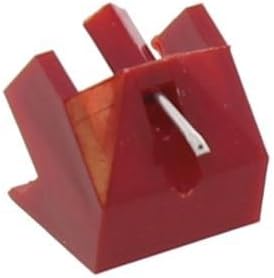
CAUTION: The diamond tip of the stylus is extremely fragile. DO NOT handle the small portion of the stylus that contains the needle. Always hold the stylus by its plastic body.
3. Operating Instructions
Once installed, the Pfanstiehl 740-D7 stylus is ready for use with your turntable. This stylus is designed for playback at standard record speeds.
- Compatible Speeds: 33 & 45 RPM (Revolutions Per Minute).
- Recommended Tracking Force: 1-3 grams. Refer to your turntable or cartridge manual for specific tracking force adjustment instructions. Proper tracking force is essential for optimal sound quality and to prevent record wear.
- Tip Radius: 0.7 Mil.
Always ensure records are clean before playback to minimize wear on both the record and the stylus.
4. Maintenance
Regular maintenance helps preserve the sound quality and extends the life of your stylus.
- Stylus Cleaning: Gently clean the stylus tip periodically using a soft stylus brush, brushing from back to front. Do not use excessive force or harsh cleaning solutions.
- Record Cleaning: Keep your records clean to prevent dust and debris from accumulating on the stylus tip.
- Inspection: Visually inspect the stylus tip for any signs of wear or damage. A worn stylus can damage your records and degrade sound quality.
5. Troubleshooting
If you experience issues with your stylus, consider the following common troubleshooting steps:
- No Sound or Distorted Sound:
- Ensure the stylus is fully seated in the cartridge.
- Check that the tonearm wiring is correctly connected to your amplifier or receiver.
- Verify the tracking force is set within the recommended 1-3 gram range.
- Inspect the stylus tip for visible damage or excessive dust/debris. Clean if necessary.
- Stylus Breaking Prematurely:
- Confirm the tracking force is not set too high, which can stress the stylus.
- Ensure the stylus is not being dropped onto the record with excessive force. Use the tonearm lift mechanism.
- Avoid handling the delicate stylus tip directly.
6. Specifications
| Brand | TacParts (Pfanstiehl) |
| Model Number | 740-D7 (Item Model Number: 661799766173) |
| Stylus Type | Diamond Tip |
| Tip Radius | 0.7 Mil |
| Tracking Force | 1-3 grams |
| Compatible Speeds | 33 & 45 RPM |
| Product Dimensions | 5 x 2.5 x 0.5 inches |
| Item Weight | 1.6 ounces |
| Manufacturer | LKG Industries |
7. Warranty and Support
For specific warranty information regarding your TacParts Pfanstiehl 740-D7 Diamond Needle Stylus, please refer to the documentation provided at the time of purchase or contact the seller directly. Support for this product is typically handled by the retailer or the manufacturer, LKG Industries.
If you require further assistance or have questions not covered in this manual, please reach out to your point of purchase or the manufacturer's customer service.