1. Introduction
The Maclean MCTV-627 DVB-T Signal Finder is designed to assist in the precise alignment of terrestrial digital TV antennas. This device features an analog display and an audible tone to indicate signal strength, making the antenna setup process more efficient. An integrated compass aids in initial antenna positioning.
2. Safety Information
- Ensure all connections are secure before powering on the device.
- Do not expose the device to moisture or extreme temperatures.
- Use only the specified power supply (12-24V DC).
- Keep the device away from strong magnetic fields, which may affect the integrated compass.
- Handle with care to avoid physical damage.
3. Package Contents
- Maclean MCTV-627 DVB-T Signal Finder
- 30 cm connection cable
- 70 cm battery power cable
- Pouch for storage
- Battery holder (requires 10x AA batteries, not included)

Image: The Maclean MCTV-627 DVB-T Signal Finder shown with its protective pouch and the battery holder and cable.
4. Product Overview
The MCTV-627 features a clear analog meter for visual signal strength indication, an audible tone for signal presence, and an integrated compass for directional guidance.

Image: Front view of the Maclean MCTV-627, showing the analog meter, "ANT" input, "PWR" output, and integrated compass.
Components:
- Analog Meter: Displays signal strength from 0 to 10.
- ANT Input: Connects to the terrestrial antenna.
- PWR Output: Connects to the DVB-T receiver or power supply.
- Compass: Provides directional reference for antenna positioning.
- Audible Tone: Increases in pitch and frequency as signal strength improves.

Image: Back view of the Maclean MCTV-627, displaying model number, frequency ranges, and power requirements.
5. Setup Instructions
- Power Supply Connection:
Insert 10x AA batteries (not included) into the provided battery holder. Connect the 70 cm battery power cable to the battery holder and then to the "PWR" input of the MCTV-627. Alternatively, you can use a 12-24V DC power adapter (not included) connected to the "PWR" input.
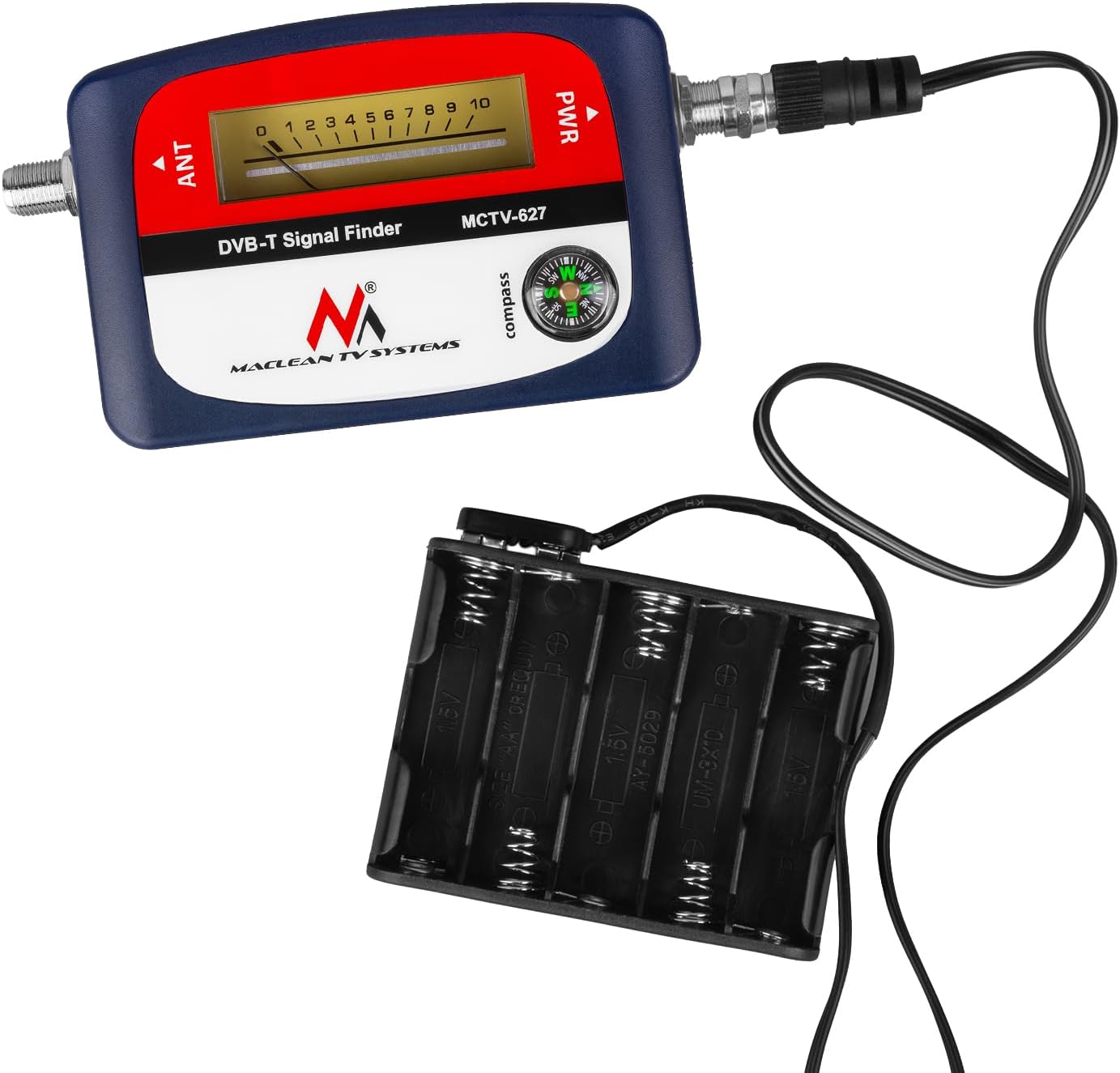
Image: The Maclean MCTV-627 DVB-T Signal Finder connected to its external battery pack via the power cable.
- Antenna Connection:
Connect your terrestrial DVB-T antenna to the "ANT" input on the MCTV-627 using the 30 cm connection cable or a suitable F-type coaxial cable.
- Receiver Connection (Optional):
If you are connecting directly to a DVB-T receiver, connect the receiver's antenna input to the "PWR" output of the MCTV-627. The receiver will provide the necessary power to the signal finder.
6. Operating Instructions
- Power On: Ensure the device is powered. If using a DVB-T receiver, turn on the receiver. The MCTV-627 will power on automatically.
- Initial Antenna Positioning: Use the integrated compass to orient your terrestrial antenna towards the general direction of the broadcast tower.
- Adjusting Signal Strength:
- Slowly rotate and tilt your antenna. Observe the analog meter and listen to the audible tone.
- The goal is to achieve the highest possible reading on the analog meter (closer to 10) and the highest pitch/frequency from the audible tone.
- If the meter reading goes beyond 8-9 and the tone becomes constant, it indicates a very strong signal. You may need to reduce the sensitivity of the signal finder if available (this model does not have an explicit sensitivity knob, so rely on fine adjustments).
- Fine-Tuning: Make small, precise adjustments to the antenna's direction and elevation until the maximum signal strength is achieved and maintained.
- Final Connection: Once the optimal signal is found, secure the antenna in position. Disconnect the MCTV-627 and connect your antenna directly to your DVB-T receiver.
7. Maintenance
- Clean the device with a soft, dry cloth. Do not use liquid cleaners.
- Store the device in its protective pouch when not in use to prevent dust and scratches.
- If using batteries, remove them if the device will not be used for an extended period to prevent leakage.

Image: The Maclean MCTV-627 DVB-T Signal Finder being stored in its brown protective pouch.
8. Troubleshooting
| Problem | Possible Cause | Solution |
|---|---|---|
| No power/display | Incorrect power connection, dead batteries, or receiver not powered on. | Check battery connections, replace batteries, ensure receiver is powered, or verify DC adapter connection. |
| Weak or no signal indication | Antenna not pointed correctly, poor cable connection, or no DVB-T signal in the area. | Re-orient antenna using compass, check all cable connections, ensure DVB-T broadcasts are available. |
| Meter maxes out immediately | Very strong signal, or interference. | Try moving the antenna slightly or using an attenuator if available (not included). Fine-tune carefully. |
| Compass seems inaccurate | Close to magnetic objects or strong electrical fields. | Move away from metal structures, large electronics, or power lines when using the compass for initial orientation. |
9. Specifications

Image: Diagram showing the dimensions of the Maclean MCTV-627 DVB-T Signal Finder: 100mm length, 65mm width, 30mm depth.
| Feature | Detail |
|---|---|
| Model | MCTV-627 |
| Frequency Range (VHF) | 174 - 230 MHz |
| Frequency Range (UHF) | 470 - 860 MHz |
| Input Level | -65 dBµV to -95 dBµV |
| Impedance | 75 ohms |
| Power Supply | 12-24 V DC |
| Operating Temperature | 0 °C ~ +40 °C |
| Connections | F-type connectors |
| Integrated Features | Analog Signal Meter, Audible Tone, Compass |
10. Warranty and Support
Information regarding specific warranty terms is not provided in the product details. For warranty claims, technical support, or further assistance, please contact your retailer or the manufacturer, Maclean, directly. Refer to the product packaging or the point of purchase for contact details.


