
Introduction
This manual provides essential information for the proper installation, operation, and maintenance of your Pulse-Bac 1000/2000 Series Filter Set. Adhering to these instructions will ensure optimal performance and longevity of the filters. Please read this manual thoroughly before use.
Product Overview
The Pulse-Bac 1000/2000 Series Filter Set consists of three high-efficiency replacement filters designed for Pulse-Bac vacuum and dust collection systems. These filters are engineered for superior dust capture and are compatible with a range of Pulse-Bac models.
- Set of 3 Filters: Provides a complete replacement for your system.
- HEPA - Individual Test: Each filter is individually tested to meet HEPA filtration standards, ensuring high-level particle capture.
- Patented Twist ON/Off Design & Non-Stick Coating: Facilitates easy installation and removal, and the non-stick coating aids in efficient pulse-cleaning.
- Compatibility: Fits Pulse-Bac models 1050, 1050H, 565, 1150, 1250, 2050, 2150, and 2500.
- Specially Designed for Pulse-Cleaning: Optimized to work effectively with the Pulse-Bac automatic filter cleaning system.
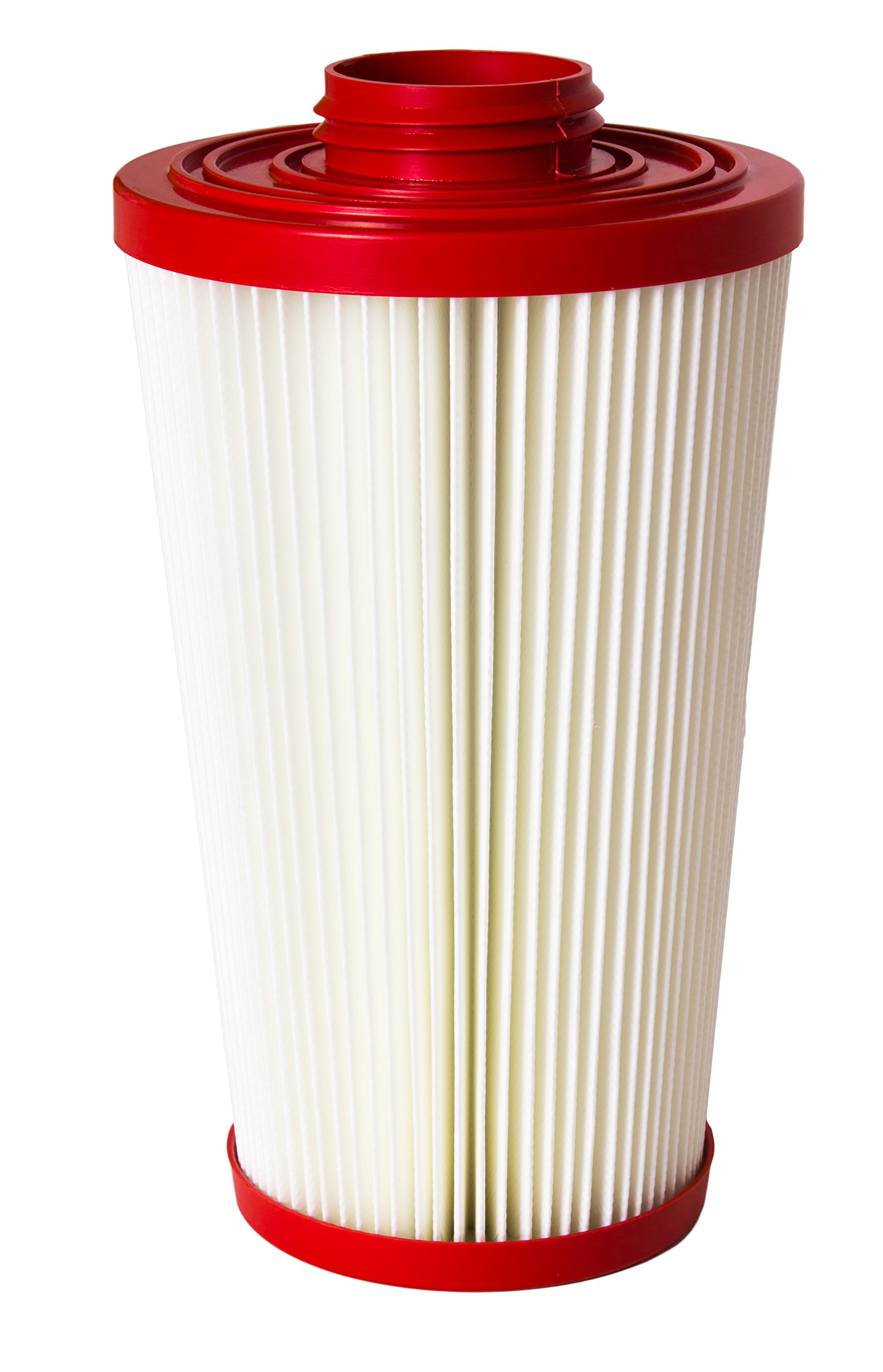
Figure 1: A detailed view of the Pulse-Bac 1000/2000 Series Filter Set, showing its pleated filter material and red top and bottom caps with a twist-on mechanism.
Safety Information
Always prioritize safety when handling and replacing filters. Dust and debris collected by the filters may contain hazardous materials. Follow these guidelines:
- Wear appropriate personal protective equipment (PPE), such as gloves and a dust mask, when handling used filters.
- Ensure the vacuum or dust collector is powered off and unplugged before attempting any filter maintenance or replacement.
- Dispose of used filters according to local regulations for waste disposal, especially if hazardous materials were collected.
- Avoid damaging the filter media during installation or removal, as this can compromise filtration efficiency.
Installation Instructions
Follow these steps to properly install the Pulse-Bac 1000/2000 Series Filter Set:
- Power Off: Ensure your Pulse-Bac vacuum or dust collector is turned off and unplugged from the power source.
- Access Filter Compartment: Open the filter access panel or remove the top section of your Pulse-Bac unit as per your specific model's instructions.
- Remove Old Filters: Carefully twist and pull out the old filters. Be mindful of any accumulated dust.
- Clean Compartment: Gently clean any dust or debris from the filter compartment before installing new filters.
- Install New Filters: Align each new Pulse-Bac filter with its designated slot. Using the patented Twist ON/Off design, insert and twist each filter clockwise until it is securely seated. Ensure a snug fit to prevent air bypass.
- Close Compartment: Close the filter access panel or reassemble the unit, ensuring all latches or clamps are securely fastened.
- Power On: Plug in and power on your Pulse-Bac unit. Perform a brief test run to confirm proper operation.
Operation Guidelines
The Pulse-Bac 1000/2000 Series Filter Set is designed to work seamlessly with your Pulse-Bac system's automatic pulse-cleaning mechanism. During operation, the system will periodically reverse airflow to dislodge dust from the filter surface, maintaining optimal suction and filtration efficiency. No special user intervention is required during normal operation for filter cleaning, as this process is automated.
Maintenance and Care
While the Pulse-Bac system features automatic pulse-cleaning, periodic manual inspection and cleaning can extend filter life and ensure peak performance. The filters are reusable and designed for durability.
- Regular Inspection: Periodically inspect the filters for visible damage, tears, or excessive caking of dust that the pulse-cleaning system might not fully remove.
- Manual Cleaning (if necessary): If filters appear heavily soiled or suction power decreases despite automatic cleaning, remove them (following installation steps in reverse) and gently tap them against a hard surface to dislodge stubborn dust. Avoid using water or harsh chemicals unless specifically instructed by Pulse-Bac, as this can damage the HEPA media.
- Replacement: Filters should be replaced when they show signs of wear, damage, or when suction performance significantly degrades even after manual cleaning. The lifespan of filters varies depending on usage frequency and the type of material being collected.
Troubleshooting
If you experience issues related to filtration or suction, consider the following:
- Reduced Suction: Check if filters are properly installed and sealed. Inspect for excessive dust buildup that may require manual cleaning or replacement. Ensure the dust bin is not full.
- Visible Dust Emission: This indicates a potential filter leak or damage. Re-check filter installation for proper seating. Inspect filters for tears or holes and replace if damaged.
- Unusual Noises: While not directly filter-related, ensure no debris is lodged in the filter compartment or other parts of the vacuum that could affect airflow or filter integrity.
Specifications
| Feature | Detail |
|---|---|
| Brand | Pulse-Bac |
| Part Number | 103621 |
| Compatible Devices | Pulse-Bac 1050, 1050H, 565, 1150, 1250, 2050, 2150, 2500 |
| Number of Pieces | 3 |
| Reusability | Reusable |
| Item Weight | 16 pounds (approximate for the set) |
| Product Dimensions | 11 x 6 x 6 inches (approximate for a single filter) |
| UPC | 857059004301 |
Warranty and Support
For specific warranty information regarding your Pulse-Bac 1000/2000 Series Filter Set, please refer to the documentation provided with your original Pulse-Bac vacuum or dust collector unit, or contact Pulse-Bac customer support directly. Support contact details are typically available on the manufacturer's official website.


