
1. Introduction
This manual provides detailed instructions for the installation, operation, and maintenance of the ALLISTER Garage Door Opener Lamp Socket, model 102954. This component is designed to replace the original lamp socket in compatible ALLISTER and Wayne Dalton garage door opener models, restoring illumination to your garage.
Please read this manual thoroughly before attempting any installation or maintenance procedures to ensure safe and correct usage.
2. Safety Information
WARNING: Risk of Electric Shock.
- Always disconnect power to the garage door opener before attempting any installation, repair, or maintenance. Failure to do so can result in serious injury or death.
- Ensure the replacement bulb does not exceed the maximum wattage specified for your garage door opener (typically 60 watts).
- If you are unsure about any part of the installation process, consult a qualified electrician or garage door technician.
- Keep hands and tools clear of moving parts of the garage door opener.
3. Compatibility
The ALLISTER Garage Door Opener Lamp Socket (Part Number 102954) is compatible with the following garage door opener models:
- ALLISTER ARD-IIA
- ALLISTER Access 200/250
- ALLISTER Access 2000/2500
- ALLISTER Access 3000/3500
- ALLISTER PDQ Series
- ALLISTER MVP Series
This lamp socket also serves as a replacement for the older Wayne Dalton Light Socket, part number 269028.
4. Setup and Installation
Follow these steps to replace the lamp socket in your garage door opener:
- Disconnect Power: Locate the circuit breaker for your garage and turn off the power to the garage door opener. Alternatively, unplug the garage door opener from the electrical outlet. Verify that the power is off by attempting to operate the opener or by checking if the existing light (if any) is off.
- Access the Lamp Socket: Depending on your specific garage door opener model, you may need to remove a cover or housing to access the lamp socket. Refer to your garage door opener's original manual for instructions on accessing internal components.
- Remove the Old Socket: Carefully disconnect the wiring from the old lamp socket. Note the orientation of the wires (e.g., which wire connects to which terminal) if they are not color-coded or if the new socket requires specific connections. The old socket may be held in place by clips or screws. Remove these fasteners.
- Install the New Socket: Connect the wires to the new ALLISTER 102954 lamp socket, ensuring they match the connections of the old socket. Secure the new socket in its designated position using the original clips or screws.
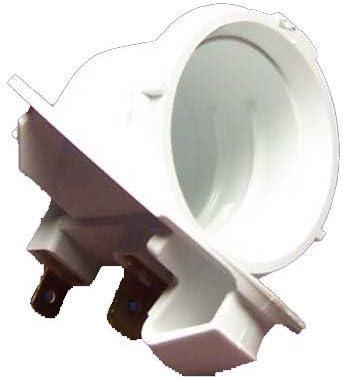
Image 1: The ALLISTER Garage Door Opener Lamp Socket 102954. This image shows the white plastic housing and the electrical contacts at the base, designed for easy replacement in compatible garage door openers.
- Replace Cover and Test: Reattach any covers or housing removed earlier. Insert a new light bulb (E26 Medium base, maximum 60 watts) into the socket. Restore power to the garage door opener. Test the light by operating the garage door opener. The light should illuminate when the opener is activated and turn off after a set period.
5. Operating
The lamp socket operates automatically in conjunction with your garage door opener. When the garage door opener is activated (either to open or close the door), the light bulb in the socket will illuminate. It typically remains on for a preset duration (e.g., 4-5 minutes) after the opener stops moving, providing illumination for safe entry and exit from the garage. The light will also turn on if the safety sensors are interrupted or if the opener is manually activated.
6. Maintenance
The ALLISTER 102954 lamp socket requires minimal maintenance. Periodically check the following:
- Bulb Replacement: If the light bulb burns out, ensure power is disconnected before replacing it with a new E26 Medium base bulb, not exceeding 60 watts.
- Cleanliness: Keep the socket free from dust and debris. Disconnect power before wiping with a dry cloth.
- Connections: Occasionally inspect the wiring connections to ensure they remain secure.
7. Troubleshooting
| Problem | Possible Cause | Solution |
|---|---|---|
| Light does not turn on. |
|
|
| Light flickers. |
|
|
8. Specifications
- Part Number: 102954
- Material: Plastic
- Color: White
- Shape: Round
- Bulb Base Type: E26 Medium
- Maximum Wattage: 60 watts
- Power Source: AC/DC (as supplied by garage door opener)
- Special Features: Removable
9. Warranty and Support
For specific warranty information regarding your ALLISTER Garage Door Opener Lamp Socket 102954, please refer to the documentation provided at the time of purchase or contact the retailer. General support for ALLISTER products can often be found through authorized dealers or the manufacturer's official website.
Always ensure you are purchasing genuine replacement parts to maintain product integrity and warranty validity.


